

First identify what you need: a personal subscription, enterprise seats, a member shared resource pack, or SA pay-as-you-go billing. Each has a different purpose and purchase entry.
Subscription plans are billed per license per month. A resource pack is purchased with a one-time upfront payment. Total price = Number of licenses × Subscription duration × Unit price.
Individual Basic Edition users receive 300 complimentary Credits.
The following tables show pricing details. Select the tab that corresponds to your product and purchase date.
When a user in the organization is assigned a billable role, they occupy a seat. Once occupied, the seat is billed for the current billing cycle. If the user is later removed from the organization, any seat charges already incurred are non-refundable. For details about adding and removing members, see Members and Roles.
Resource packs are a one-time upfront purchase that supplements subscription Credits. For deduction priority, validity, and acquisition records, see Credits.
Specifications for two versions of resource packs are provided below. View the tab that corresponds to your purchased product:
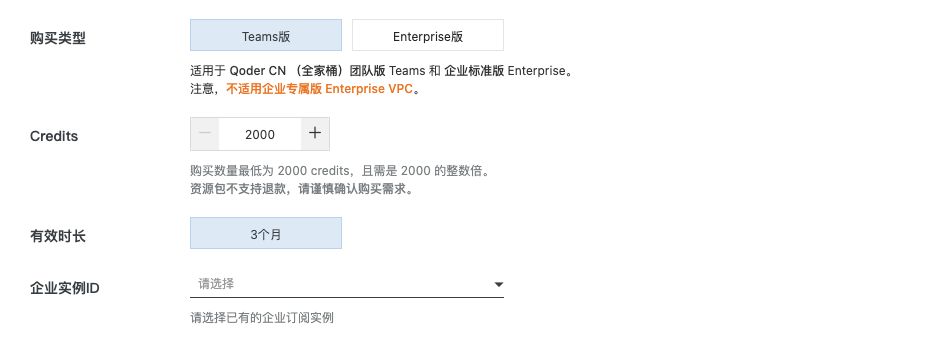 Select the edition first, then check the Credits quantity, validity, and target instance. This screenshot shows a member shared pack, not an SA pack.
This is an enterprise subscription shared resource pack and does not apply to Enterprise VPC. A member shared pack balance or purchase entry does not indicate whether SA postpaid billing is enabled. See Service Accounts to check enablement and usage.
Select the edition first, then check the Credits quantity, validity, and target instance. This screenshot shows a member shared pack, not an SA pack.
This is an enterprise subscription shared resource pack and does not apply to Enterprise VPC. A member shared pack balance or purchase entry does not indicate whether SA postpaid billing is enabled. See Service Accounts to check enablement and usage.
Purchase channels vary by product. View the tab that corresponds to your product:
Subscriptions are billed monthly or annually. The following explains the start and end times for new purchases and renewals of personal and enterprise subscriptions. The subscription validity period differs from the Credits issuance cycle, and resource packs have independent validity periods.
Enterprise auto-renewal charges nine days before expiration; personal auto-renewal charges one day before expiration. If the auto-renewal charge fails, the subscription for the next cycle is unavailable. See Renewal for switch configuration, enterprise retries, and troubleshooting.
Subscriptions are billed monthly or annually. A monthly subscription cycle is calculated as follows:
Annual billing cycle examples:
Renewals do not apply the new-purchase rule of moving the calculated time forward to midnight. Instead, each renewal cycle advances by one calendar month from the previous cycle's end time. For a monthly subscription, the renewal cycle is calculated as follows:
Transition from new purchase to renewal: If you purchase a monthly subscription on September 30 at 05:00, the first cycle ends on October 31 at 00:00. After renewal, the next cycle runs from October 31 at 00:00 to November 30 at 00:00, not December 1 at 00:00.
Continuous renewal example: Because each renewal is calculated from the previous cycle's end date, the expiration date moves earlier after a shorter month and does not automatically return to the original date. For example, if the previous cycle ends on July 31 at 00:00, subsequent cycles end at 00:00 on August 31, September 30, October 30, November 30, December 30, and January 30 of the following year. If the following year is not a leap year, the next cycle ends on February 28 at 00:00, and subsequent cycles use the 28th as their reference date. If it is a leap year, the next cycle ends on February 29 at 00:00, and subsequent cycles use the 29th until a non-leap-year February shifts the reference date to the 28th; all later cycles then use the 28th.
Please confirm your requirements before making a purchase.
Qoder CN Suite Teams, Enterprise, and Enterprise VPC support monthly and annual subscriptions. Check the edition, seat count, and purchase duration. Prices expressed per seat per month in the table are monthly unit prices; the order shows the annual amount payable and any applicable discounts.
For Enterprise and Enterprise VPC, the annual service term differs from the monthly Credits cycle. Credits are issued and reset monthly, not for the entire year at once. See Enterprise Credits sharing.
The Configuration Administrator has no Credits and is used only for purchasing and configuration. After an enterprise purchase, actual users need member seats to sign in and use the product. See Accounts and Subscriptions for personal upgrades, enterprise purchasing, and repurchase after expiration.
A service account is an organization identity for automation. It does not occupy a member seat, and usage is tracked separately. Postpaid billing is enabled per organization and settles actual SA Credits consumption. Other features retain their existing billing methods.
In Alibaba Cloud, open the corresponding Qoder organization details and find Service account pay-as-you-go. After enablement, return to Members > Service accounts in Qoder and check synchronization. You can set a Credits limit for each SA. See Service Accounts for the unit price, switch behavior, overdue payments, and screenshots.
See Cloud Agents billing for enterprise-space SA binding and usage. Distinguish ordinary member Credits from SA usage when purchasing or troubleshooting; a member's balance does not establish SA availability.
Credits from Qoder CN Series Personal and Teams subscriptions purchased on or after June 20, 2026, and Dedicated Enterprise Edition subscriptions purchased on or after June 30, 2026, can be used across Qoder CN, Qoder CN IDE, the JetBrains plugin, QoderWork CN, Qoder CN CLI, and Qoder CN Mobile.
If you have a separate subscription for Qoder CN (formerly Qoder CN), you can upgrade your account to merge it into a Full Suite subscription. After the upgrade, you can share Credits across products. For upgrade instructions, see Qoder CN (formerly Qoder CN) Personal Edition Upgrade Guide.
| Your goal | Where to look |
|---|---|
| Choose a plan and compare prices | Subscription and resource pack tables below |
| Add more people to your team | Add seats |
| Add Credits for organization members | Enterprise shared pack purchase steps; check personal and group limits in Credits sharing |
| Enable billing for automation | Service account postpaid billing |
| Renew, change editions, or repurchase | Renewal, subscription changes, or repurchase |
Billing methods
Subscription plans are billed per license per month. A resource pack is purchased with a one-time upfront payment. Total price = Number of licenses × Subscription duration × Unit price.
| Edition | Billing Model | Billing Unit |
|---|---|---|
| Individual Pro Edition (Pro) | Subscription (upfront) | Per month |
| Individual Advanced Edition (Pro+) | Subscription (upfront) | Per month |
| Individual Ultra Edition (Ultra) | Subscription (upfront) | Per month |
| Teams Edition (Teams) | Subscription (upfront) | Per license/month |
| Enterprise Standard Edition (Enterprise) | Subscription (upfront) | Per license/month (minimum of 10 licenses) |
| Enterprise Dedicated Edition (Enterprise VPC) | Subscription (upfront) | Per license/month (minimum of 50 licenses) |
| Resource pack | One-time upfront payment | Credits pack |
Pricing
Individual Basic Edition users receive 300 complimentary Credits.
Subscription plans
The following tables show pricing details. Select the tab that corresponds to your product and purchase date.
- Qoder CN Series
- Qoder CN (Lingma)
- TONGYI Lingma (Legacy)
Starting June 20, 2026, a single individual subscription to the Qoder CN Series can be used across Qoder CN, Qoder CN IDE, the JetBrains plugin, Qoder CN CLI, Qoder CN Wake, Qoder CN Mobile, and QoderWork CN, with shared Credits. Enterprise editions (Teams / Enterprise VPC) currently cover Qoder CN, Qoder CN IDE, the JetBrains plugin, QoderWork CN, Qoder CN CLI, and Qoder CN Mobile.
- The VS Code plugin is no longer being updated.
- Individual Trial, Pro, Pro+, and Ultra editions: Cover Qoder CN IDE, JetBrains plugins, QoderWork CN, Qoder CN CLI, and Qoder CN Mobile.
- Teams and Enterprise VPC editions: Currently cover only Qoder CN IDE, JetBrains plugins, and Qoder CN CLI.
Personal editions
| Parameter | Individual Trial Edition | Individual Pro Edition (Pro) | Individual Advanced Edition (Pro+) | Individual Ultra Edition (Ultra) |
|---|---|---|---|---|
| Unit Price | Free | CNY 59/month; CNY 637.20/year (list price CNY 708, 10% off) | CNY 169/month; CNY 1,825.20/year (list price CNY 2,028, 10% off) | CNY 559/month; CNY 6,037.20/year (list price CNY 6,708, 10% off) |
| Credits Quota | Limited trial quota, includes a 2-week Pro trial and 300 Credits | 2,000 Credits/month | 6,000 Credits/month | 20,000 Credits/month |
| Billing Model | N/A | Upfront subscription | Upfront subscription | Upfront subscription |
| Minimum Quantity | N/A | N/A | N/A | N/A |
| Features | - Limited trial quota - 2-week Pro trial and 300 Credits - Limited number of completions | - Higher limits on chat and agent requests - Repo Wiki features - Experts - More completions with higher limits - Browser automation, scheduled tasks, IM channels, and more - Writing, Slides, and Design workbenches - Unlocks all professional skills and expert suites | Includes all features of the Pro edition | Includes all features of the Pro+ edition, plus: - A high-performance plan for heavy users - Priority access to new features |
| Purchase Link | Claim Credits | Subscribe to the Qoder CN Series Pro Edition | Subscribe to the Qoder CN Series Advanced Edition | Subscribe to the Qoder CN Series Ultra Edition |
Team and enterprise editions
| Parameter | Teams Edition (Teams) | Enterprise Standard Edition (Enterprise) | Enterprise Dedicated Edition (Enterprise VPC) |
|---|---|---|---|
| Unit Price | CNY 99 per license/month | CNY 149 per license/month | CNY 199 per license/month |
| Credits Quota | 3,000 Credits per license/month | 3,000 Credits per license/month, shared across the team | 3,000 Credits per license/month, shared across the team |
| Billing Model | Subscription | Subscription | Subscription |
| Minimum Quantity | Starts from 1 license | Starts from 10 licenses | Starts from 50 licenses |
| Features | - 3,000 Credits per license/month - Centralized billing - Administrator console - SSO support | Includes all features of the Teams Edition, plus: - 3,000 Credits per license/month, shared across the team; minimum purchase of 10 licenses - Group-based permission and billing management - Multi-dimensional model policy controls - Plugin sharing and distribution controls - Private enterprise capability marketplace - Operations auditing - Priority support | Includes all features of the Enterprise Standard Edition, plus: - 3,000 Credits per license/month, shared across the team; minimum purchase of 50 licenses - Dedicated instance and storage - Virtual private network - Access control - IP address whitelist management |
| Purchase Link | Subscribe to the Qoder CN Series Teams Edition | Subscribe to the Qoder CN Series Enterprise Standard Edition | Subscribe to the Qoder CN Series Enterprise Dedicated Edition |
Seat management
When a user in the organization is assigned a billable role, they occupy a seat. Once occupied, the seat is billed for the current billing cycle. If the user is later removed from the organization, any seat charges already incurred are non-refundable. For details about adding and removing members, see Members and Roles.
- Enterprise: After a member is removed from the organization, their seat is automatically released and returned to the unassigned pool. It can be reassigned to another member within the current billing cycle at no additional charge.
- Teams: Seats include Credits. Once any Credits from a seat have been used, the seat is bound to that member's account and cannot be reassigned to another user during the current billing cycle.
Resource packs
Resource packs are a one-time upfront purchase that supplements subscription Credits. For deduction priority, validity, and acquisition records, see Credits.
Specifications for two versions of resource packs are provided below. View the tab that corresponds to your purchased product:
- Qoder CN (Lingma)
- Qoder CN Series
For Qoder CN (IDE, JetBrains, and VS Code)
| Resource pack | Personal resource pack (for Pro) | Enterprise resource pack (for Teams and VPC) |
|---|---|---|
| Minimum purchase | CNY 40 / 1,000 Credits | CNY 80 / 2,000 Credits |
| Increment | 1,000 Credits | 2,000 Credits |
| Validity period | 1 month from the date of purchase | 3 months from the date of purchase |
| Purchase notes | Resource packs are a one-time upfront purchase and do not auto-renew. Any unused Credits expire at the end of the validity period. | Resource packs are a one-time upfront purchase and do not auto-renew. Any unused Credits expire at the end of the validity period. |
| Purchase link | Purchase a personal resource pack for Qoder CN (formerly Qoder CN) | Purchase an Enterprise Standard Edition resource pack for Qoder CN (formerly Qoder CN) |
Purchase an enterprise shared resource pack
- In the Qoder CN management console, open Organization usage and click Buy in the Shared resource pack section. You can also open the enterprise subscription shared pack purchase page.
- Select Teams or Enterprise and verify the Enterprise instance ID to avoid purchasing for the wrong instance.
- Choose an option and enter the Credits quantity: the 3-month option starts at 2,000 Credits in increments of 2,000, and the 1-year option starts at 3,000 Credits in increments of 3,000. Check the displayed validity period (3 months or 1 year) and amount payable.
- Confirm the edition and quantity before purchasing. Resource packs are non-refundable.
How to purchase
Before purchasing, check the products and editions supported by the specific offering. Do not infer support for every product from the “Full Suite” name. The Enterprise subscription purchase page currently states that it does not apply to QoderWork CN. For legacy Lingma account migration, see the Personal Edition upgrade guide.
- Qoder CN (Lingma)
- Qoder CN Series
Purchase, renew, or modify your Qoder CN subscription in the Qoder CN console. For more information about accounts and subscriptions, see Qoder CN (formerly Lingma) Accounts and Subscriptions.
Billing cycle
Subscriptions are billed monthly or annually. The following explains the start and end times for new purchases and renewals of personal and enterprise subscriptions. The subscription validity period differs from the Credits issuance cycle, and resource packs have independent validity periods.
Enterprise auto-renewal charges nine days before expiration; personal auto-renewal charges one day before expiration. If the auto-renewal charge fails, the subscription for the next cycle is unavailable. See Renewal for switch configuration, enterprise retries, and troubleshooting.
New Purchase Scenarios
Subscriptions are billed monthly or annually. A monthly subscription cycle is calculated as follows:
- The start time is the order payment time.
- To calculate the end time, add one calendar month to the order payment time, then move forward to the next midnight (00:00). If the next month does not have the corresponding date, use the same time on its last day before moving forward to midnight.
| Purchase scenario | Start time | Calculation | End time |
|---|---|---|---|
| Purchased at 05:00 on September 30 | September 30 at 05:00 | Add one calendar month to get October 30 at 05:00, then move forward to midnight | October 31 at 00:00 |
| Purchased at 05:00 on October 1 | October 1 at 05:00 | Add one calendar month to get November 1 at 05:00, then move forward to midnight | November 2 at 00:00 |
| Purchased at 05:00 on October 30 | October 30 at 05:00 | Add one calendar month to get November 30 at 05:00, then move forward to midnight | December 1 at 00:00 |
| Purchased at 05:00 on October 31 | October 31 at 05:00 | Add one calendar month; because November has no 31st, use November 30 at 05:00, then move forward to midnight | December 1 at 00:00 |
| Purchased at 05:00 on November 1 | November 1 at 05:00 | Add one calendar month to get December 1 at 05:00, then move forward to midnight | December 2 at 00:00 |
| Non-leap-year February (28 days): purchased at 05:00 on January 28, 29, 30, or 31 | January 28, 29, 30, or 31 at 05:00 | Add one calendar month; when the target day exceeds the last day of February, use month-end. Each case results in February 28 at 05:00, then moves forward to midnight | March 1 at 00:00 |
| Leap-year February (29 days): purchased at 05:00 on January 29, 30, or 31 | January 29, 30, or 31 at 05:00 | Add one calendar month; when the target day exceeds the last day of February, use month-end. Each case results in February 29 at 05:00, then moves forward to midnight | March 1 at 00:00 |
| Leap-year February (29 days): purchased at 05:00 on January 28 | January 28 at 05:00 | Add one calendar month to get February 28 at 05:00, then move forward to midnight | February 29 at 00:00 |
- Regular subscription: If you subscribe on August 16, 2025, the current billing cycle ends at midnight on August 17, 2026.
- Month-end subscription: If you subscribe on January 31, 2025, the current billing cycle ends at midnight on February 1, 2026.
Resource packs are one-time prepaid purchases with independent validity periods and no auto-renewal. See Resource packs.
Renewal Scenarios
Renewals do not apply the new-purchase rule of moving the calculated time forward to midnight. Instead, each renewal cycle advances by one calendar month from the previous cycle's end time. For a monthly subscription, the renewal cycle is calculated as follows:
- The start time is the end time of the previous cycle.
- The end time is midnight on the same date one calendar month after the start time. If the next month does not have the corresponding date, use midnight on the last day of that month.
| Renewal scenario | Start time | Calculation | End time |
|---|---|---|---|
| Previous cycle ends on October 31 at 00:00 | October 31 at 00:00 | Add one calendar month; because November has no 31st, use November 30 | November 30 at 00:00 |
| Previous cycle ends on October 30 at 00:00 | October 30 at 00:00 | Add one calendar month to get November 30 | November 30 at 00:00 |
| Previous cycle ends on October 29 at 00:00 | October 29 at 00:00 | Add one calendar month to get November 29 | November 29 at 00:00 |
| Previous cycle ends on October 15 at 00:00 | October 15 at 00:00 | Add one calendar month to get November 15 | November 15 at 00:00 |
| Non-leap-year February (28 days): previous cycle ends on January 31 at 00:00 | January 31 at 00:00 | Add one calendar month; because February has no 31st, use February 28 | February 28 at 00:00 |
| Across calendar years: previous cycle ends on December 31 at 00:00 | December 31 at 00:00 | Add one calendar month to get January 31 of the following year | January 31 of the following year at 00:00 |
Purchase notes
Order requirements
- Use the Alibaba Cloud account that owns the instance or a RAM user to manage orders.
-
Placing orders with an Alibaba Cloud account is recommended. If you use a RAM user, grant the following permissions:
- Alibaba Cloud DevOps product management permission: AliyunRDCFullAccess
- Order payment permission: AliyunBSSOrderAccess
- To grant permissions, see Manage permissions for a RAM user. For more information about order permissions, see RAM policies for billing management.
Refund policy
This product is not eligible for 5-day unconditional refunds. All purchases are final and non-refundable, except where required by law or in case of company error.
| Type | Refund conditions | Actions |
|---|---|---|
| Subscription | Available if requested within 24 hours of purchase and no Credits have been used. | Send your Qoder account information and the relevant bill to qoder@service.aliyun.com. Processing typically takes 5–10 business days. |
| Resource pack | Non-refundable | / |
Monthly and annual enterprise subscriptions
Qoder CN Suite Teams, Enterprise, and Enterprise VPC support monthly and annual subscriptions. Check the edition, seat count, and purchase duration. Prices expressed per seat per month in the table are monthly unit prices; the order shows the annual amount payable and any applicable discounts.
For Enterprise and Enterprise VPC, the annual service term differs from the monthly Credits cycle. Credits are issued and reset monthly, not for the entire year at once. See Enterprise Credits sharing.
The Configuration Administrator has no Credits and is used only for purchasing and configuration. After an enterprise purchase, actual users need member seats to sign in and use the product. See Accounts and Subscriptions for personal upgrades, enterprise purchasing, and repurchase after expiration.
Service account (SA) pay-as-you-go billing
A service account is an organization identity for automation. It does not occupy a member seat, and usage is tracked separately. Postpaid billing is enabled per organization and settles actual SA Credits consumption. Other features retain their existing billing methods.
In Alibaba Cloud, open the corresponding Qoder organization details and find Service account pay-as-you-go. After enablement, return to Members > Service accounts in Qoder and check synchronization. You can set a Credits limit for each SA. See Service Accounts for the unit price, switch behavior, overdue payments, and screenshots.
See Cloud Agents billing for enterprise-space SA binding and usage. Distinguish ordinary member Credits from SA usage when purchasing or troubleshooting; a member's balance does not establish SA availability.
Frequently asked questions
Pricing for existing enterprise subscriptions
- Existing subscriptions purchased before 12:00 (UTC+8) on May 20, 2026, will remain at their original price until they expire.
-
After 12:00 (UTC+8) on May 20, 2026, the following applies to organizations with existing subscriptions:
- New licenses are charged at the new subscription price. Credits are not used for these licenses. These new licenses do not include new features available under the Credits system, such as Experts mode and new models.
- Renewals are charged at the new subscription price and activate the Credits system. This gives you access to new features, such as Experts mode and new models.
- If your existing subscription has not expired, you can upgrade to the Credits system. After the upgrade, all your existing licenses will use Credits based on usage. An upgrade plan will be provided. For details, please check our product announcements.
Usage for existing customers
-
IDE / JB / VS Code upgrade : Upgrade your IDE. This is recommended whether you switch to the new pricing or enable the Credits system. To upgrade, uninstall the original
Lingma IDE, then install and switch to the newQoder CN IDE. -
After enabling the Credits system: The following capabilities become available.
-
Access to more model options, such as
GLM 5.1andDeepSeek V4. -
Unlimited usage for
RepoWiki,Agent sessions, andSubagent. - Access to the Experts feature.
-
Access to more model options, such as