Use this guide to buy or upgrade a personal subscription, or take an enterprise subscription from purchase to member access. This page covers Qoder CN Full Suite. For a legacy Lingma subscription, first identify the product line on your order.
Personal subscriptions require an Alibaba Cloud main account; RAM users cannot use their paid features. See Account System for details.Start at: the Qoder CN website. Purchase with the personal account that will use the product.
Sign up or sign in, then choose Pro, Pro+, or Ultra and a monthly or annual subscription.
Check the plan, billing period, and amount, then follow the payment instructions.
Open Account center > My bills to check the subscription, and Usage details to check Credits.
Sign in to your chosen client with the same account and verify the plan and available features.
If the client still shows a trial plan after payment, compare the purchasing account with the client account, then follow purchase troubleshooting.
Personal subscriptions currently offer three paid tiers. The tiers differ in Credits quota and target scenarios, but share the same account system and purchase path:
Personal Pro, Pro+, and Ultra are ordered through the same Qoder CN account on qoder.cn. Credits are metered uniformly across the full suite of products, including QoderWork CN, Qoder CN CLI, and Qoder CN IDE. Ultra includes all Pro+ features, provides 20,000 Credits per month, is designed as a high-performance plan for heavy users, and offers priority access to new features.
Choose the upgrade path for your current personal plan:
Current status
Target plan
Personal account without a paid plan
Pro
Pro
Pro+ / Ultra
Pro+
Ultra
Upgrading a paid personal subscription: The following rules apply to Pro → Pro+, Pro → Ultra, and Pro+ → Ultra. Once payment succeeds, the original subscription becomes inactive immediately, and you receive a refund based on the remaining value of its Credits. If those Credits have been used up, no refund is issued. The new subscription takes effect immediately. This action is irreversible. The original subscription’s remaining Credits are removed from your account; they are not carried over to the new subscription or converted into a resource pack.
Sign in to qoder.cn with the personal account to upgrade, then go to Account Center > My Bills.
Find the upgrade entry in the current subscription information and choose the target plan. If you do not yet have a paid plan, choose to purchase Pro.
Check the target plan, subscription cycle, amount, and entitlement changes shown on the page, then complete payment as prompted.
Return to Account Center and check the current plan, validity, and Credits acquisition records.
Use the personal account to upgrade, not an enterprise Configuration Administrator account with no Credits. The refund and Credits rules above apply when upgrading a paid personal subscription. Check the purchase page for the new subscription’s price and entitlements.
When purchasing a personal subscription, you can choose a monthly or annual cycle. The cycle selected for the initial purchase determines the auto-renewal cycle: a monthly purchase renews monthly, while an annual purchase renews annually.
Log in to qoder.cn and go to Account Center > My Bills to view the current auto-renewal cycle. Click Manage Subscription to turn off auto-renewal.
On the My Bills page, click Renew to manually renew for a monthly or annual period. Manual renewal only extends the current subscription's validity period and does not change its auto-renewal cycle. The auto-renewal cycle remains the one selected for the initial purchase.
The Configuration Administrator has no Credits, is used only for purchasing and configuration, and does not occupy a usage seat. It cannot directly use features that require Credits. After purchase, add actual users and assign seats so they can sign in with member accounts. No Credits on the configuration account does not mean the subscription failed to activate.
Role comparison
Role
Purpose
Product usage account
Configuration Administrator
Initial purchase and organization configuration, subsequent seat purchases and renewals.
No; has no usage Credits.
Admin
Member, seat, and usage management, plus product use.
Yes; requires a member seat.
Member
Uses the purchased edition's features.
Yes; requires a member seat.
Directory Member
Join the organization before switching roles to use paid features as needed.
No. Does not occupy a seat or have access to paid features or Credits.
See Members and Roles for member addition, identity access, and removal rules.
Configuration Administrator: purchase and configure member accessBefore purchasing, check the ordering permissions.
Sign in to the Alibaba Cloud Qoder CN console and choose the edition, seat count, and duration. For repurchase or an edition change, check the original organization and subscription status first.
After purchase, verify the instance, organization ID, and validity period.
Enter the Qoder management console from that instance. VPC users use the enterprise-specific entry.
CN Suite Teams, Enterprise, and Enterprise VPC support monthly and annual subscriptions. Check the edition, seat count, and purchase duration. See Billing for unit prices and minimum seat counts; the order shows the total amount payable.Check subscription validity separately from Credits issuance cycles. For annual Enterprise and Enterprise VPC subscriptions, Credits are issued and reset monthly, not allocated for the entire year at once. See Credits sharing.
On the Enterprise purchase page, select 1年 for an annual subscription. Check the seat count and renewal option before continuing.
Instances are released immediately upon expiration. To continue using the original organization, create a new instance, select the existing organization option (选择已有企业 on the Enterprise purchase page), and enter the original organization ID. Binding requires no active subscription on that organization. See Impact of order expiration.
To change Teams to Enterprise, unsubscribe from Teams or wait for its release, then purchase Enterprise and bind the original organization ID to inherit the organization structure data. See Modify subscription.
Individual users can complete purchases directly at qoder.cn and view Credits usage.Individual users log in with an Alibaba Cloud account bound to their phone number. If the phone number is not registered with Alibaba Cloud, a corresponding Alibaba Cloud account will be automatically created at the time of purchase. Customers can later log in to aliyun.com to view orders.
The enterprise purchaser goes to the Alibaba Cloud console to complete the first subscription and organization creation. Day-to-day organization management (members, seats, Credits usage, etc.) is unified in the Enterprise Settings at qoder.cn.Members use the identity method configured for their organization. For Teams and Enterprise, see Members and Roles for SSO, email invitation, and RAM access; VPC members use their enterprise entry point.
The enterprise purchaser goes to the Alibaba Cloud console to complete the first subscription and organization creation. Day-to-day organization management (members, seats, Credits usage, etc.) is unified in the enterprise dedicated instance backend.Members use the identity method configured for their organization. For Teams and Enterprise, see Members and Roles for SSO, email invitation, and RAM access; VPC members use their enterprise entry point.
Individual Editions (Free / Pro / Pro+ / Ultra): You must log in with an Alibaba Cloud primary account. RAM users have 0 Credits and cannot use paid features (including Pro / Pro+ / Ultra and Credits-related features).
Teams / Enterprise / Enterprise VPC: The Configuration Administrator handles purchasing and configuration and has no usage Credits or member seat. Purchase permissions for Alibaba Cloud accounts and RAM users are listed below.
Use the Alibaba Cloud account or RAM user of the instance owner to perform order-related operations.
We recommend placing orders with an Alibaba Cloud primary account. If placing orders with a RAM user, make sure the following permissions have been granted:


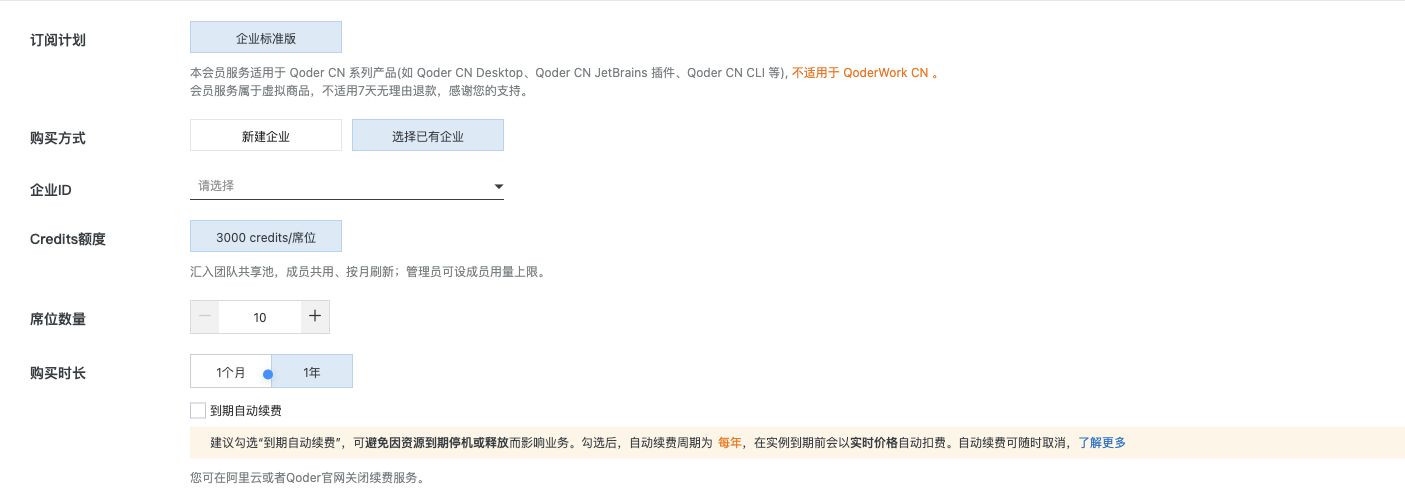 On the Enterprise purchase page, select 1年 for an annual subscription. Check the seat count and renewal option before continuing.