

Release rules for Suite enterprise instances after expiration, expiration times, and repurchasing for an existing organization.
This page applies to Qoder CN Suite Teams, Enterprise, and Enterprise VPC subscriptions. For original Lingma migration, use the corresponding migration guide rather than this existing-organization purchase flow.
Members can no longer rely on the expired subscription for enterprise entitlements. The released instance and the organization are different: to continue using the original organization, purchase a new instance and bind its organization ID.
Binding requires that the original instance has been released and the organization has no active subscription. Matching organization names do not establish identity; check the organization ID.
Have ready: the original organization ID, the intended edition, and an Alibaba Cloud account authorized to manage the instance order. For an active subscription, use Renewal.
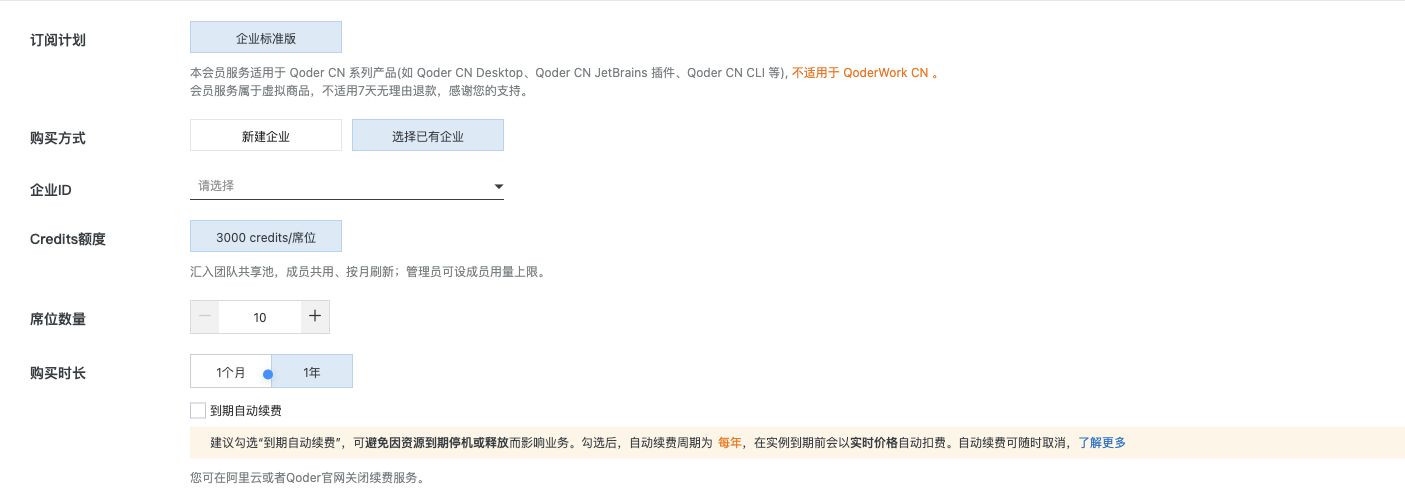 Enterprise purchase page (Chinese UI). Select 选择已有企业, then select the original organization in 企业 ID. For an annual subscription, select 1年 under purchase duration. The organization must meet the binding requirements above.
If binding fails, check the original instance and organization subscription status. Contact support with the page message, order number, and organization ID. Repeatedly creating organizations with the same name does not resolve a binding issue.
For Enterprise VPC, also verify the enterprise domain and network connection using the VPC guide. Binding the original organization does not mean that all old instance resources, historical data, or unused subscription Credits are automatically restored.
Enterprise purchase page (Chinese UI). Select 选择已有企业, then select the original organization in 企业 ID. For an annual subscription, select 1年 under purchase duration. The organization must meet the binding requirements above.
If binding fails, check the original instance and organization subscription status. Contact support with the page message, order number, and organization ID. Repeatedly creating organizations with the same name does not resolve a binding issue.
For Enterprise VPC, also verify the enterprise domain and network connection using the VPC guide. Binding the original organization does not mean that all old instance resources, historical data, or unused subscription Credits are automatically restored.
What happens after expiration
Members can no longer rely on the expired subscription for enterprise entitlements. The released instance and the organization are different: to continue using the original organization, purchase a new instance and bind its organization ID.
Binding requires that the original instance has been released and the organization has no active subscription. Matching organization names do not establish identity; check the organization ID.
Repurchase after expiration
Have ready: the original organization ID, the intended edition, and an Alibaba Cloud account authorized to manage the instance order. For an active subscription, use Renewal.
- Record the original organization ID and confirm that the original instance has been released.
- Create a new instance using the purchase entry for the intended edition:
- Select the existing organization option (选择已有企业 on the Enterprise purchase page) and enter the original organization ID.
- The system checks that the organization has no active subscription. Complete binding and continue the purchase as prompted.
- After purchase, check the organization ID, edition, seat count, and validity of the new instance. Have an actual member sign in to the intended organization and verify their entitlements.
Expiration dates and exact cutoff times
- An expiration date of April 1 means validity ends at 00:00 on April 2, the following day.
- An explicit cutoff time of 00:00 on July 1 means validity ends at that time. Do not add another day.
Related operations
- Extend an active subscription: Renewal.
- Change from Teams to Enterprise: Modify subscription.
- Check funds and entitlements: Billing query.