

Understand enterprise Credits pools, personal and billing group limits, monthly allocation, and validity.
Each seat in Enterprise Standard Edition and Enterprise Dedicated Edition includes 3,000 Credits. Credits from all seats under the same enterprise subscription are pooled into a shared team resource pool. Team members draw from this pool, while administrators set individual usage limits. Credits are not pre-allocated to individual members.
A member needs usage eligibility, a valid organization balance, and room under personal and applicable group limits. Increasing a personal or group limit does not add organization Credits.
The following numbers illustrate the relationship; they are not default settings:
Open Organization usage to check the Shared resource pack summary and purchase entry. Below it, select Member accounts and the date range to inspect member usage. A member shared pack is separate from SA billing.
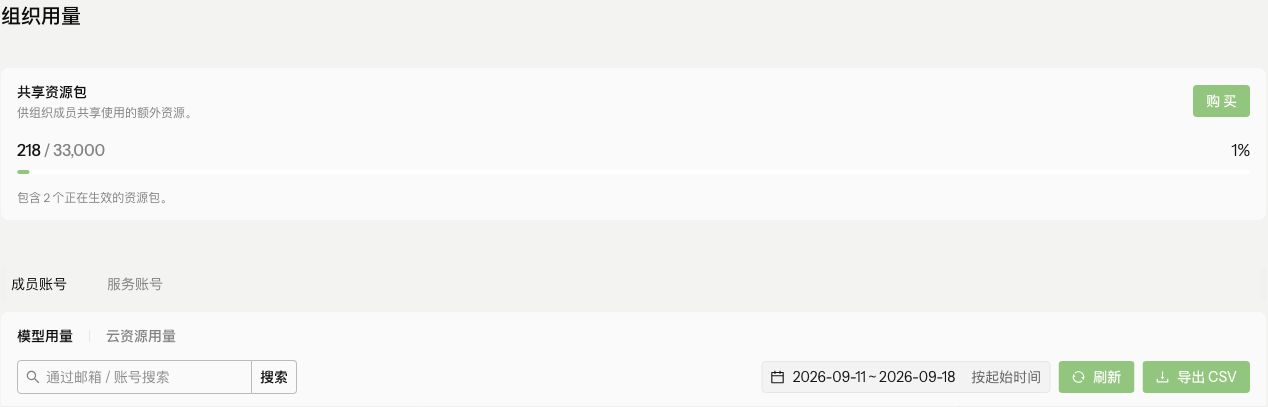 The amounts and dates shown are test data.
When you purchase
By default, each member has an individual usage limit of 3,000 Credits. This prevents a single member from consuming the entire shared pool at once. Under the default configuration, total team usage cannot exceed
Administrators can set a different usage limit for each seat. For example, administrators can raise limits for heavy users and lower them for light users. Limits can be adjusted as needed, provided that total team usage does not exceed the shared pool.
In Members > All members, open the member’s … menu and select 设置共享资源包限额. Check the current period and the limit before saving. This setting controls that member’s use of the shared resource pack; it does not purchase Credits or change the organization’s balance.
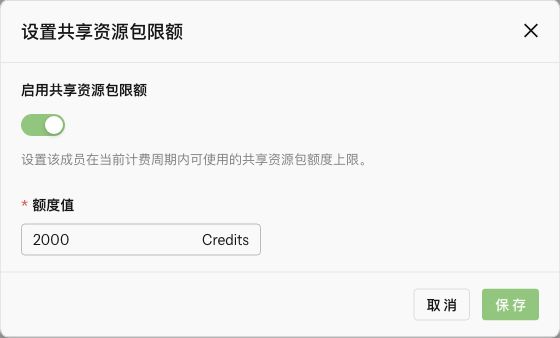 The value in this test-environment example is not a default entitlement or a Credits grant.
Credits are issued monthly and are valid only for the current billing cycle. Unused Credits expire at the end of the cycle and do not roll over or accumulate.
Enterprise Standard Edition (CNY 149 per seat per month) and Enterprise Dedicated Edition (CNY 199 per seat per month) can be purchased on a monthly or annual basis.
For annual subscriptions, Credits are still issued and reset monthly. The system does not issue the full annual allocation at once, and unused Credits do not accumulate across months.
No. Credits are issued monthly and cannot be accumulated or carried over to the next billing cycle.
Administrators can adjust personal usage limits to let members use the shared pool differently. This changes limits, not the amount of Credits issued or reserved for a member.
The shared resource pool is aggregated under the same enterprise subscription. Credits from all seats under the same enterprise subscription are added to a single shared pool.
Check the order charge and Credits acquisition record separately. Added seats do not change the original subscription cutoff, and a personal limit is not the amount of Credits issued for that seat. See Add seats for monthly and annual checks and effective times.
Personal limits, group limits, and organization Credits
| Item | What it controls | What it does not mean |
|---|---|---|
| Valid balance in the shared pool and shared resource packages | Resources consumed jointly by eligible organization members. | Each member does not receive a separate copy of the balance. |
| Personal usage limit | One member's maximum usage in the applicable reporting cycle. | Credits are not allocated or reserved for that member. |
| Billing-group cycle limit | Combined usage by members of the billing group. | This is not an extra resource package issued to the group. |
- Organization balance exhausted: A personal limit of 8,000 Credits does not allow continued use when the organization has no valid balance.
- Personal limit reached: The organization has Credits, but a member has used their entire 3,000-Credit personal limit and is restricted.
- Group limit reached: Both organization balance and personal headroom remain, but the member's group has reached its limit and group-level restrictions apply.
Unassigned.
See the Credits log for acquisition, effective dates, and expiration, and the organization usage steps below for member usage.
Find the shared resource pack and usage
Open Organization usage to check the Shared resource pack summary and purchase entry. Below it, select Member accounts and the date range to inspect member usage. A member shared pack is separate from SA billing.
Credit allocation and issuance
When you purchase n seats under an enterprise subscription, the system creates a shared team resource pool:
- The total allocation is
3,000 × n Credits. - Credits are valid for one month and are issued automatically each month with the subscription.
- All team members use the same pool. Credits are deducted based on actual usage rather than pre-allocated to individual members.
Default usage limit
By default, each member has an individual usage limit of 3,000 Credits. This prevents a single member from consuming the entire shared pool at once. Under the default configuration, total team usage cannot exceed 3,000 × n Credits.
Adjust member usage limits
Administrators can set a different usage limit for each seat. For example, administrators can raise limits for heavy users and lower them for light users. Limits can be adjusted as needed, provided that total team usage does not exceed the shared pool.
A subscription with 10 seats provides a shared monthly pool of 30,000 Credits. By default, each member can use up to 3,000 Credits.If three members are heavy users, an administrator can raise each of their limits to 6,000 Credits. When the remaining light users consume only a few hundred Credits each, the heavy users can draw from the unused team capacity, provided that total team usage remains within 30,000 Credits.
Check a member’s shared resource pack limit
In Members > All members, open the member’s … menu and select 设置共享资源包限额. Check the current period and the limit before saving. This setting controls that member’s use of the shared resource pack; it does not purchase Credits or change the organization’s balance.