

Constructing a dedicated enterprise portal for product development and office work
Solution Architecture
The enterprise-dedicated AI platform is built around a "four-layer stack plus two feedback loops" model: a unified portal layer consolidates employee touchpoints; a scenario capability layer delivers both out-of-the-box and proprietary capabilities; a platform core layer handles building and execution; an integration and governance layer connects enterprise systems and ensures compliance. A single employee request completes the "enter → route → execute → write back → audit" execution loop across all four layers, and each completed task simultaneously feeds the "use → feedback → asset accumulation → capability upgrade" accumulation loop.
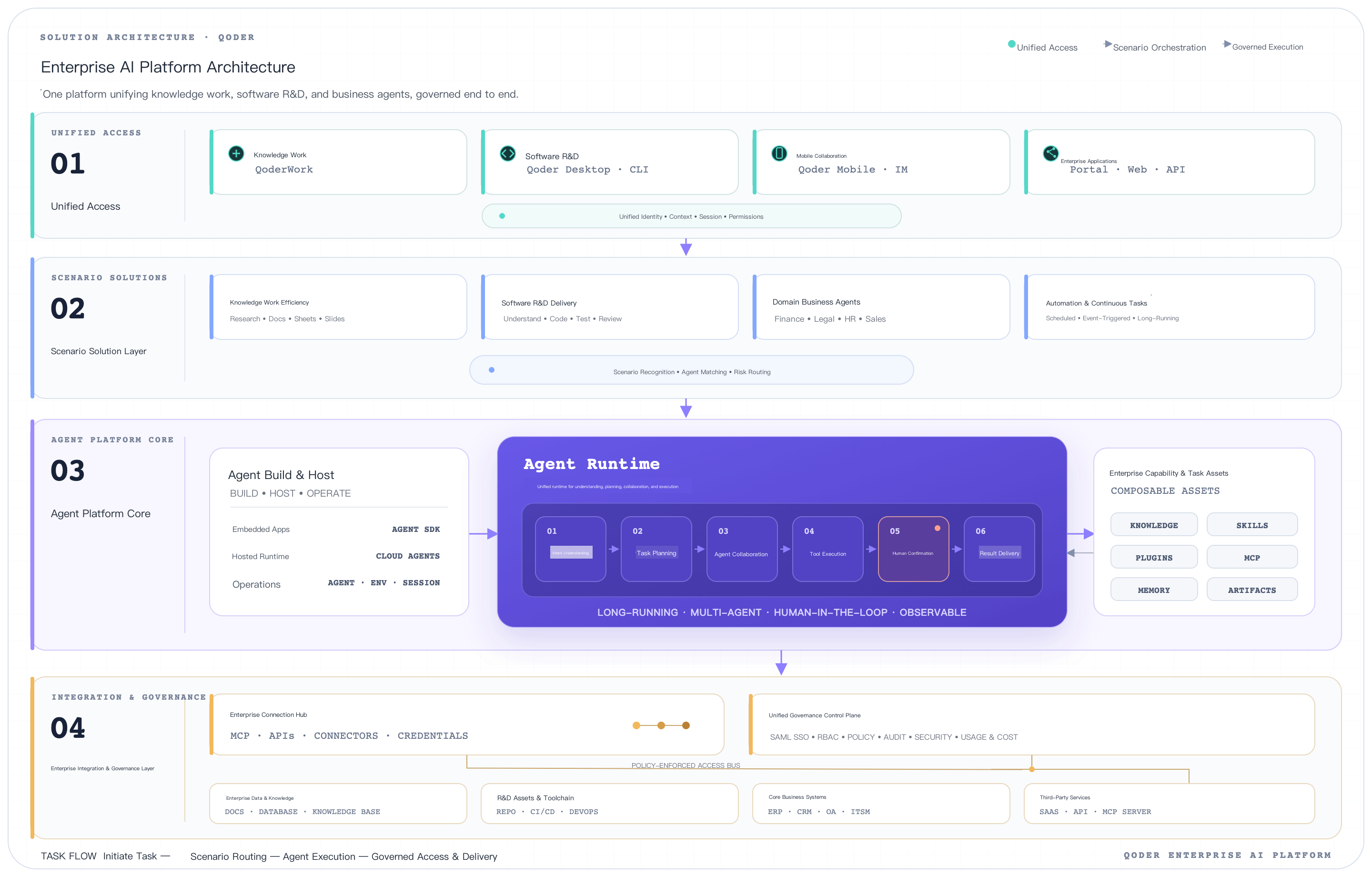
Solution Advantages
Advantage 01: One Portal Consolidates All AI Scenarios Across Product, Engineering, and Office Work
The office portal, product and engineering portal (IDE / CLI), and mobile portal all connect to the same platform core and capability asset library. Employees no longer need to remember multiple AI tools, and IT only needs to govern a single platform. This solves the problems of AI tool fragmentation, fragmented user experience, and uncontrolled governance and costs.
Advantage 02: Office Scenarios Work Out of the Box on Day One
The platform includes built-in capability bundles for documents, spreadsheets, scheduling, approvals, email, meeting minutes, and other office functions. These can be made available to all employees without custom development, delivering immediate value on the day the platform goes live. This solves the problem of long build timelines with no short-term visible impact.
Advantage 03: Product and Engineering Portal Fully Integrated, End-to-End from Requirements to Release
Qoder IDE / CLI handles coding, review, testing, release, and troubleshooting. Requirements, design decisions, code changes, and release records automatically flow back into the project view in the office portal, eliminating the need for two separate toolchains across product, engineering, and office work. This solves the problem of product and engineering progress being disconnected from office collaboration and information being moved manually.
Advantage 04: Proprietary AI Agents Are Enterprise Assets That Compound Over Time
Business units encode SOPs and domain knowledge as Skills and Plugins, accumulating them in the enterprise's own capability asset library for cross-department reuse and hot updates. Staff turnover and model iteration do not take assets away. This solves the problem of methodology staying locked in individual experience and documents, unable to scale.
Advantage 05: Artifact Workspace Elevates AI from Chat to a True Workbench
Five concepts — conversation, workspace, artifact, preview, and edit — and eight interaction slots support complex deliverables. Artifacts use versioned files as the source of truth, and optimistic concurrency control allows employees and agents to edit in parallel without conflicts. This solves the problem of chat-style AI being unable to support complex deliverables such as documents, proposals, and designs.
Advantage 06: Human-in-the-Loop and Enterprise Governance Built In
A six-layer control model and five interaction modes cover the complete control surface from capability scope to execution audit. High-risk operations require 100% confirmation. SSO / RBAC, three-tier logging, and sensitive operation detection are built into the platform foundation. This solves the problem of enterprises being hesitant to scale AI adoption due to compliance and security concerns.
Business Scenarios
Scenario 01: Unified AI Assistant for Everyday Office Work
Employees complete document drafting, spreadsheet analysis, schedule coordination, email handling, approval assistance, and other daily tasks from a single portal, with no more switching between multiple AI tools.
- Customer problem: AI capabilities are scattered across separate entry points for documents, email, calendar, and IM; the employee experience is fragmented, and IT cannot govern them centrally.
- Trigger: Employee initiates a request such as writing a weekly report, organizing meeting minutes, summarizing data, or processing email from the office portal.
- Agent actions: Load the office capability bundle, read relevant document / spreadsheet / email context, execute the standard workflow, and produce structured deliverables.
- Deliverables: Documents, spreadsheets, email drafts, meeting minutes, or approval comments that comply with enterprise standards.
- Completion definition: Deliverable passes the workbench diff comparison and user confirmation.
- Human Gate: Operations that send externally or write to production systems require business confirmation.
Scenario 02: Enterprise-Proprietary Business AI Agents
Business units encode SOPs into dedicated agents such as "Expense Reimbursement Assistant," "Compliance Review Assistant," and "Pre-sales Proposal Assistant," serving all employees at scale from the unified portal.
- Customer problem: Senior employees' methodologies remain locked in personal experience; new employees onboard slowly; cross-team consistency is poor.
- Trigger: A business stakeholder configures a proprietary agent in the build console; employees invoke it from the unified portal.
- Agent actions: Load business Plugins and Skills, read internal system data via MCP, and execute the standard workflow.
- Deliverables: Business deliverables such as expense reports, compliance opinions, and pre-sales proposals that meet enterprise quality standards.
- Completion definition: All quality gates defined in the Skill are passed.
- Human Gate: Nodes involving amounts, external commitments, or high-risk decisions require confirmation and approval.
Scenario 03: Intelligent Collaboration Workbench for Product and Engineering Teams
Developers, testers, and PMs switch seamlessly between IDE / CLI and the office portal, with AI spanning the complete chain from requirements through coding, review, and release.
- Customer problem: Requirements reviews happen on the office side, code changes happen in the IDE, AI cannot connect the two end-to-end, and progress is synchronized manually.
- Trigger: PM initiates a requirement from the office portal, or a developer starts a development task from the IDE.
- Agent actions: Requirement context is bi-directionally synchronized between the office and product and engineering portals; agents collaborate to complete requirement decomposition, code changes, unit test generation, review, and release preparation.
- Deliverables: Versioned code changes, review records, and release records, synchronized back to the project view in the office portal.
- Completion definition: Review passed, unit tests passed, canary metrics within target.
- Human Gate: Merging to main and production release require approval.
Scenario 04: Automated Closed Loop Driven by Cross-System Events
When internal enterprise systems generate events — a new contract is signed, an expense report is submitted, an alert fires — the agent automatically executes standardized tasks and returns critical nodes to human approval.
- Customer problem: Cross-system repetitive tasks depend on manual triggering; responses are slow, items are missed, and traceability is poor.
- Trigger: An internal enterprise system pushes an event to the platform via MCP or event subscription.
- Agent actions: Read the event context, determine the processing path based on capability bundles, invoke external system tools to execute, and write back to the business system.
- Deliverables: Status updates, approval instances, notification messages, or process advancement records in the business system.
- Completion definition: Business system write-back status meets expectations; audit log is complete.
- Human Gate: High-risk operations pause for confirmation; decisions are recorded in the audit log.
Reference Practice
Practice Name
Agent SDK plus Qoder Product Suite x A Large Group Enterprise: Building a Group-Level Dedicated AI Platform in Six Months, Unifying Product, Engineering, and Office Portals
Practice Background
- Customer or industry: A large group enterprise with tens of thousands of employees and business spanning multiple business units.
- Original workflow: Each business unit independently purchased AI tools; office and product and engineering toolchains were disconnected; Group IT had no unified governance pane.
- Core problems: Portal fragmentation, no way to accumulate methodology as institutional knowledge, high compliance risk, difficulty measuring return on investment.
- Pilot scope: One headquarters functional department plus one business unit with a product and engineering team; three categories of proprietary agents in the first batch.
Practice Design
- How events enter: Employees initiate requests from the unified portal (office portal / IDE / CLI / Mobile), or enterprise systems push events via MCP.
- How the control layer routes: The platform routes to out-of-the-box capability bundles or proprietary agents based on user role and scenario, loading context, capabilities, and authentication in a single step.
- How the Agent executes: Office tasks are handled by built-in capability bundles; business tasks are handled by proprietary agents; product and engineering tasks are bi-directionally synchronized between the IDE / CLI and the office portal.
- How results are written back: Artifacts are versioned and written to the Artifact Workspace; employees view in the preview area, make precise edits in the editor, and export in the delivery area.
- How failures are routed back: Degraded into three categories — retryable, non-retryable, and unknown error; audit logs provide full traceability of the decision chain.
- Where humans make decisions: Portal and permission configuration, high-risk operation confirmation, and review before external delivery.
Practice Workflow
| Step | Event | Role | Action | Write-Back Evidence |
|---|---|---|---|---|
| 01 | Governance and boundary design | Group IT plus Qoder team | Define portal consolidation scope, authentication, audit, and data isolation strategy | Governance design document |
| 02 | Platform foundation setup | Qoder team | Deploy Agent SDK Runtime and Cloud Agents; integrate SSO and audit | Platform acceptance record |
| 03 | Unified portal launch | Group IT | Office portal, IDE / CLI product and engineering portal, and mobile portal all connect to the same platform | Portal access logs |
| 04 | Office capability activation | Group IT | Enable out-of-the-box capabilities for documents, spreadsheets, scheduling, approvals, email, and meeting minutes | Capability activation records |
| 05 | First-batch proprietary agent development | Business units plus Qoder team | Encode Skills and Plugins; connect business systems via MCP | Capability asset library version |
| 06 | Pilot usage and governance review | Pilot users plus Group IT | Complete tasks from the unified portal; review compliance and costs via audit and billing views | Session and audit logs, governance reports |
| 07 | Scaled rollout | Group IT plus business units | Replicate portal and agent matrix to more departments and business units | Portal coverage rate and asset growth curve |
Practice Outcomes
- Closed loops delivered: Both the execution loop ("employee initiates request from unified portal" through "deliverable delivered and accumulated as capability asset") and the accumulation loop are proven end-to-end.
- Validated capabilities: Portal consolidation, out-of-the-box office productivity, proprietary agent development, bi-directional context bridging between product, engineering, and office, six-layer control and audit, internal system integration via MCP.
- Data and evidence: Portal consolidation rate increased significantly; first-batch proprietary agents reused cross-department; 100% of high-risk operations require confirmation. Specific metrics pending customer authorization for disclosure.
- Out-of-scope areas: Cross-business-unit capability asset governance and multi-model cost optimization are still evolving.
Recommended Product Bundle
| Product | Role in Solution | Entry Point | Customer Capabilities | Product Link |
|---|---|---|---|---|
| Agent SDK | Platform foundation | SDK / API | Embed Agent Runtime and build capabilities into the enterprise's own platform, fully self-controlled | https://docs.qoder.cn/cli/sdk/overview |
| Qoder IDE | product and engineering portal | IDE | Coding, review, unit testing, release preparation, with bi-directional context bridging to the office portal | Qoder IDE |
| Qoder CLI | Terminal and pipeline entry point | CLI / CI/CD | Run agents in development, testing, and automated pipelines | https://docs.qoder.cn/cli/overview |
| Cloud Agents | Cloud-hosted execution | Cloud Runtime | High-availability, maintenance-free agent runtime | https://docs.qoder.cn/cloud-agents/overview |
| Qoder Mobile | Mobile review and approval | Mobile | Mobile confirmation for high-risk operations and audit viewing | https://docs.qoder.cn/mobile/app/remote-control |
| Qoder Security | Security governance | Security | Sensitive operation detection and remediation suggestions | https://qoder.cn/security |