

Rapidly building AI platforms for different users and scenarios
Solution Architecture
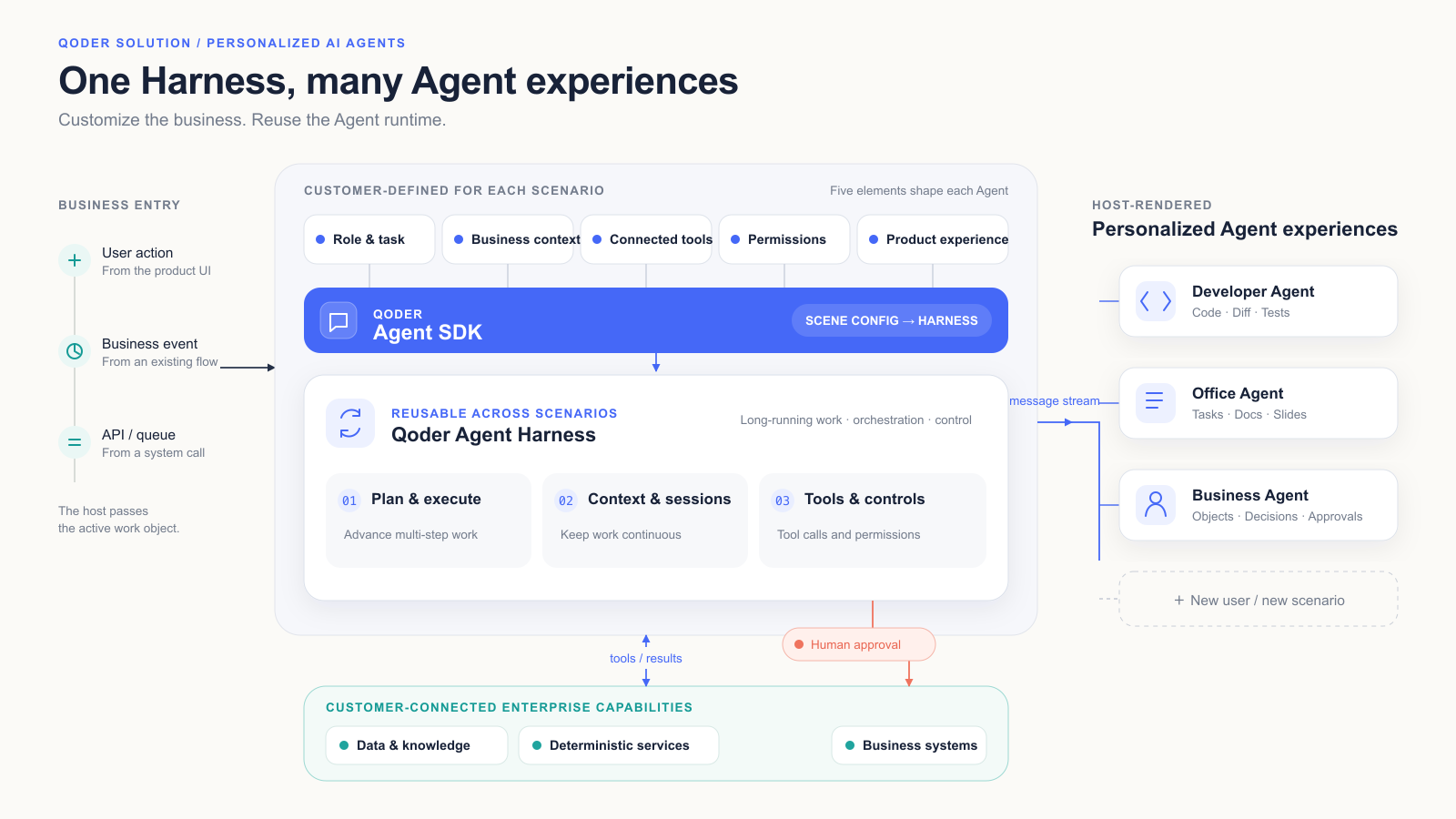
Building an Agent directly on a model API leaves the development team to handle general-purpose capabilities on its own, including the task loop, context continuity, tool protocols, permission confirmation, message state, and unexpected interruptions.
The Qoder Agent SDK provides the runtime and control capabilities of the Qoder Agent Harness. Teams only need to complete configuration around five core elements: define the user and the task, inject business context, connect business tools, set permission boundaries, and design a product interface suited to the user. This allows engineering resources to be concentrated on the parts that genuinely affect business outcomes.
Solution Advantages
Advantage 01: Reuse the Agent Harness to Significantly Reduce Redundant Engineering
The Qoder Agent SDK hands developers the task loop, context continuity, tool protocols, permission prompts, message state, and interruption recovery as reusable runtime primitives. This lets the first scenario reach a closed loop faster, while subsequent scenarios follow the same technical pattern, significantly lowering the cost of rebuilding a runtime framework for each new scenario.
Advantage 02: Outcomes Built on Real Context and Enterprise Tools
The host application passes the current file, customer, contract, ticket, or project directly to the Agent, and enterprise tools then supply up-to-date data, policy rules, and deterministic calculations. The model handles understanding, planning, and coordination, and authoritative results are computed by business systems or purpose-built tools. Output therefore aligns more closely with enterprise constraints and is easier to review and evaluate.
Advantage 03: One Foundation Can Produce Entirely Different Business Products
The same session, tools, permissions, and execution events are reused underneath, while the interface is designed around the way each role most naturally works. Desktop office, equipment maintenance, supply chain, and other Agents need not be compressed into one uniform chat interface, so enterprises can build differentiated business products on this basis.
Advantage 04: Moving from Answering Questions to Completing Tasks Under Control
Working toward a goal, the Agent continuously reads information, invokes tools, produces business results, and waits for human decisions. Before key tool calls, the SDK hands authorization to the host, and Hooks plus message streams hand the host the state of each tool call including start, success, failure, and rejection. This lets enterprises establish a task loop that is observable, can be taken over, and can be written back.
Business Scenarios
The scenarios below use fixed synthetic data to illustrate business entry points, product interfaces, and process forms. Time figures represent reference operating baselines and PoC acceptance targets. Agent run time is measured from the point where materials are complete and excludes human approval, system execution, external communication, and rework caused by exceptions. Formal results should be validated using a customer-authorized task set against a human baseline measured on the same basis.
Scenario 01: Desktop Office Agent — AI Native Office Assistant
Working toward a clearly defined task goal, the Agent reads authorized files, forms an execution plan, and invokes office tools to produce a reporting deck, a data verification sheet, and an action item list.
- Customer problem: Business materials are scattered across folders, spreadsheets, meeting minutes, and presentation templates, so staff must switch repeatedly between files, reconcile data, and assemble reporting materials by hand.
- Trigger: An employee creates a review task in the office product and authorizes the Agent to access the relevant files.
- Agent actions: Read and analyze the authorized files, form an execution plan, and invoke enterprise document, spreadsheet, and presentation tools to generate reporting materials and a data verification sheet. When conflicts appear in budget figures, versions, or data definitions, raise a confirmation request with the employee.
- Deliverables: Reporting deck, data verification sheet, and action item list.
- Completion definition: Cross-file consolidation previously took about one working day; the Agent produces a review-ready deliverable package in about 15 minutes, with key conclusions and figures traceable to their source files.
- Human Gate: The employee confirms final data definitions, file save locations, and task assignment.
Scenario 02: Coding Agent — From Understanding the Repository to Delivering a Reviewable Change
Working from the current code repository and task context, the Agent searches code, edits files, runs tests, and delivers a reviewable code patch.
- Customer problem: Developers must first understand code structure and engineering constraints, then work through locating the implementation, modifying files, validating with tests, and reviewing the diff, which makes the process long and the information fragmented.
- Trigger: A developer submits a feature request or a defect fix task.
- Agent actions: Read the project description and development standards, search the relevant code, and form an execution plan. Within the authorized scope, edit files and run commands and tests, then summarize code differences, test results, and potential risks.
- Deliverables: Reviewable code patch, diff, test results, and risk notes.
- Completion definition: A small fix usually requires 2–4 hours of manual effort, while the Agent PoC target is to produce a reviewable patch within 15 minutes. In the sample task, the Agent completed changes to 3 files in 8 minutes 36 seconds and passed 18 tests.
- Human Gate: The developer confirms before installing dependencies, running high-risk commands, committing code, pushing to the remote repository, and creating a merge request.
Scenario 03: Sales Management Agent — Identifying, Matching, and Pricing Hundreds of Line Items
Working from the current opportunity in CRM, the Agent reads customer and product information, invokes the enterprise pricing tool to generate multiple proposals, and completes the comparison on a single page.
- Customer problem: Customer budget, product mix, historical deal prices, fulfillment cost, discount policy, and approval authority are spread across CRM, the product catalog, and pricing sheets. Sales staff must query and recalculate repeatedly, and gross margin or discount breaches usually surface only at the approval stage.
- Trigger: An inquiry from a key account arrives, or a sales representative requests a pricing strategy for the current opportunity.
- Agent actions: Read customer, opportunity, and product information, invoke the enterprise pricing tool to generate several optional proposals, and compare price, gross margin, requirement fit, and approval path in one consistent view.
- Deliverables: Multiple pricing proposals, gross margin calculations, requirement fit assessment, and approval path, with the option to continue generating the CPQ draft, initiating discount approval, and updating CRM.
- Completion definition: Pricing proposals comply with enterprise pricing policy, gross margin guardrails, and approval rules, and the recommended proposal stays consistent with its supporting data.
- Human Gate: The sales representative selects the final proposal, and the discount level and submission scope are confirmed by the Deal Desk or an authorized manager before anything is written back to business systems.
Scenario 04: Bidding Decision Agent — Reaching a Go / No-Go Decision Before Committing Resources
The Agent parses tender documents, links enterprise qualifications, historical projects, and financial models, and generates a Go / No-Go brief with the supporting decision evidence.
- Customer problem: Public and enterprise bids come with tight cycles and heavy documentation, so sales, delivery, finance, and legal teams must jointly assess eligibility conditions, delivery capability, expected gross margin, competitive position, and key risks within limited time.
- Trigger: The system receives a new tender announcement or tender document.
- Agent actions: Parse the tender announcement and documents, invoke the enterprise qualification repository, historical projects, resource data, and financial models, break down and verify key requirements, and generate a decision brief, an economic assessment, and a risk list.
- Deliverables: Go / No-Go decision brief, economic assessment, and risk list.
- Completion definition: Preparing decision materials manually previously took about two working days; the Agent produces a review-ready brief in about 20 minutes, with every key conclusion supported by data or document evidence.
- Human Gate: The business owner approves whether to bid, the budget commitment, and the formal submission.
Scenario 05: Contract Review and Negotiation Agent — Risks, Evidence, and Revision Suggestions on One Work Surface
The Agent invokes contract review and policy retrieval tools to generate clause-level risk cards, policy evidence, revision suggestions, and an approval path, and establishes the link between the contract text and the review conclusions.
- Customer problem: Legal staff must combine the contract text, deal background, company policy, counterparty records, and the approval matrix to identify risks, locate the relevant clauses, assess impact, and propose negotiation positions. The information required is scattered, and manual review takes considerable time.
- Trigger: A CRM opportunity enters the contract negotiation stage, or a business user uploads a new contract version.
- Agent actions: Invoke the contract review and policy retrieval tools connected by the enterprise, identify clause-level risks, locate the source text and policy evidence, generate revision suggestions and an approval path, and establish the correspondence between text, risks, and suggestions.
- Deliverables: Clause-level risk cards, policy evidence, revision suggestions, and approval path.
- Completion definition: A first-round manual review of a 38-page contract takes about 4 hours, while the Agent can produce a draft review in about 10 minutes, with every risk traceable to a specific clause and the applicable rule.
- Human Gate: Enterprise legal counsel must sign off on the formal legal position, redline versions, policy exceptions, and any write-back of review results to the contract system.
Scenario 06: Complaint and After-Sales Ticket Agent — From Multi-System Investigation to an Executable Resolution Plan
Once a ticket arrives, the Agent reads customer and product context and invokes cross-system tools to reconstruct the incident timeline, analyze likely causes, and generate resolution recommendations.
- Customer problem: Complex complaints involve orders, logistics, device logs, service records, warranty policy, and compensation authority. Service staff must verify information across systems and coordinate with technical, warehouse, and service teams to resolve the case.
- Trigger: A complaint or after-sales ticket enters the system.
- Agent actions: Read the current customer, product, and ticket information, invoke CRM, order, logistics, knowledge base, and diagnostic tools, reconstruct the incident timeline, analyze likely causes, generate a resolution plan and a customer communication draft, and flag compensation options or closure conditions that require escalated approval.
- Deliverables: Incident timeline, cause analysis, resolution plan, and customer communication draft.
- Completion definition: A complex ticket previously took about 90 minutes of manual cross-system investigation; the Agent produces resolution recommendations for confirmation in about 6 minutes, with the supporting data retained.
- Human Gate: Authorized staff confirm compensation commitments, external communication, and ticket closure.
Scenario 07: Supply Chain Fulfillment Exception Agent — Forming a Cross-System Response Plan the Moment an Exception Occurs
After a fulfillment exception occurs, the Agent invokes ERP, WMS, MES, and TMS data along with customer commitments to identify root causes and the scope of impact, and to evaluate different response plans.
- Customer problem: Delivery delays are usually caused by the combined effect of order commitments, inventory, production, procurement, logistics, and customer priority. Supply chain staff must first reconstruct the scope of impact, then compare options such as stock transfer, order splitting, expedited logistics, material substitution, and customer communication.
- Trigger: The system detects a fulfillment exception, or the responsible owner initiates an exception handling task.
- Agent actions: Invoke ERP, WMS, MES, TMS, and customer commitment data, pinpoint the root cause of the exception and the affected orders, calculate how each response plan affects delivery dates, cost, and customer commitments, and generate an execution checklist.
- Deliverables: Scope of exception impact, root cause chain, response plan comparison, and execution checklist.
- Completion definition: An exception task previously took about 2 hours of manual investigation and coordination; the Agent produces response recommendations for confirmation in about 12 minutes.
- Human Gate: The relevant owners approve stock transfers, expediting costs, and changes to customer commitments.
Scenario 08: Project Delivery Agent — Turning Project Risk from a Post-Meeting Discovery into Continuous Progress
The Agent continuously consolidates data from project systems and process records, updates milestone status, identifies blockers and owners, and generates a project management summary and action plan.
- Customer problem: Project plans, weekly reports, meeting minutes, defects, changes, and customer feedback are spread across different systems, project status depends on manual consolidation, and critical dependencies and risks are often discovered only at the regular meeting.
- Trigger: The Agent runs continuously through the project cycle, or is triggered on schedule and at key milestones.
- Agent actions: Read project systems, tickets, meeting minutes, and change records, update milestone status, identify blockers, key risks, and owners, generate a management summary, action plan, and escalation recommendations, and follow up continuously on open items.
- Deliverables: Project management summary, action plan, and escalation recommendations.
- Completion definition: Preparing a project business view manually previously took about one working day; the Agent produces a review-ready project brief in about 15 minutes.
- Human Gate: The project owner confirms task reassignment, changes to project scope, and commitments made to customers.
Reference Practice
Practice Name
Qoder Agent SDK × Enterprise Office and Task Systems: A Desktop Office Agent Produces a Reviewable Business Review Package in One Run
Practice Background
- Customer or industry: Enterprise business operations and office scenarios.
- Original workflow: Employees manually opened sales details, budget sheets, meeting minutes, and presentation templates, aligned metric definitions, built charts, wrote conclusions, applied templates, and then entered action items into the task system.
- Core problems: Information was scattered across multiple files, two versions of the budget existed, reconciling metric definitions and producing deliverables depended on manual work, and both conflict resolution and write operations lacked a unified confirmation point.
- Pilot scope: Using “produce Q3 business review materials” as the example, covering material reading, metric verification, deliverable generation, and action item write-back.
Practice Design
- How events enter: An employee creates a “Q3 business review” task in the office product and selects four authorized files, and the host passes the task goal, file identifiers, deadline, and output requirements to the SDK.
- How the control layer routes: The Qoder Agent SDK launches the business analysis Agent, breaks the goal down into material reading, metric verification, indicator calculation, conclusion extraction, deliverable generation, and action item consolidation, and maintains a long-lived session.
- How the Agent executes: It reads files through enterprise MCP tools, calculates indicators with the spreadsheet tool, and forms draft deliverables with the presentation and document tools, with authoritative figures computed by deterministic tools rather than estimated by the model.
- How results are written back: After employee confirmation, write tools save the files, create internal tasks, and update status in the task system.
- How failures are routed back: When two versions of the budget sheet are found, the related conclusions are paused and handed to the employee for judgment. Permission rejection or timeout means no write tool is invoked, and deliverables remain in a pending review state.
- Where humans make decisions: Budget version selection, final metric definitions, file saving, version overwrite, and task creation.
Practice Workflow
| Step | Event | Role | Action | Write-Back Evidence |
|---|---|---|---|---|
| 01 | Task arrives | Employee / host application | Create the review task and authorize four files | Task goal, file identifiers, deadline |
| 02 | Agent forms a plan | Desktop Office Agent | Break down material reading, verification, calculation, and deliverable generation | Plan message and stage status |
| 03 | Invoke enterprise tools | Desktop Office Agent | Read files, calculate indicators, generate draft deliverables | MCP tool calls and completion status |
| 04 | Conflict confirmation | Employee | Select the valid budget version | Version selection record |
| 05 | Request write authorization | SDK permission mechanism | Pause execution and display the target location and file list | Permission request number, approval or rejection record |
| 06 | System write-back | Enterprise connector | Save files, create tasks, update status | System receipt and reference numbers |
Practice Outcomes
- Closed loop delivered: The full chain of “task goal → authorized files → multi-tool execution → human confirmation → controlled write-back” is proven, and business review deliverables no longer depend on manual cross-file transfer.
- Validated capabilities: System Prompt role definition, MCP tools, long-lived Session, message streams, and the canUseTool permission gate can be used in combination.
- Data and evidence: Following the reference workflow, manual work takes about one working day while the Agent produces a review-ready deliverable package in about 15 minutes, and every step leaves tool call status, permission request records, and system receipts.
- Out-of-scope areas: Cross-department collaborative review, external report distribution, long-term indicator tracking, and other downstream processes.
Recommended Product Bundle
| Product | Role in Solution | Entry Point | Customer Capabilities | Product Link |
|---|---|---|---|---|
| Qoder Agent SDK | Define specialized Agents and embed them in business systems | SDK / Server-side application | Task execution, sessions, message streams, tool integration, permission callbacks, Hooks, and Agent configuration | https://docs.qoder.cn/cli/sdk/overview |
| Qoder CLI | Local development, debugging, and PoC validation | CLI / Headless | Rapidly validate tasks, prompts, Skills, Agents, and tool chains | https://docs.qoder.cn/cli/overview |