

Upgrade your Qoder CN (formerly Lingma) Personal Edition account to a Qoder CN Full Suite account and unlock the entire product series—including the IDE, JetBrains plug-in, QoderWork CN, Qoder CN CLI, QoderWake CN, Qoder CN mobile, and Qoder CN Cloud Agents—with a single subscription.
Before June 20, 2026, Qoder CN (formerly Lingma) and other products such as QoderWork CN operated on separate account systems, requiring users to purchase separate subscriptions to use both. Qoder CN (formerly Lingma) now offers an upgrade path to the Qoder CN Full Suite. Upgrades for the Personal Edition are now available, with support for the Enterprise Standard Edition and Enterprise Exclusive Edition coming soon.
After the upgrade, you need only one account and one subscription to access the entire Qoder CN Full Suite, including the IDE and JetBrains plug-ins, Qoder CN CLI, QoderWork CN, QoderWake CN, Qoder CN mobile, and Qoder CN Cloud Agents. Your credits are metered uniformly, and all your AI data is preserved. Note: The login method will change, and the upgrade is irreversible. We recommend reading this guide in full before upgrading.
Read this guide before you begin to understand the changes and important details.
Before June 20, 2026, Qoder CN (formerly Lingma) and other products in the Qoder CN Full Suite, such as QoderWork CN, used separate account systems.
To use both Qoder CN (formerly Lingma) and QoderWork CN, you had to purchase two separate subscriptions.
To ensure a smooth transition for existing Personal Edition users to the new system and allow them to immediately benefit from the Full Suite capabilities, we offer a one-time upgrade plan for existing personal accounts. (Support for the Enterprise Standard Edition and Enterprise Exclusive Edition is coming soon.)
 The following sections cover changes to your benefits, important notes, and the step-by-step upgrade procedure.
After the upgrade, your Qoder CN (formerly Lingma) personal account becomes a Qoder CN Full Suite account with the following capabilities:
The upgrade converts your credits at an equivalent rate and extends their validity period:
After the upgrade, your Qoder CN (formerly Lingma) subscription orders are handled as follows:
Qoder CN (formerly Lingma) account:
That is, the two Pro subscription fees are merged into one subscription.
Qoder CN (formerly Lingma) account:
Review the following changes carefully before upgrading:
Review each point carefully before you click "Confirm, Start Upgrade":
The upgrade flow is available within the IDE starting June 20, 2026. The system guides each step; you only need to confirm.
Starting June 20, 2026, log in to the Qoder CN IDE plug-in or JetBrains plug-in using your original method (Alibaba Cloud China site account). On the identity selection page, select your personal account and click "Continue".
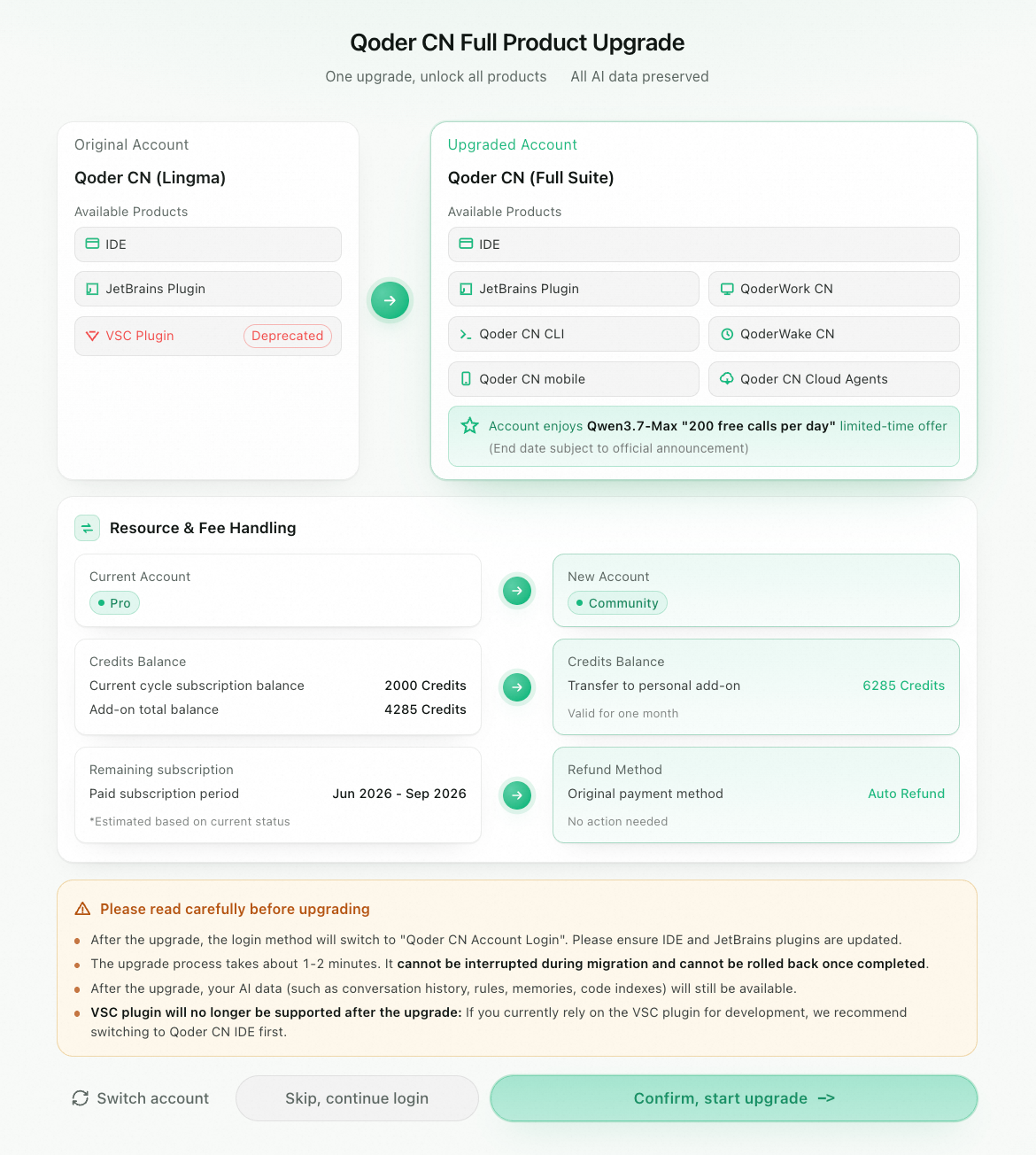
After selecting your identity, the Qoder CN Full Product Upgrade card will appear. This card clearly displays:
After you confirm, the system performs the upgrade automatically. The process takes about 1 to 2 minutes. Do not close the IDE during this time.
After the system confirms the upgrade was successful, the IDE will guide you to switch your login status. On the login page, select Log in with Qoder CN and sign in with your new Qoder CN account.
After upgrading to a Qoder CN Full Suite account, when you log in with the new account on the same computer, the system automatically restores your data from the original account, including AI conversation history, skills, rules, memories, and your code index.
This completes the upgrade process. You can now use your new account to continue using the Qoder CN IDE or JetBrains plug-in and explore other products in the Qoder CN Full Suite.
Q1: Can I choose not to upgrade?
A: The old system will remain operational until June 20, 2026. However, to access new products such as QoderWork CN and Qoder CN CLI and to avoid duplicate subscription fees, we recommend upgrading as soon as possible.
Q2: Will I lose my conversation history?
A: No. The migration is lossless. Your AI conversation history and personal preference settings are fully preserved in your new account.
Q3: When will I receive my refund?
A: The refund is triggered as soon as you confirm the upgrade. Funds are typically returned to your original payment method (Alipay/bank card) within 1 to 7 business days, depending on your bank's processing time.
Q4: Where can I check my credit usage?
A: Go to the Qoder CN usage page to view usage details for all Qoder CN products, including your credits balance and usage breakdown.
Your historical usage details from before the upgrade are preserved and can be viewed in the original Qoder CN Alibaba Cloud console (which only shows usage for the IDE and JetBrains plug-in) at https://qoder.console.aliyun.com/usage.
If you encounter issues during the upgrade, use the following channels:
Background
Before June 20, 2026, Qoder CN (formerly Lingma) and other products in the Qoder CN Full Suite, such as QoderWork CN, used separate account systems.
To use both Qoder CN (formerly Lingma) and QoderWork CN, you had to purchase two separate subscriptions.
To ensure a smooth transition for existing Personal Edition users to the new system and allow them to immediately benefit from the Full Suite capabilities, we offer a one-time upgrade plan for existing personal accounts. (Support for the Enterprise Standard Edition and Enterprise Exclusive Edition is coming soon.)
Before you upgrade
Upgrade benefits
After the upgrade, your Qoder CN (formerly Lingma) personal account becomes a Qoder CN Full Suite account with the following capabilities:
- Cross-product access: Use the same account to log in to the Qoder CN IDE plug-in, JetBrains plug-in, QoderWork CN, Qoder CN CLI, QoderWake CN, Qoder CN mobile, and Qoder CN Cloud Agents without separate registrations.
- Unified resource pool: After the upgrade, credits are tracked and consumed uniformly across all products in the Full Suite, simplifying quota management and budget planning.
- Limited-time model benefits: Upgraded users can enjoy a limited-time offer of 200 free daily calls to the Qwen3.7-Max model. The end date will be announced on the official Qoder CN website.
- AI data continuity: Your existing AI data, including AI conversation history, user- and project-specific rules, memories, skills, agents, and code index, are preserved. Your settings in the IDE and JetBrains plug-in, such as general settings, session settings, and terminal settings, are also migrated to the new account.
Credit handling
The upgrade converts your credits at an equivalent rate and extends their validity period:
- The credits balance from your Qoder CN (formerly Lingma) account's monthly subscription plan and your current credit resource pack balance are combined and converted into a personal resource pack under the upgraded Qoder CN Full Suite account.
- The conversion is a 1:1 equivalent conversion, so the total amount of credits remains the same.
- The validity period of the converted personal resource pack is reset to one month, starting from the day of the upgrade.
- Because existing personal resource packs also have a one-month validity period, and the credits in your original account likely have less than one month remaining, this upgrade effectively extends the validity of your balance while maintaining its value.
Order refunds
After the upgrade, your Qoder CN (formerly Lingma) subscription orders are handled as follows:
- Seat subscription fees for the next and subsequent subscription periods are automatically refunded to your original payment method. You do not need to apply for a refund.
- Any active auto-renewal orders are also canceled.
- Fees for used periods are not eligible for a refund.
- Remaining credits within the current subscription period are migrated to the new account's personal resource pack as described in Credit handling and will not be refunded as cash.
Case 1: A user's Alibaba Cloud UID is subscribed only to Qoder CN (formerly Lingma) and they perform the upgrade on June 30.
Qoder CN (formerly Lingma) account:
- Account description: The user previously purchased a Personal Pro subscription. Login is through the Alibaba Cloud China site and only supports the original Qoder CN product.
- Account type: Current Personal Pro subscription
- Purchase status:
- Purchased a three-month Personal Pro subscription: 500 credits remain in the current subscription period (June 11 to July 12); the order also includes a two-month Pro subscription (July 12 to September 12); auto-renewal is enabled.
- Also has one personal resource pack: a resource pack with a balance of 123 credits (validity period: June 13 - July 14); a resource pack with a balance of 1,000 credits (validity period: June 18 - July 16).
- Credits conversion: The 1,623 credits in the original account are cleared.
- Status of other orders: The two unused months of the Personal Pro subscription (July 12 to September 12) are refunded; subsequent auto-renewal orders are canceled.
- Account description: After the upgrade, an account is automatically registered for the user's Alibaba Cloud UID with the default name nick-123 or aliyun-123 (where 123 is your Alibaba Cloud UID). You can change the account name later on the Qoder CN website.
- Account type: A free Personal Community Edition account is registered by default.
- Purchase status: None.
- Credits conversion: 1,623 credits are transferred from the original account and added to the personal resource pack. The validity period is from June 30 to July 30 (one month from the upgrade date).
Case 2: A user's Alibaba Cloud UID is subscribed to both Qoder CN (formerly Lingma) and QoderWork CN, paying two separate Personal Pro subscription fees. The user performs the upgrade on June 25.
That is, the two Pro subscription fees are merged into one subscription.
Qoder CN (formerly Lingma) account:
- Account description: The user previously purchased a Personal Pro subscription. Login is through the Alibaba Cloud China site and only supports the original Qoder CN product.
- Account type: Current Personal Pro subscription
- Purchase status:
- Purchased a three-month Personal Pro subscription: 500 credits remain in the current subscription period (June 11 to July 12); the order also includes a two-month Pro subscription (July 12 to September 12); auto-renewal is enabled.
- Also has one personal resource pack: a resource pack with a balance of 1,000 credits (validity period: June 18 - July 16).
- Credits conversion: The 1,500 credits in the original account are cleared.
- Status of other orders: The two unused months of the Personal Pro subscription (July 12 to September 12) are refunded; subsequent auto-renewal orders are canceled.
- Account description: The user previously activated a Personal Pro subscription for QoderWork CN on the official Qoder CN website.
- Account type: Personal Pro subscription
- Purchase status: Purchased a one-month Personal Pro subscription, with Y credits remaining in the current subscription period (May 30 - June 30); also purchased n personal resource packs, with a balance of Z credits (validity period: June 20 - July 20). Note: The subscription and credit balance for this account will not change.
- Credits conversion: 1,500 credits are transferred from the original account and added to the personal resource pack. The validity period is from June 25 to July 25. After the upgrade, the user will have a total of 1,500 + Y + Z credits available.
Changes and notes
Review the following changes carefully before upgrading:
- VSC plug-in is no longer supported: After the upgrade, the original Qoder CN (formerly Lingma) VSC plug-in is deprecated and is not included in the Qoder CN Full Suite. If you currently rely on the VSC plug-in for daily development, we recommend switching to the Qoder CN IDE plug-in and assessing your development environment's compatibility before upgrading. The supported clients in the Full Suite are the IDE, JetBrains plug-in, QoderWork CN, Qoder CN CLI, QoderWake CN, Qoder CN mobile, and Qoder CN Cloud Agents.
- Login method change: After the upgrade, you can no longer use your original login method (such as logging in with an Alibaba Cloud account). You must use your Qoder CN account and select the Log in with Qoder CN option to access the IDE plug-in, JetBrains plug-in, and other Full Suite products.
- Account system switch: The credits for the current cycle from your old account will be transferred to your Qoder CN account.
- Existing Qoder CN personal account: If you previously registered a personal account on the official Qoder CN website (qoder.cn) with the same Alibaba Cloud account UID, your Qoder CN account will be merged into your existing Qoder CN account. The remaining credits and inheritable data from Qoder CN will be added to this account. You can then use this account to log in to all Qoder CN products.
- No existing Qoder CN personal account: If you have never registered a personal account on the official Qoder CN website with your Alibaba Cloud account UID, the system automatically uses your UID to create a new Qoder CN Personal Community Edition account. This account serves as your new login identity, and no extra action is required. If you later need a higher quota or Pro benefits, purchase a subscription on the Qoder CN pricing page.
- Client version requirements: Ensure your IDE plug-in and JetBrains plug-in are updated to the latest versions before upgrading to support the new login method.
- Irreversible action: The upgrade is irreversible. Once completed, you cannot revert to the old Qoder CN (formerly Lingma) account system. Please assess the changes thoroughly before you proceed.
Must-read before upgrading
Review each point carefully before you click "Confirm, Start Upgrade":
Upgrade procedure
The upgrade flow is available within the IDE starting June 20, 2026. The system guides each step; you only need to confirm.
Step 1: Log in and select identity
Starting June 20, 2026, log in to the Qoder CN IDE plug-in or JetBrains plug-in using your original method (Alibaba Cloud China site account). On the identity selection page, select your personal account and click "Continue".
Step 2: Review prompt and confirm
After selecting your identity, the Qoder CN Full Product Upgrade card will appear. This card clearly displays:
- A comparison of the product matrix for your Original Account Capabilities (Qoder CN - Lingma) and Upgraded Account Capabilities (Qoder CN - Full Suite). Note that the VSC plug-in is deprecated and is not supported in the new system.
- The Resources & Fees panel: Shows your current account, credits balance, and the target personal resource pack and its validity period after the upgrade.
- The Must-Read Before Upgrading section: Contains key alerts about the login method change, VSC plug-in deprecation, the non-interruptible and irreversible nature of the process, and the preservation of AI data.
- Confirm, Start Upgrade: Proceeds to Step 3 and begins the formal upgrade process.
- Skip, Continue with Old Version: Postpones the upgrade and allows you to continue using Qoder CN (formerly Lingma) with your original login. The original login method will be available for a transitional period, the end of which will be announced separately.
- Switch Account: Returns to the identity selection page, allowing you to log in with a different Alibaba Cloud account. This is for users who have multiple Alibaba Cloud UIDs.
Step 3: System performs the upgrade
After you confirm, the system performs the upgrade automatically. The process takes about 1 to 2 minutes. Do not close the IDE during this time.
Step 4: Receive notice and re-login
After the system confirms the upgrade was successful, the IDE will guide you to switch your login status. On the login page, select Log in with Qoder CN and sign in with your new Qoder CN account.
Step 5: Restore your personal AI data
After upgrading to a Qoder CN Full Suite account, when you log in with the new account on the same computer, the system automatically restores your data from the original account, including AI conversation history, skills, rules, memories, and your code index.
This completes the upgrade process. You can now use your new account to continue using the Qoder CN IDE or JetBrains plug-in and explore other products in the Qoder CN Full Suite.
FAQ
Q1: Can I choose not to upgrade?
A: The old system will remain operational until June 20, 2026. However, to access new products such as QoderWork CN and Qoder CN CLI and to avoid duplicate subscription fees, we recommend upgrading as soon as possible.
Q2: Will I lose my conversation history?
A: No. The migration is lossless. Your AI conversation history and personal preference settings are fully preserved in your new account.
Q3: When will I receive my refund?
A: The refund is triggered as soon as you confirm the upgrade. Funds are typically returned to your original payment method (Alipay/bank card) within 1 to 7 business days, depending on your bank's processing time.
Q4: Where can I check my credit usage?
A: Go to the Qoder CN usage page to view usage details for all Qoder CN products, including your credits balance and usage breakdown.
Your historical usage details from before the upgrade are preserved and can be viewed in the original Qoder CN Alibaba Cloud console (which only shows usage for the IDE and JetBrains plug-in) at https://qoder.console.aliyun.com/usage.
Support
If you encounter issues during the upgrade, use the following channels:
- In-IDE Feedback: Submit an issue through the "Feedback" option in the upper-right corner of the IDE or JetBrains plug-in.
- Future subscriptions: To purchase plans with higher quotas, visit the Qoder CN pricing page.