Learn about Qoder Cloud Agents CN Credits consumption, deduction and settlement rules, and billing for personal and enterprise spaces.
Qoder Cloud Agents CN meters usage in Credits. First check whether you are using personal mode or an enterprise space, then prepare Credits or enable billing for that mode.
Credits measure usage; prepaid and postpaid describe settlement. A Configuration Administrator manages the enterprise space; automation is not billed to that administrator's personal Credits.
The following items consume Credits when you use Qoder Cloud Agents CN:
Model calls are converted into Credits based on actual task execution. Consumption varies by model and task complexity.
These figures are estimates for typical scenarios and are provided for reference only. They are not a basis for billing. Actual consumption varies by model, task complexity, context length, and tool usage. Refer to the Credits usage details for actual consumption. For more information, see Qoder CN Credits.
Cloud sandboxes used during task execution are billed on demand based on active Session runtime and metered by the second:
At this stage, the following storage resources are free for a limited time and do not consume Credits:
Personal mode uses prepaid Credits. For more information, see Credits.
You can combine multiple Credits packs purchased through the following Chinese mainland channel:
Personal mode currently uses Qoder Teams shared add-on Credits for purchase and allocation. You need an existing Qoder account and a Teams seat. After purchase, allocate the Credits to the current Qoder Cloud Agents CN PAT user.
Before purchasing, confirm the applicable site, organization, validity period, and allocation target. Purchase and allocation rules are subject to the purchase page and the information displayed in the Qoder console.
Qoder administrators and configuration administrators can access the Qoder Cloud Agents CN console for the same enterprise space and jointly configure enterprise data.
Enterprise spaces use Service Accounts (SAs) for API access and billing. A Service Account is an organization identity for automated tasks, Agents, and other non-human applications. It does not occupy a member seat, its usage is tracked separately, and you can set a Credits limit for it.
Enterprise spaces currently support pay-as-you-go billing. It is enabled at the Qoder organization level, charges only usage generated by Service Accounts, and settles charges based on actual consumption. Refer to the Alibaba Cloud console for current unit prices and billing details.
In the Qoder organization management console, go to Members > Service Accounts to set, view, or update the Credits limit for each Service Account.
The enterprise space uses the bound SA as its billing identity, not the Configuration Administrator signed in to the console. No personal usage Credits on the configuration account does not establish the SA billing state; check organization billing and the bound SA separately.
Postpaid billing and usage limits are separate conditions. Even with postpaid enabled, new calls pause when an SA reaches its current-period limit. Adjusting the limit does not issue Credits or change recorded usage. See Service Accounts for enablement, disabling, and overdue-payment recovery.
| Mode | Billing preparation | Intended use |
|---|---|---|
| Personal mode | Prepaid Credits; purchase and allocate a resource pack as described below | Testing or POC validation |
| Enterprise space | Use an SA and enable service account pay-as-you-go billing for the organization | Providing production services |
Credits consumption
The following items consume Credits when you use Qoder Cloud Agents CN:
| Billable item | Billing method | Description |
|---|---|---|
| Model calls | Converted based on token consumption | Consumption varies by the model and task complexity |
| Sandbox runtime (cloud resources) | Pay-as-you-go based on active Session runtime | Billed only while a Session is in the running state; paused or waiting time is not billed |
Model calls
Model calls are converted into Credits based on actual task execution. Consumption varies by model and task complexity.
Typical consumption estimates
| Scenario | Estimated consumption |
|---|---|
| Simple questions and answers | About 1–3 Credits |
| Routine document or copy generation | About 10–15 Credits |
| Complex tasks involving multi-turn conversations and tool calls | About 20–50 Credits |
Sandbox billing (charges begin August 10, 2026)
Cloud sandboxes used during task execution are billed on demand based on active Session runtime and metered by the second:
runningstate: Billedpause/idle/terminatedstates: Not billed
Storage
At this stage, the following storage resources are free for a limited time and do not consume Credits:
- Conversation history and task records
- Task-generated data, such as reports, code, files, and other outputs
- Uploaded attachments and files
- Private Skill repository storage for the space
- Persistent personal user data storage
Deduction rules
- Personal mode deducts charges from the available Credits balance; enterprise spaces settle actual SA Credits consumption.
- If a model call fails, Credits are not deducted for that call. Model calls that complete successfully are billed based on actual consumption.
Settlement
- Sandbox runtime is metered by the second and its charges are settled hourly. Model calls are converted into Credits based on actual consumption.
- Personal mode deducts the Credits balance; enterprise spaces use the organization’s enabled SA postpaid billing.
Personal mode (prepaid Credits)
Billing model
Personal mode uses prepaid Credits. For more information, see Credits.
- Purchase before use: Purchase and allocate a Credits pack before using the service.
- Unified deduction: All charges are deducted from the Credits balance.
- Usage-based metering: Model-call and sandbox-runtime charges are deducted from the Credits balance based on actual usage.
Purchase and allocation
You can combine multiple Credits packs purchased through the following Chinese mainland channel:
Personal mode currently uses Qoder Teams shared add-on Credits for purchase and allocation. You need an existing Qoder account and a Teams seat. After purchase, allocate the Credits to the current Qoder Cloud Agents CN PAT user.
Before purchasing, confirm the applicable site, organization, validity period, and allocation target. Purchase and allocation rules are subject to the purchase page and the information displayed in the Qoder console.
Credits pack rules
- A Credits pack can be used after it is purchased and allocated. Refer to the Qoder console for its activation status.
- Multiple packs can be combined. Refer to the Qoder console for Credits balances, pack expiration dates, and deduction order.
- If the Credits balance is insufficient, a task might not start or continue. You can start a new task after Credits become available.
Enterprise spaces (Service Account mode)
We recommend using an enterprise space when providing services to external users.
Billing method
Enterprise spaces currently support pay-as-you-go billing. It is enabled at the Qoder organization level, charges only usage generated by Service Accounts, and settles charges based on actual consumption. Refer to the Alibaba Cloud console for current unit prices and billing details.
1
Enable Service Account pay-as-you-go billing
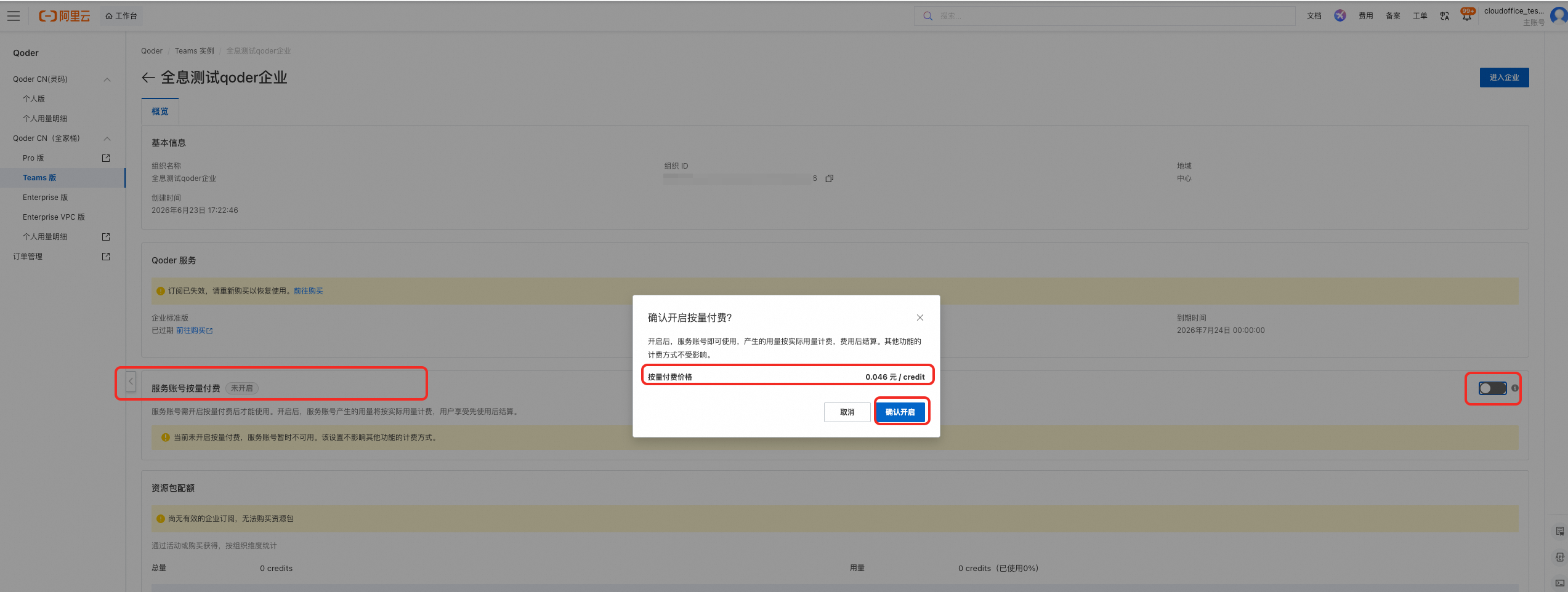
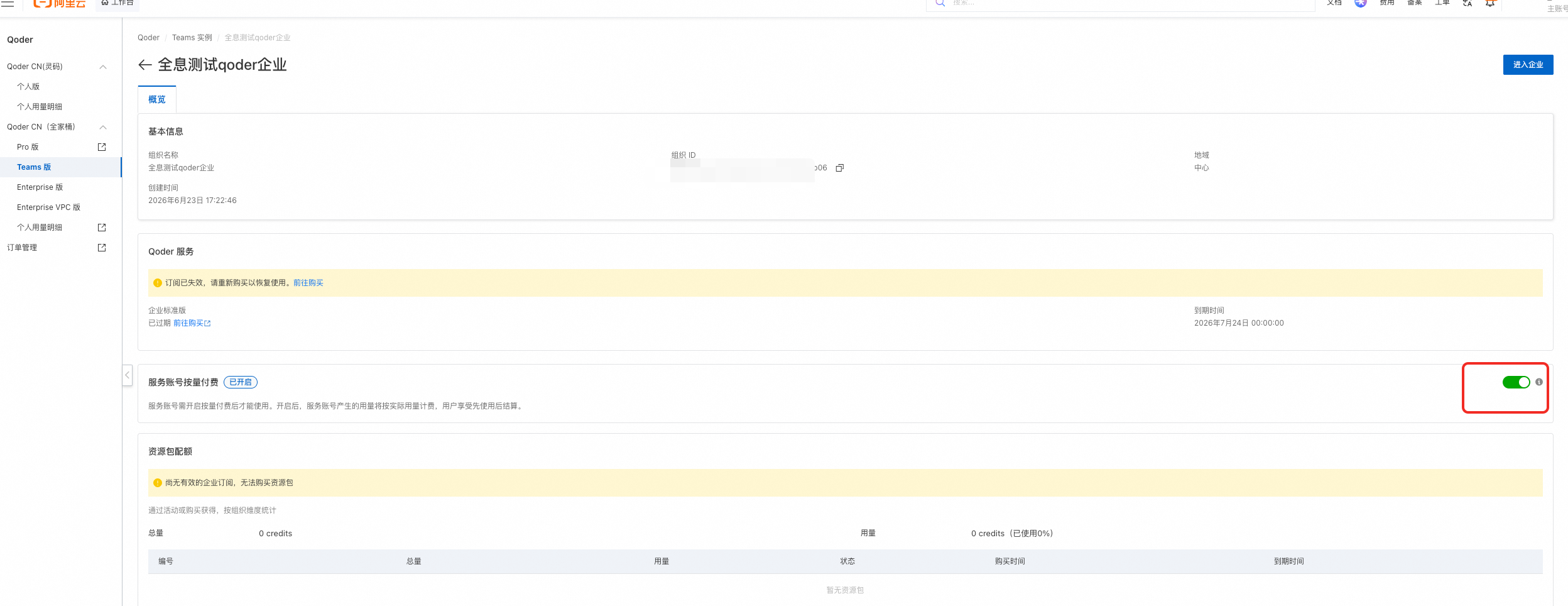
Sign in to the Alibaba Cloud Qoder console with an authorized Alibaba Cloud account. Open the relevant Qoder organization and enable Service Account pay-as-you-go billing.
2
Create a Service Account and credential
In the Qoder management console, go to Members > Service Accounts and create a Service Account. Set a Credits limit if needed, then create a credential (API key). The plaintext credential is displayed only once, so store it securely.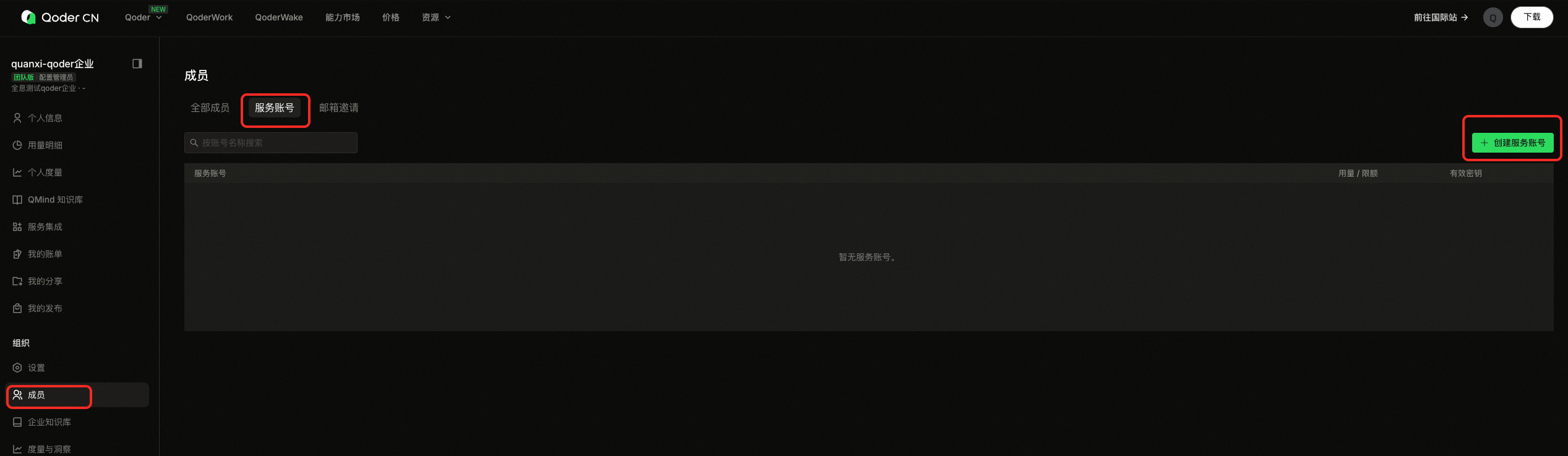
Use an enterprise space
- Sign in to the Qoder Cloud Agents CN console and switch to the relevant enterprise space.
- Open Enterprise credentials and bind the Service Account you created.
- Use the Service Account credential to call the API.
Set a Credits limit for a Service Account
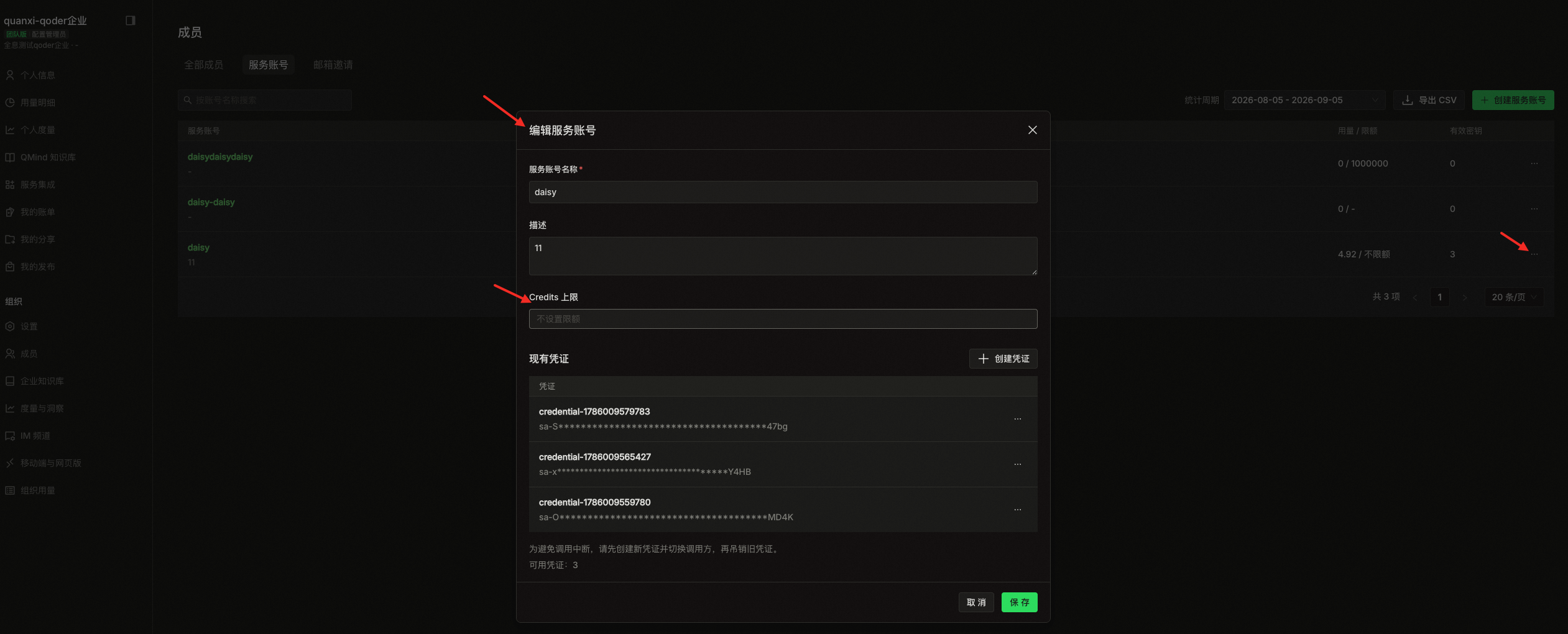
In the Qoder organization management console, go to Members > Service Accounts to set, view, or update the Credits limit for each Service Account.
1
Set a limit when creating a Service Account
Click Create Service Account, enter a value in Credits limit, and finish creating the account.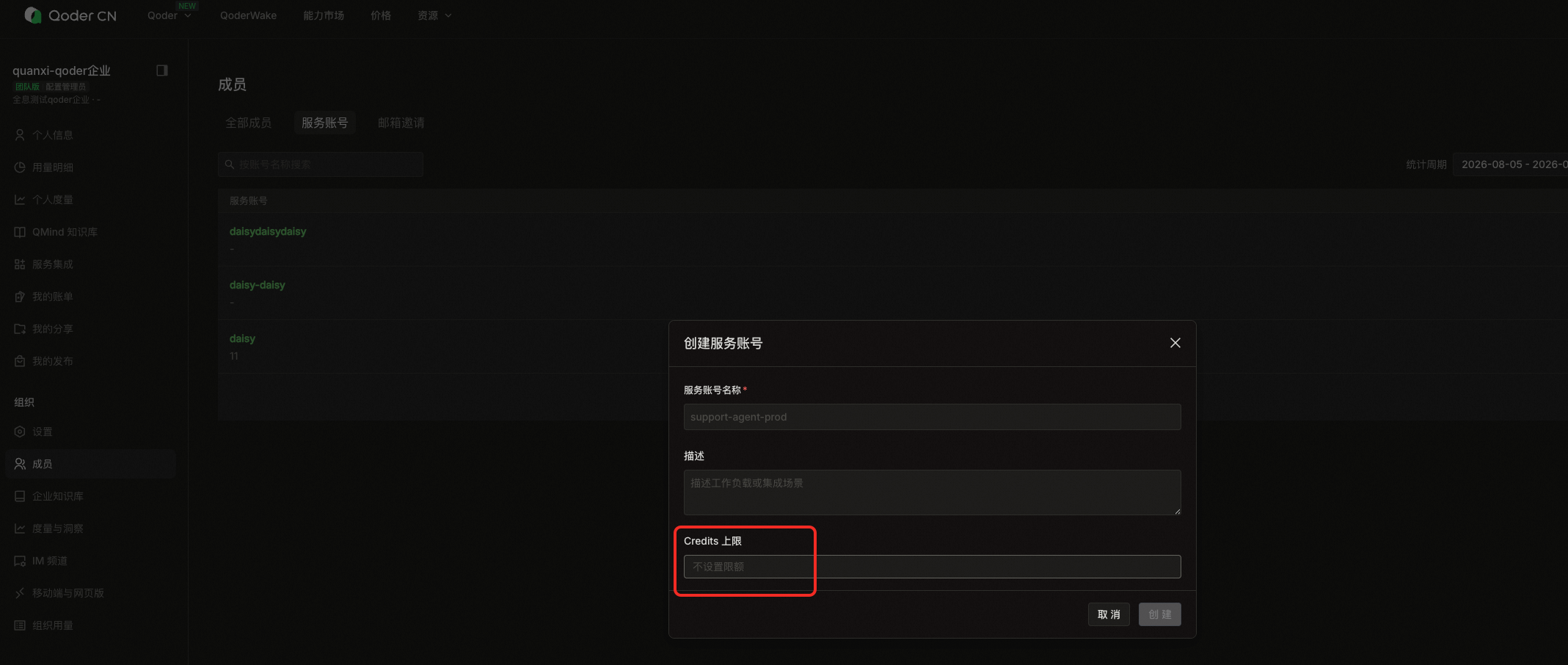
2
View usage and limit
In the Service Account list, check the Usage / Limit column to view the current Credits usage and limit for each account. If no limit is set, the page shows Unlimited.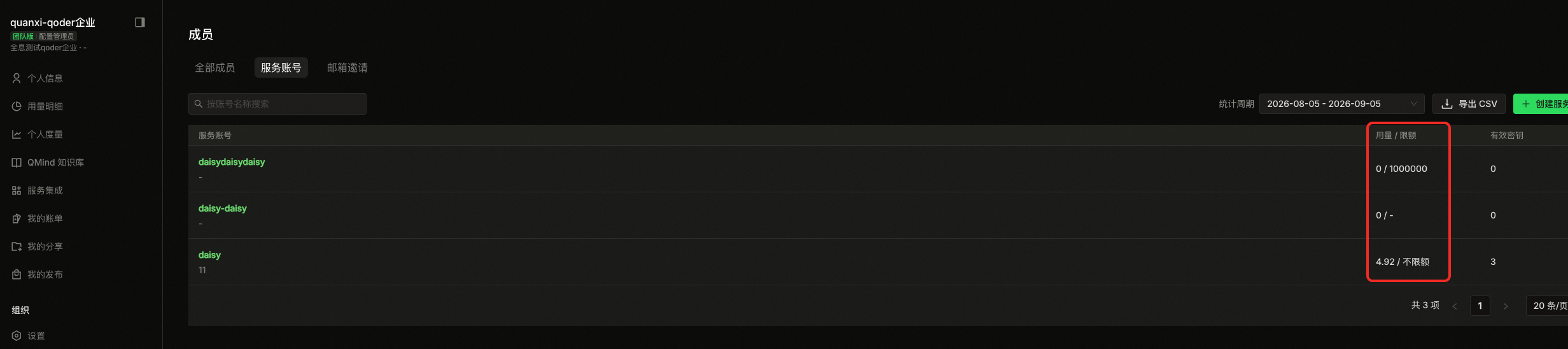
3
Update the limit
Open the ... menu at the end of the Service Account row and select edit. In the Edit Service Account window, update Credits limit, and then click Save.