

Qoder CN IDE offers a rich set of tools covering programming scenarios such as file search, file reading, directory browsing, semantic symbol retrieval, file editing, error checking, and command execution. It can also integrate with Model Context Protocol (MCP) services, allowing developers to configure more extensions to further optimize the coding experience.
In Agent Mode, Qoder CN IDE uses search tools to retrieve information from the following scopes:
In Agent Mode, Qoder CN IDE uses the following tools to modify code files:
In Agent Mode, Qoder CN IDE uses the following tools to write and run commands based on earlier conditions.
In Agent Mode, Qoder CN IDE uses the following tool to find code problems.
In Agent Mode, Qoder CN IDE uses the following tool to update memories according to your requirements:
Whenever AI suggests code modifications—whether through Agent Mode or Inline Chat—the changes are presented in a clear, contextual diff view so you can review them before applying. This gives you full visibility and control over every modification.
The preview displays changes using standard diff notation:
After an Agent completes its task or a conversation turn, the system displays all modifications, providing a comprehensive overview of changes across the entire codebase. Since code changes are applied directly, any unsatisfactory modification can be reverted by clicking Reject.
In the top-right corner of each change block, use Reject to discard that specific change.
At the bottom of the file:
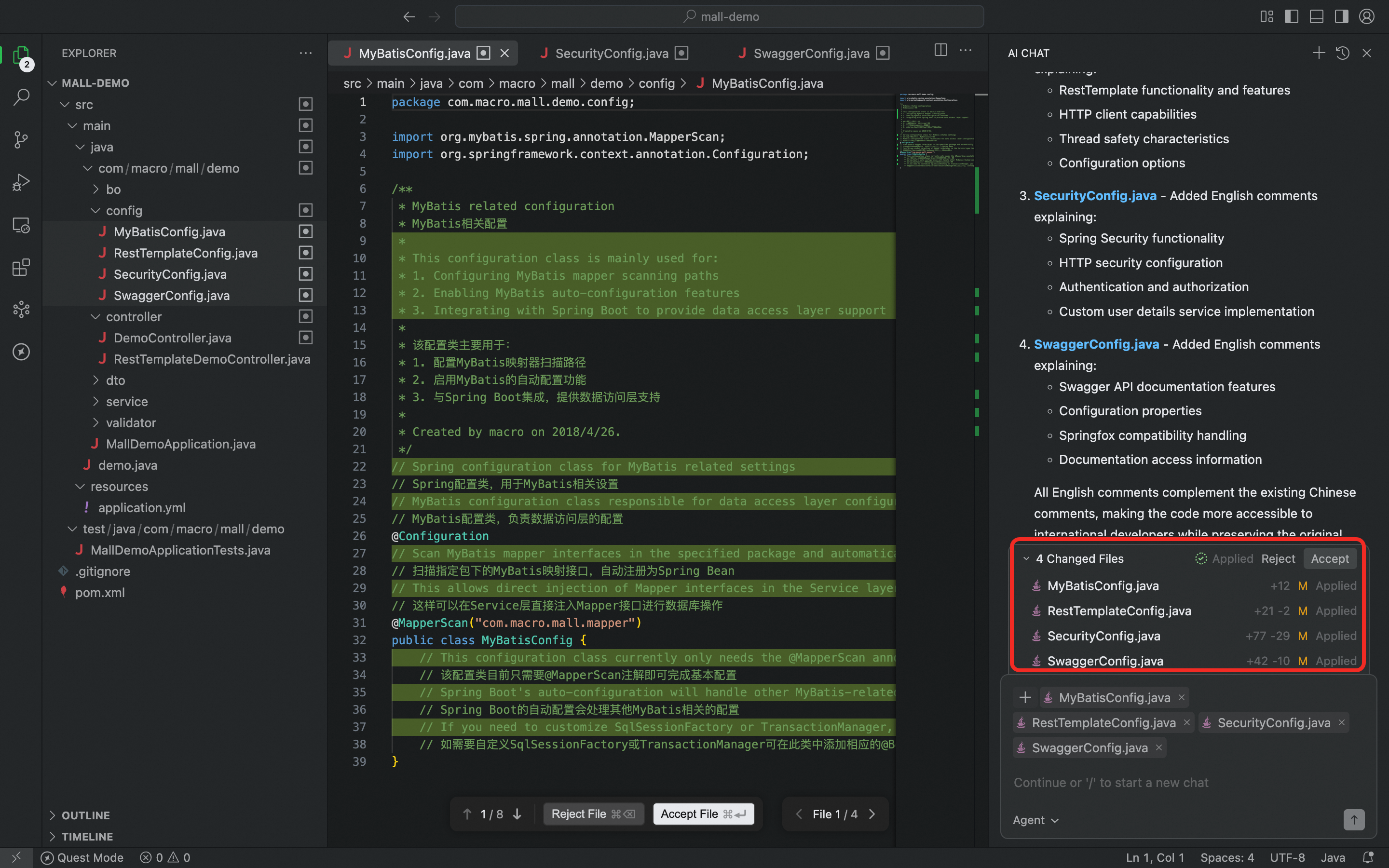
When changes span multiple files, the affected file names appear above the Chat panel. Click Reject All to discard changes across all listed files (a secondary confirmation prompt prevents accidental operations); click a file name to jump to that file with diffs displayed; or hover over a file name to show Reject for that file only.
Type the
The message queue lets you keep typing what to do next while the Agent is running a task. New messages enter a pending list and queue up in order, then run once the current task finishes. You can also trigger Steer on any message in the queue at any time to add direction or adjust requirements while the task is running.
While an Agent task is running, type into the input box and press Enter — the message appears as a new entry at the top of the pending list. When the current task finishes, the Agent automatically processes the queued messages in order, and the queue area collapses once the list is empty.
How the queue executes differs by mode:
Click the Steer button on a message in the queue to hand that content to the Agent immediately, letting it take on new direction or adjusted requirements mid-execution and reducing the cost of interruptions and restarts.
Once Steer is triggered, the model decides how to weave the input in based on the current task progress.
Hover over a message entry in the pending list to reveal its actions:
Search
In Agent Mode, Qoder CN IDE uses search tools to retrieve information from the following scopes:
| Scope | Description |
|---|---|
| Codebase | A code search tool for codebase exploration |
| Files | Searches for files within the project. |
| Code | Searches for specific code snippets within the project. |
| Directory | Views the project directory structure. |
| Web | Performs a free web search without requiring API keys. |
| Web content | Retrieves content from web pages. |
Edit
In Agent Mode, Qoder CN IDE uses the following tools to modify code files:
| Function | Description |
|---|---|
| Modify files | Modifies specific code files. |
| View files | Displays the content of code files. |
Execute commands
In Agent Mode, Qoder CN IDE uses the following tools to write and run commands based on earlier conditions.
| Function | Description |
|---|---|
| Run a command | Executes commands in the terminal. |
| Get terminal output | Retrieves the output from previously run commands. |
Find problems
In Agent Mode, Qoder CN IDE uses the following tool to find code problems.
| Function | Description |
|---|---|
| Get code problems | Finds code issues within the project (in the Problem window). |
Update memories
In Agent Mode, Qoder CN IDE uses the following tool to update memories according to your requirements:
| Function | Description |
|---|---|
| Update memories | Updates persistent memory based on user input. |
Diff view
Whenever AI suggests code modifications—whether through Agent Mode or Inline Chat—the changes are presented in a clear, contextual diff view so you can review them before applying. This gives you full visibility and control over every modification.
Diff preview format
The preview displays changes using standard diff notation:
- Added lines are shown in green
- Removed lines are shown in red
- Unchanged surrounding code is displayed in a neutral tone, preserving context and helping you understand the scope of the change
Review mode
After an Agent completes its task or a conversation turn, the system displays all modifications, providing a comprehensive overview of changes across the entire codebase. Since code changes are applied directly, any unsatisfactory modification can be reverted by clicking Reject.
Per-change controls
In the top-right corner of each change block, use Reject to discard that specific change.
File-level controls
At the bottom of the file:
- Reject to discard all suggested modifications in the current file
- Navigate between files that have pending changes
Handle multiple-file changes
When changes span multiple files, the affected file names appear above the Chat panel. Click Reject All to discard changes across all listed files (a secondary confirmation prompt prevents accidental operations); click a file name to jump to that file with diffs displayed; or hover over a file name to show Reject for that file only.
Image generation
Type the /gen-image command in chat to generate images from a natural-language description; the Agent creates the image and returns a preview inline.
Generated images support:
- Add to Chat — add the image back into the conversation as context so the Agent can answer or produce follow-ups based on it.
- Download — save the image locally to plug straight into your design or authoring workflow.
- Copy image — copy the image to the clipboard for pasting elsewhere.
Message queue
The message queue lets you keep typing what to do next while the Agent is running a task. New messages enter a pending list and queue up in order, then run once the current task finishes. You can also trigger Steer on any message in the queue at any time to add direction or adjust requirements while the task is running.
Queuing and execution
While an Agent task is running, type into the input box and press Enter — the message appears as a new entry at the top of the pending list. When the current task finishes, the Agent automatically processes the queued messages in order, and the queue area collapses once the list is empty.
How the queue executes differs by mode:
- Ask and Agent modes: queued messages wait for the current turn to end by default, then run automatically in order. You can click the Steer button on any queued message at any time to have the Agent step in immediately.
- Experts mode: the Agent proactively decides when to batch-fetch and take over queued messages — no manual steering needed.
Steer
Click the Steer button on a message in the queue to hand that content to the Agent immediately, letting it take on new direction or adjusted requirements mid-execution and reducing the cost of interruptions and restarts.
Once Steer is triggered, the model decides how to weave the input in based on the current task progress.
Other queue actions
Hover over a message entry in the pending list to reveal its actions:
- Drag to reorder: adjust message order with the handle on the left; the new order takes effect immediately.
- Edit: the message content is loaded back into the input box; after editing, press Enter to update the entry in place, keeping its position.
- Delete: removes the message from the queue; the order of the remaining messages is unchanged.