

Use four independent Wakers to run a GitHub delivery loop from implementation and review through testing and release.
This practice uses an open-source demo to show how QoderWake responds to GitHub events. Release, Developer, Reviewer, and Tester Wakers collaborate on one delivery while GitHub stores requirements, code, and quality evidence. People continue to approve code merges and the production release.
Use the demo for product evaluation, solution validation, or team demonstrations. Before applying the design to a real project, adapt it to your branch strategy, quality gates, and access-control policy.
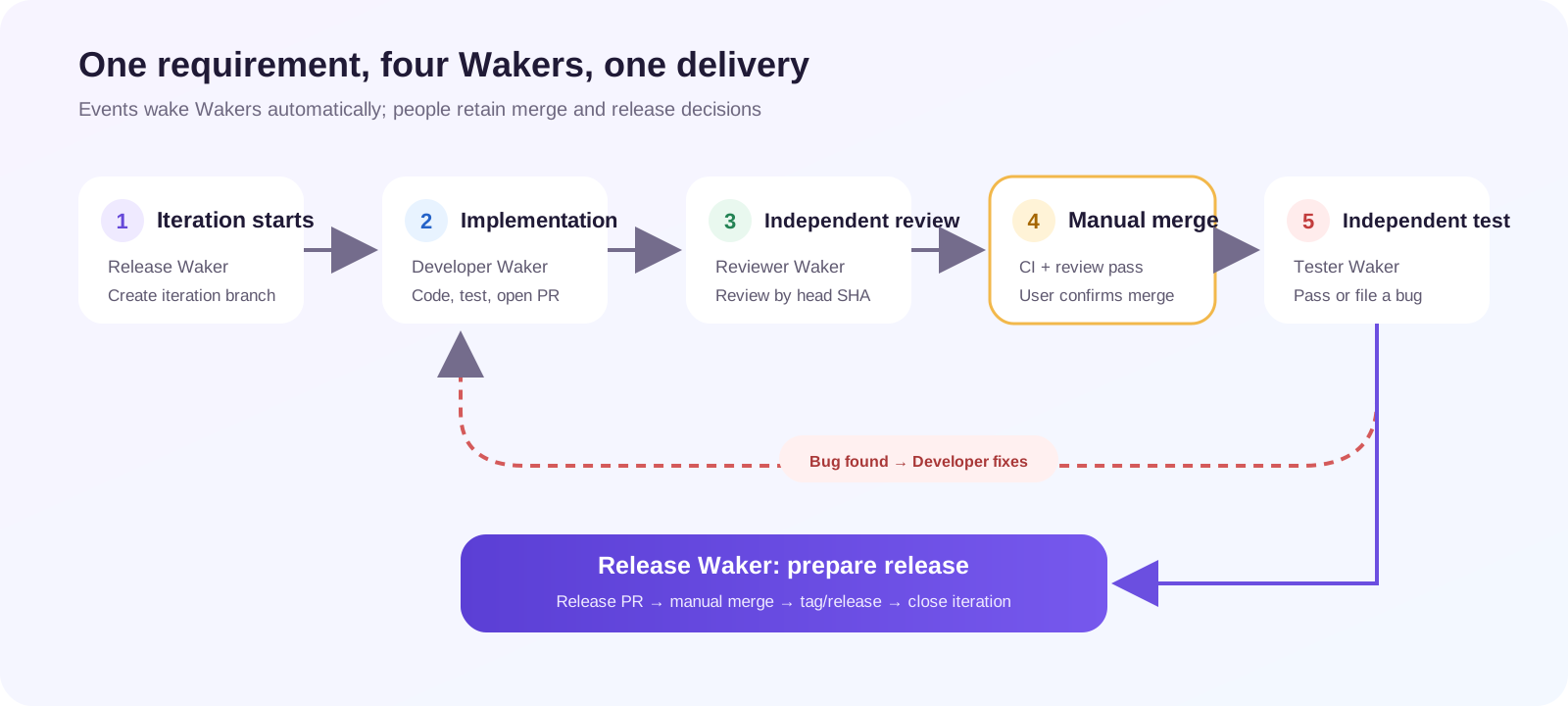
When testing finds a bug, the flow returns to Developer and repeats implementation, review, manual merge, and testing. Release preparation starts only after testing passes.
Before running the demo, prepare:
Windows:
The source package runs directly: do not compile it or run
Follow the terminal wizard:
For the first run, select the option that finds one bug. It verifies that a failed test returns to development correctly.
The terminal shows the current stage, active Waker, live session link, and next manual action. If the flow pauses unexpectedly, read the terminal prompt first, then open the corresponding QoderWake session and GitHub object to compare the recorded facts.
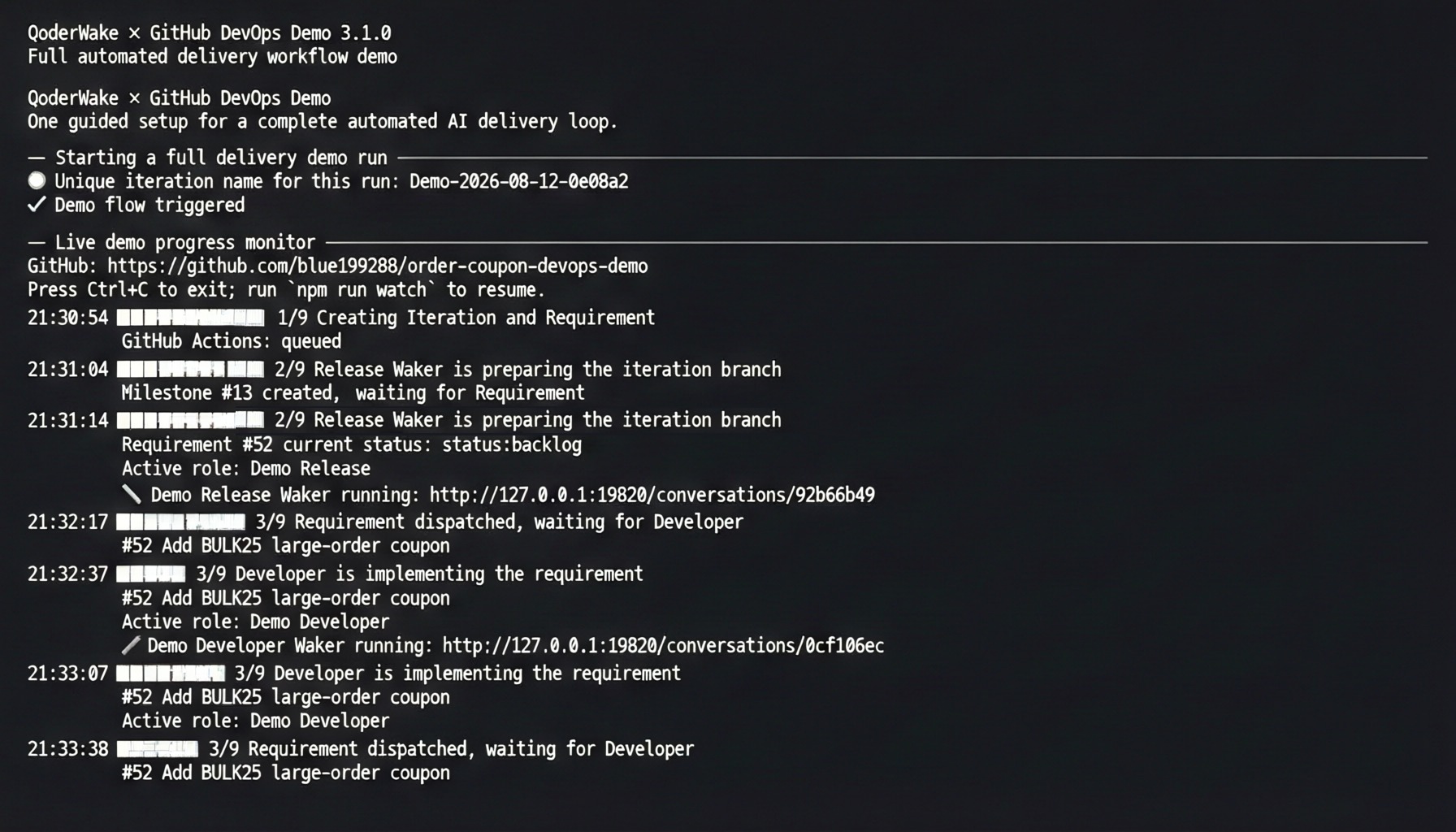
After Release Waker creates the iteration branch, the requirement enters the development flow. The terminal moves to the Developer stage and shows a live session link.
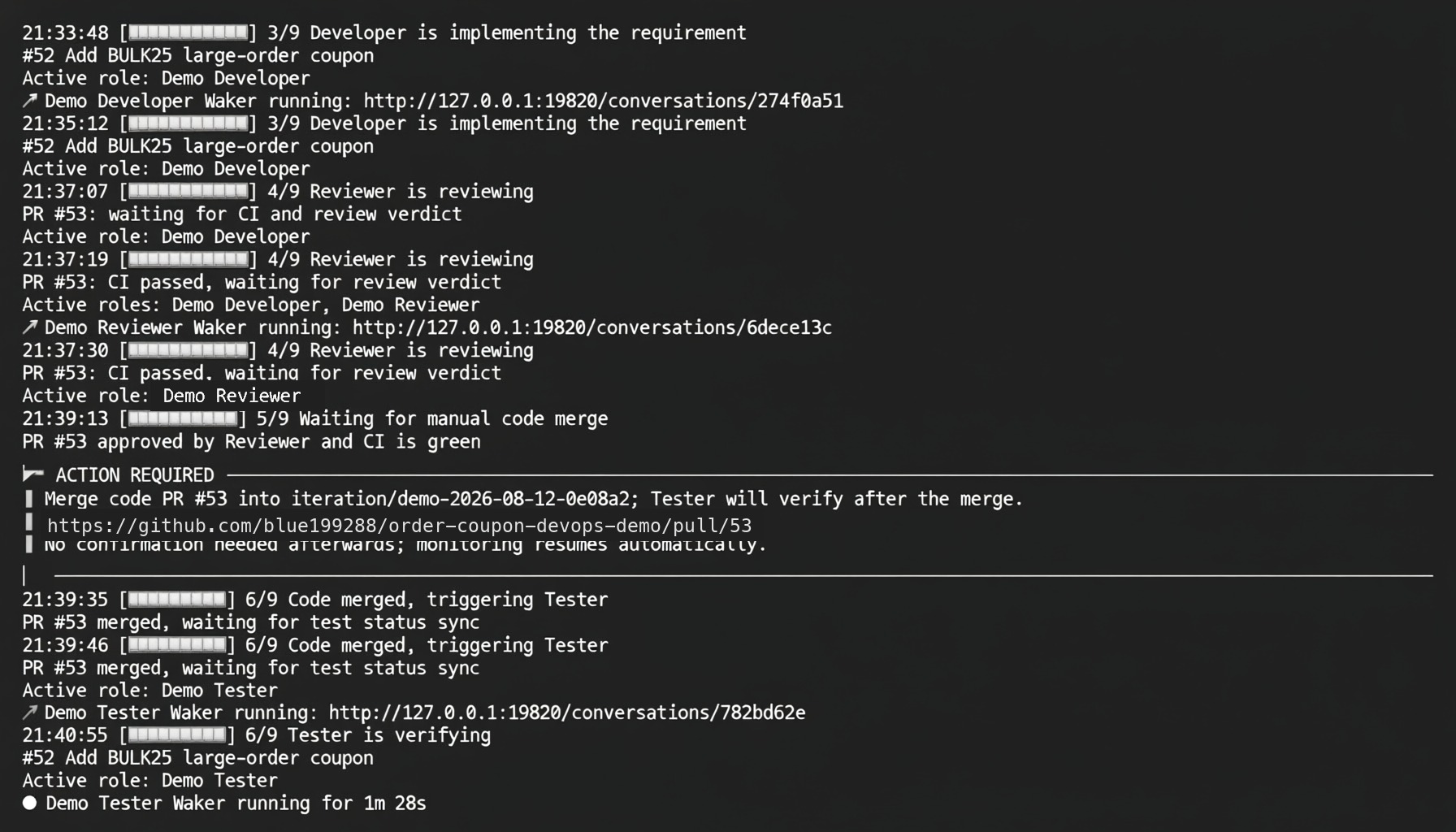
After Developer opens the code PR, Reviewer evaluates only the current code revision. When Reviewer and CI both pass, the terminal stops at the manual merge gate and waits for the user to decide whether to merge the code PR.
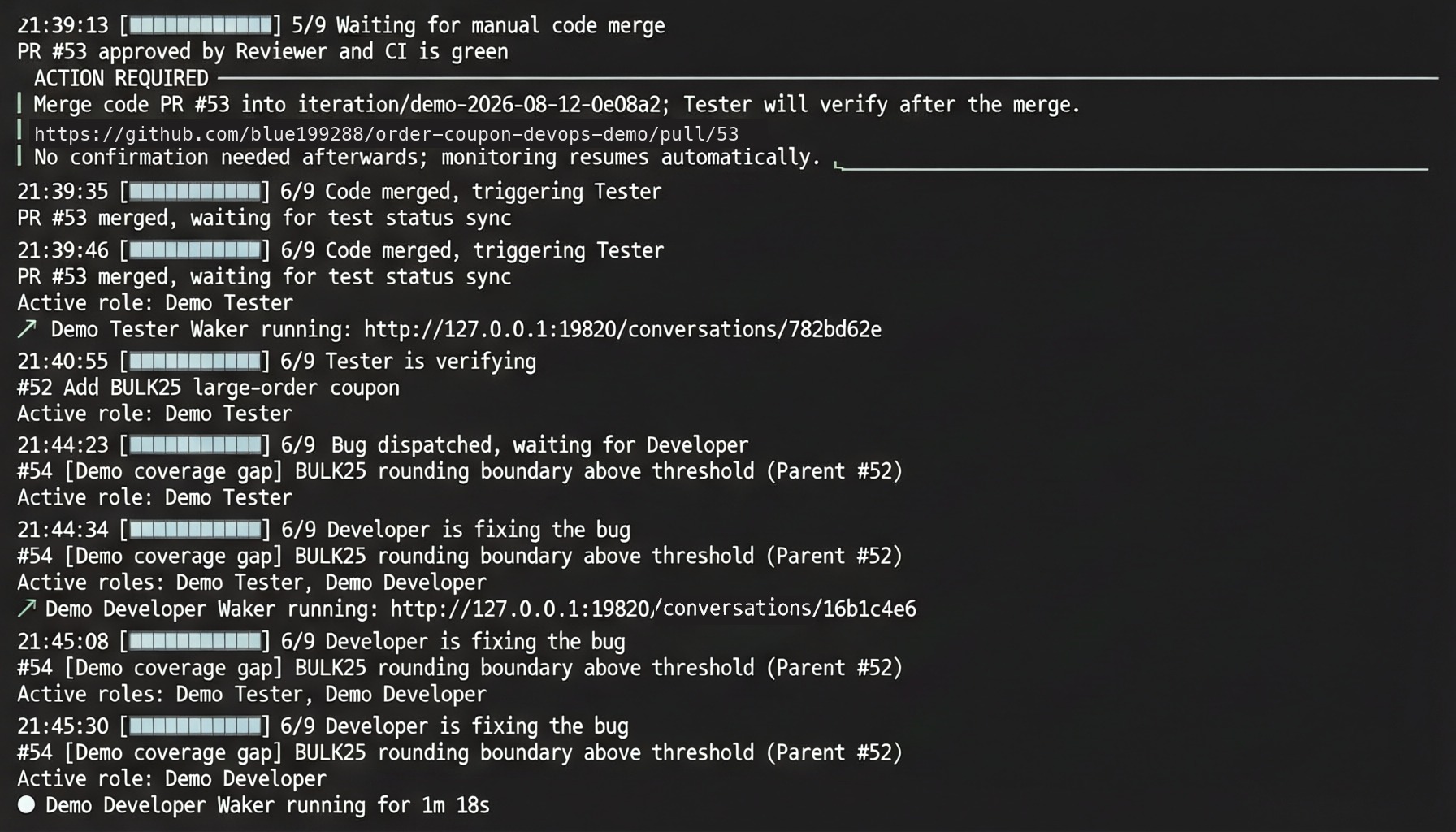
After the code enters the iteration branch, Tester runs independent acceptance tests. When a test fails, Tester creates a bug with reproduction evidence and returns the task to Developer.
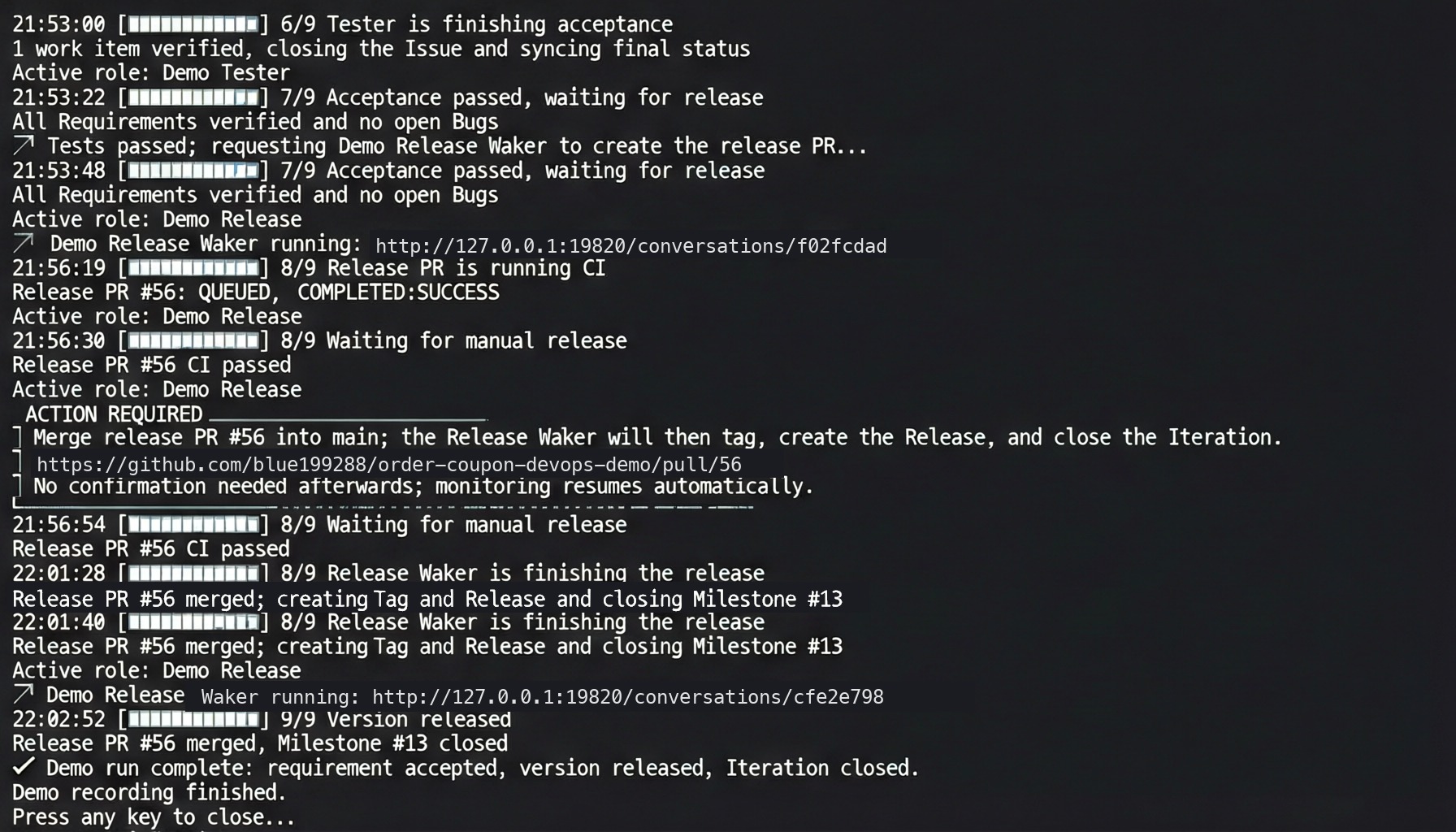
After retesting passes, Release Waker opens the release PR. Once the user merges it, Release Waker creates the tag and GitHub Release and closes the milestone.
At the end of a complete run, verify that:
Do not copy the demo's permissions and trigger filters directly into production. Replace the event adapter and fact-reading tools with the corresponding components in your delivery platform:
Preserve these controls after migration:
Understand the Delivery Flow
GitHub events wake the responsible Waker; both the code PR and release PR retain a manual merge gate.
| Waker | Responsibilities | Must not do |
|---|---|---|
| Release | Create the iteration branch, prepare the release PR, create the tag and GitHub Release, and close the milestone | Modify product code or merge a PR for the user |
| Developer | Read the requirement and acceptance criteria, implement and test the change, and create or update the code PR | Approve its own code review |
| Reviewer | Read the diff for the current head SHA, check CI, run an independent test, and write the review result back | Modify code or merge the PR |
| Tester | Run independent acceptance tests after the code enters the iteration branch; create a bug with reproduction evidence when a test fails | Skip a failure or report a false pass |
Prepare the Environment
Before running the demo, prepare:
- Node.js 20 or later, Git, and GitHub CLI.
- A running QoderWake instance that is already signed in.
- A QoderWake account that can create Wakers and Autonomous Work.
- A GitHub account that can manage the target repository, GitHub Actions, and Actions Secrets.
- A Personal Access Token (PAT) for invoking API-triggered Autonomous Work. See Configure an API trigger for token creation and storage guidance.
Download and Start the Demo
- Open the QoderWake × GitHub DevOps Demo repository and download the latest source package from Releases.
- Select the Windows Source package for Windows or the macOS/Linux Source package for macOS or Linux, then extract it locally.
- Confirm that QoderWake is running and signed in.
- Run the command for your operating system from the extracted directory.
npm install. If the operating system blocks the script, check file permissions and the terminal security prompt instead of disabling system security controls.
Complete First-Run Configuration
Follow the terminal wizard:
- Sign in to GitHub and verify the current account and target repository.
- Select or create a local working directory. If the directory does not exist, the launcher creates it and clones the demo repository.
- Enter the QoderWake PAT in the masked input. Never paste the token into repository files, Waker instructions, or ordinary terminal logs.
- Create or reuse the Release, Developer, Reviewer, and Tester Wakers when prompted.
- Confirm that four API-triggered Autonomous Work items and their invocation URLs have been created.
- Allow the launcher to store the PAT and four Waker invocation URLs in GitHub Actions Secrets.
- Confirm that the demo workflows, event router, CI, and status labels are ready.
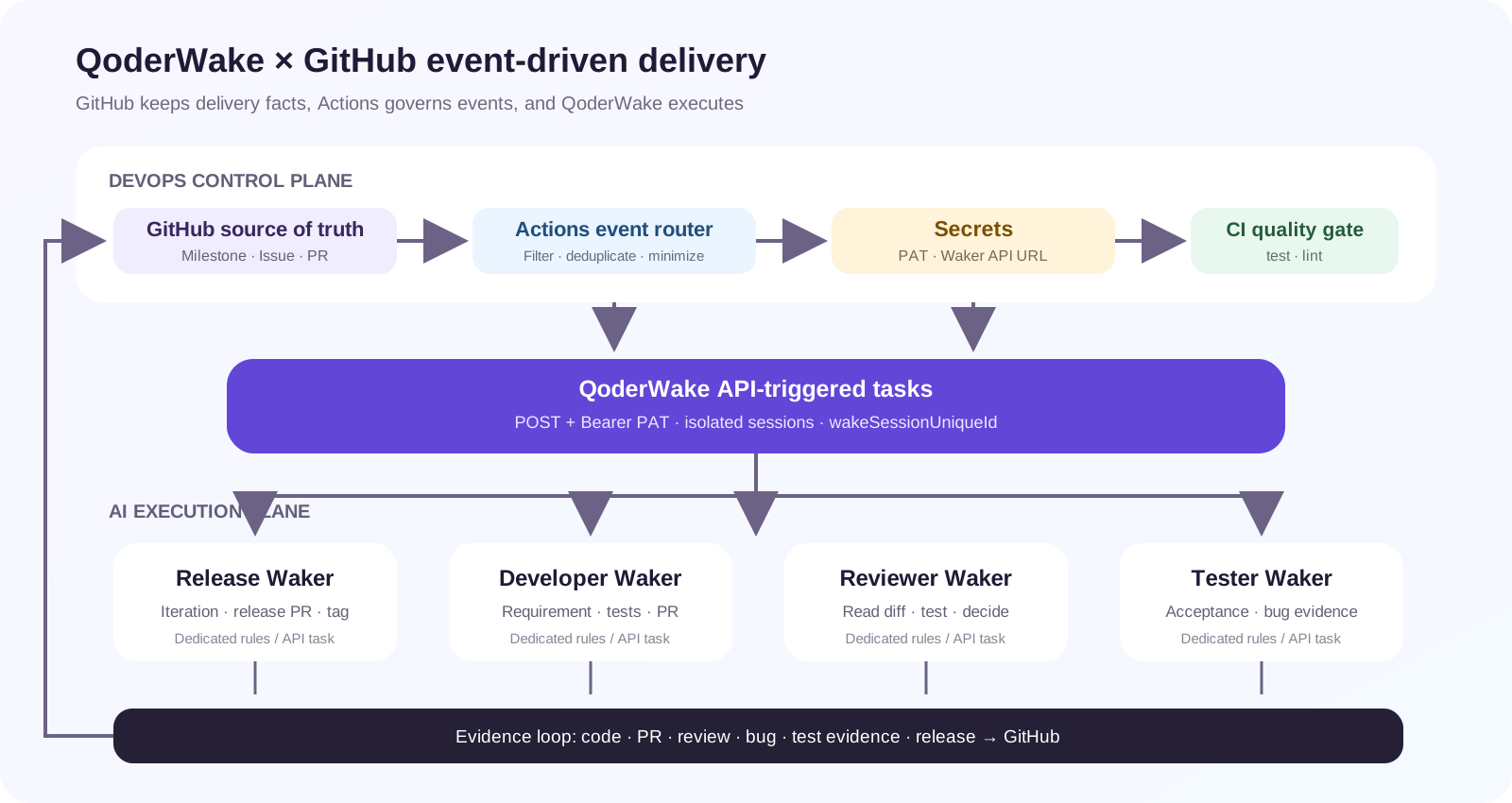
GitHub Actions filters and forwards events; four API-triggered Autonomous Work items wake Wakers with separate responsibilities.
Run the Complete Delivery Flow
For the first run, select the option that finds one bug. It verifies that a failed test returns to development correctly.
| Stage | What the system does | What the user confirms |
|---|---|---|
| Start iteration | Release Waker creates the milestone, iteration branch, and requirement | Check the requirement and acceptance criteria |
| Implement | Developer Waker creates a branch, changes and tests the code, and opens a code PR | Review the requirement link and test evidence in the PR |
| Review | Reviewer Waker independently reviews the current revision while GitHub Actions runs CI | Merge the code PR only after Reviewer passes and CI succeeds |
| Test and fix | Tester Waker runs acceptance tests; a failure creates a bug and wakes Developer | Check the bug's reproduction steps, expected result, and actual result |
| Release | Release Waker collects requirement, bug, PR, and CI evidence and opens a release PR | Review and merge the release PR |
| Finish | Release Waker creates the tag and GitHub Release and closes the milestone | Verify the version, release contents, and milestone state |
Check the Key Stages
Developer Receives the Requirement
After Release Waker creates the iteration branch, the requirement enters the development flow. The terminal moves to the Developer stage and shows a live session link.
The terminal shows Developer implementing the requirement and provides the live session link.
Reviewer and CI Pass Before Manual Merge
After Developer opens the code PR, Reviewer evaluates only the current code revision. When Reviewer and CI both pass, the terminal stops at the manual merge gate and waits for the user to decide whether to merge the code PR.
The terminal identifies the code PR that requires a manual merge; Tester starts only after the merge.
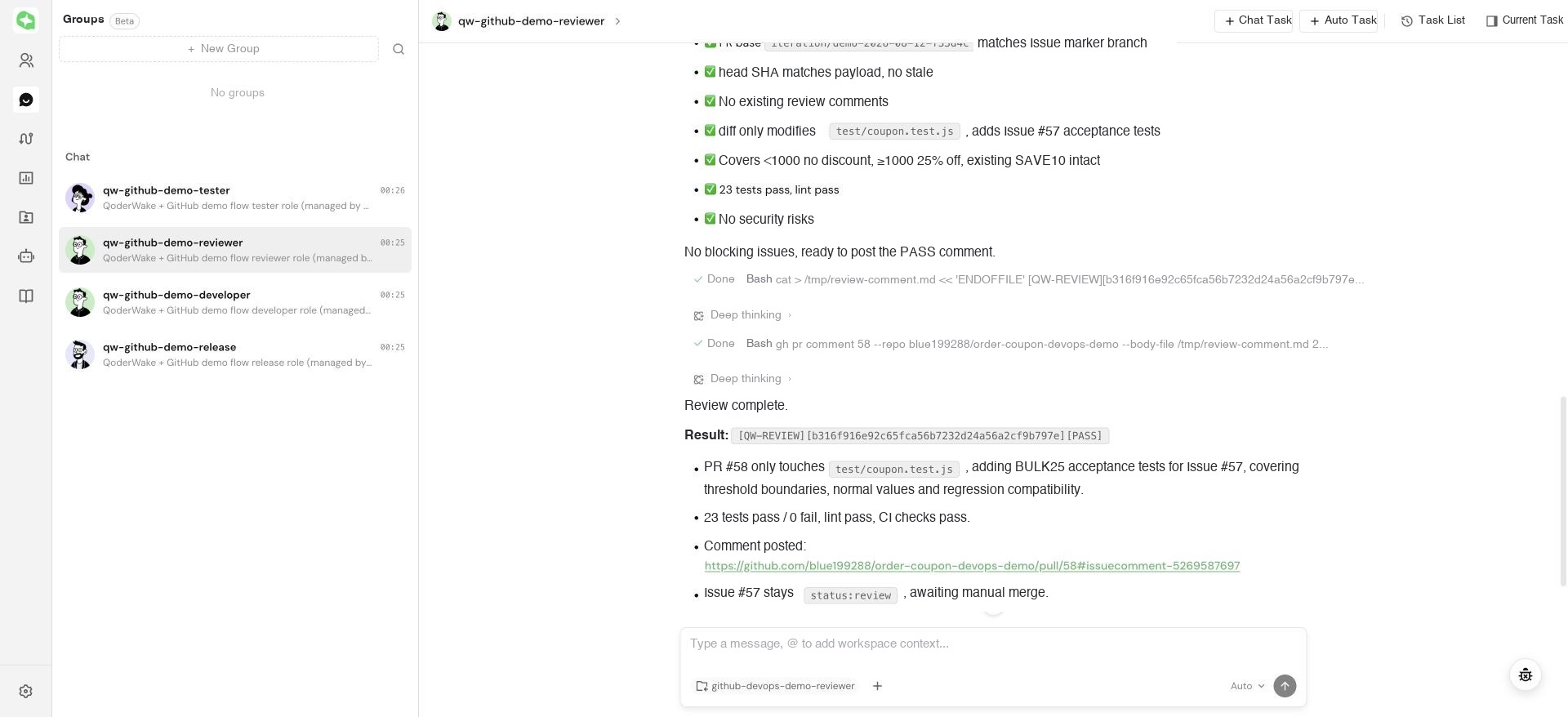
Open the live session and confirm that Reviewer reads the PR, linked requirement, target branch, and head SHA, then runs an independent test.
The Reviewer session retains the test process, review decision, and GitHub write-back result.
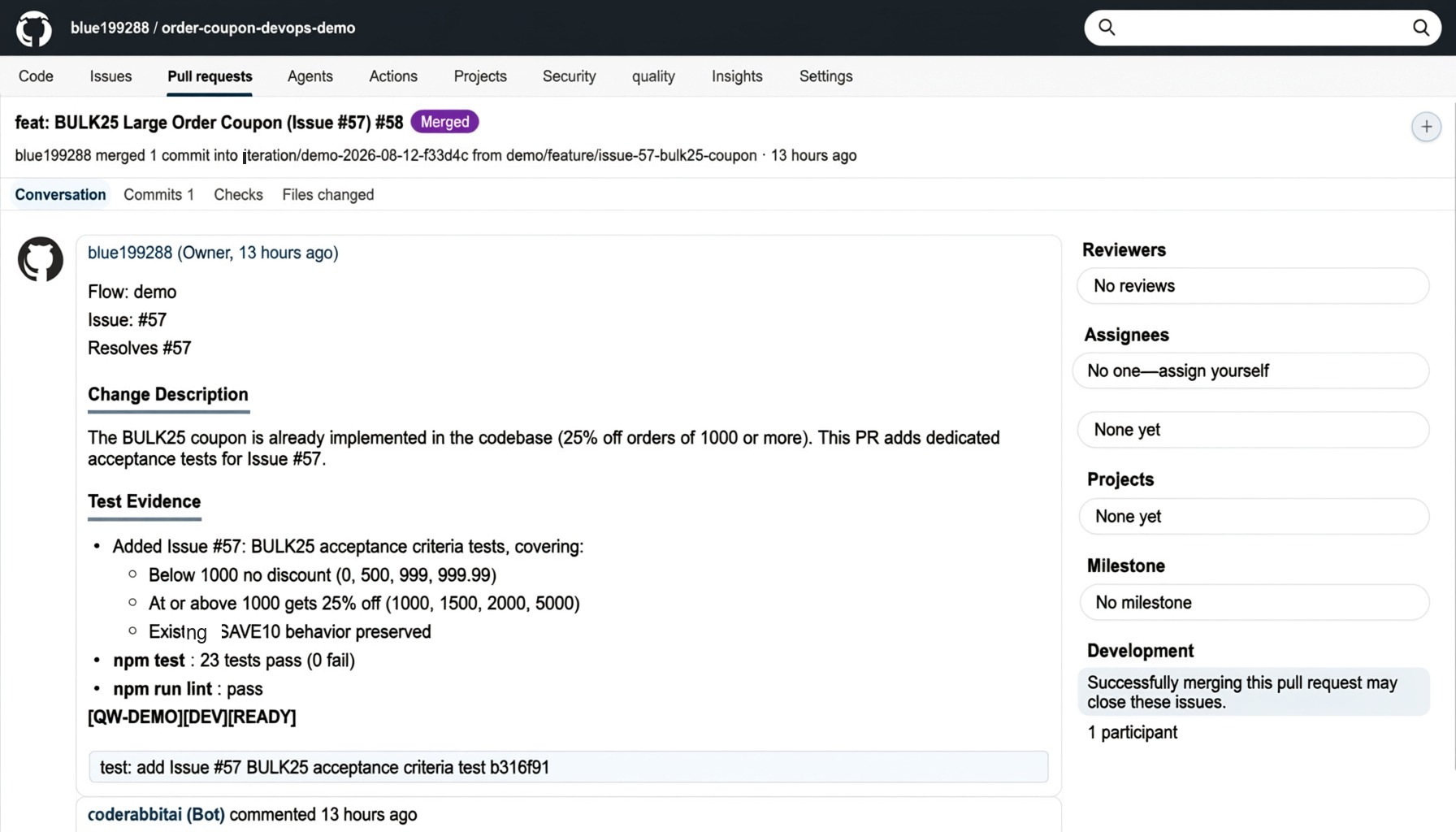
The GitHub PR should retain the requirement link, branches, change description, and test evidence. Do not treat a “completed” QoderWake session as sufficient delivery evidence on its own.
The code PR is the fact page for the change, and the user still decides whether to merge it.
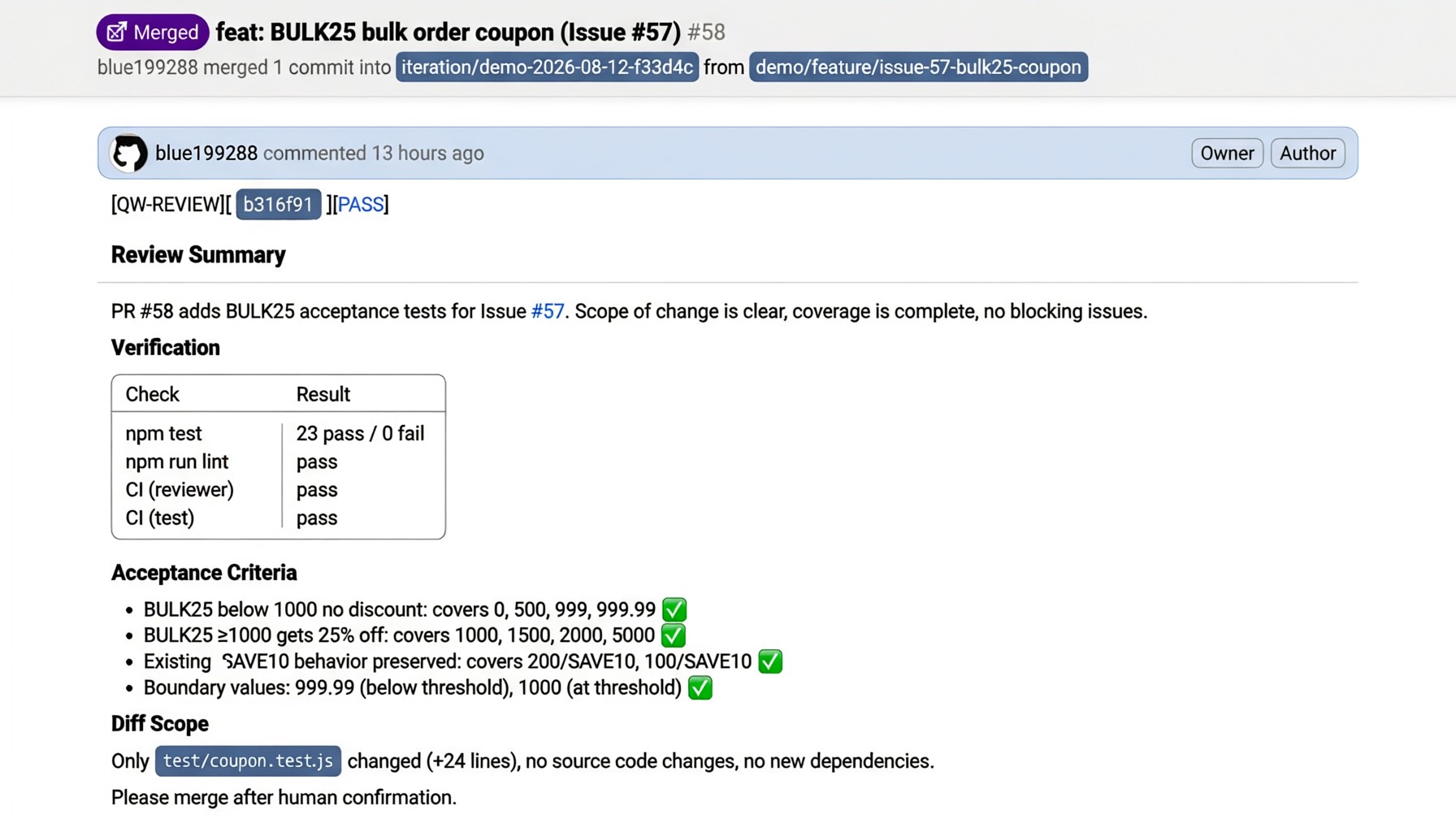
Reviewer should write a revision-specific Review Summary back to the PR, covering tests, lint, CI, acceptance criteria, and diff scope.
The review result identifies a specific revision; a code update requires a new review.
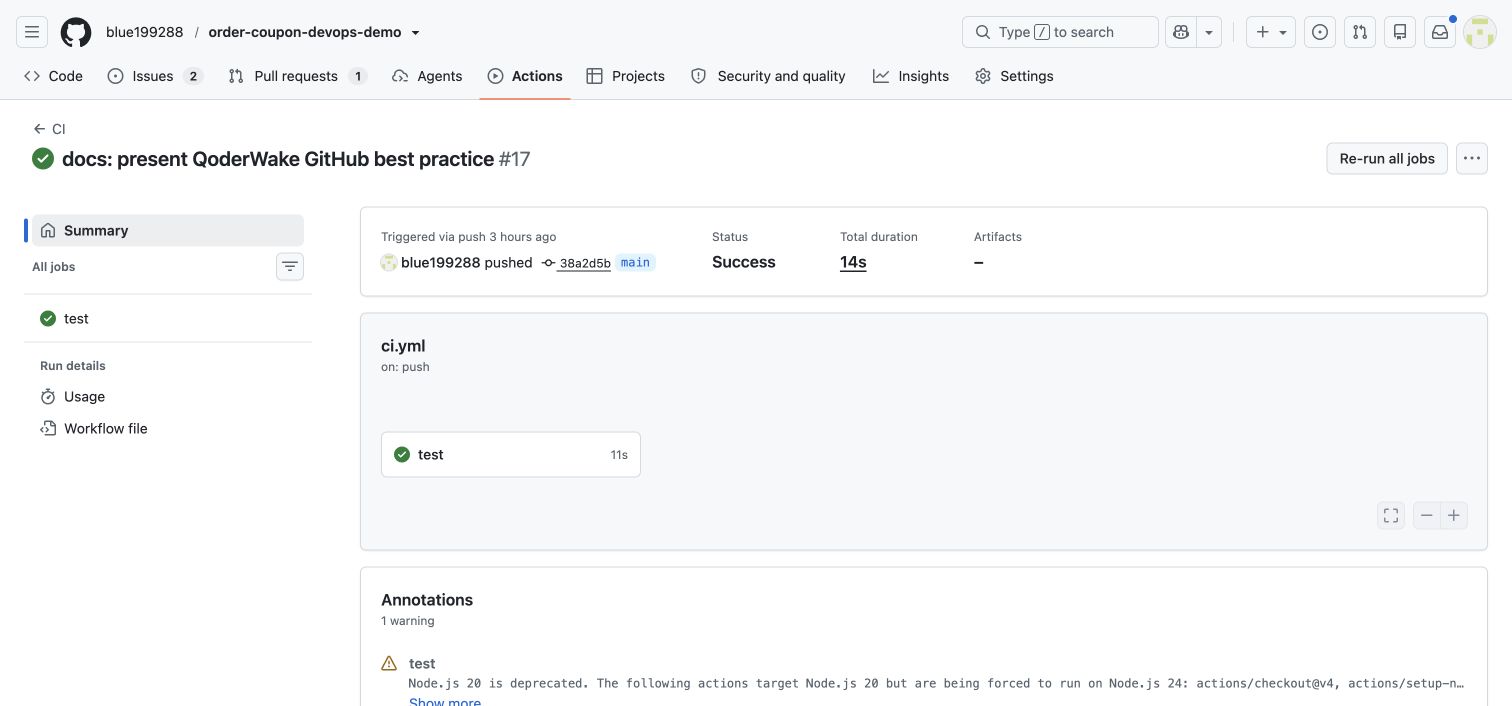
Also verify that the GitHub Actions CI job succeeds. A Reviewer pass does not replace independent CI; both results must pass before the merge gate.
GitHub Actions provides the independent test gate.
Tester Creates a Bug and Returns It to Developer
After the code enters the iteration branch, Tester runs independent acceptance tests. When a test fails, Tester creates a bug with reproduction evidence and returns the task to Developer.
The bug re-enters implementation, review, manual merge, and retesting.
Release Completes Publication and Closes the Iteration
After retesting passes, Release Waker opens the release PR. Once the user merges it, Release Waker creates the tag and GitHub Release and closes the milestone.
The terminal reaches 9/9 and confirms that the release is published and the iteration is closed.
Verify the Result
At the end of a complete run, verify that:
- GitHub contains a separate milestone, requirement, code PR, test record, and release PR for this run.
- The Reviewer result identifies the current PR head SHA instead of an older revision.
- The flow reaches the manual merge gate only after CI and Reviewer both pass.
- In the bug path, the bug contains reproduction evidence and re-enters implementation, review, and retesting.
- The correct tag and GitHub Release exist and the milestone is closed.
- The four QoderWake runs map to the relevant GitHub objects, with no credential in sessions, screenshots, or logs.
npm run watch in the source-package directory to resume progress monitoring. If the local checkout has been deleted, restarting the launcher attempts to restore it from the remote repository. Fix repository or access problems first if the remote repository does not exist or the current account cannot access it.
Adapt the Design to a Real Delivery System
Do not copy the demo's permissions and trigger filters directly into production. Replace the event adapter and fact-reading tools with the corresponding components in your delivery platform:
| GitHub capability in the demo | Equivalent in another system |
|---|---|
| Issue / Milestone | Requirement, defect, and iteration management |
| Pull Request event | GitLab Merge Request, Codeup code review, or equivalent event |
| GitHub Actions router | Enterprise CI, event bus, or automation pipeline |
| GitHub CLI | The platform's official CLI or OpenAPI |
| Actions Secrets | Enterprise credential vault or secrets manager |
- Give each Waker one clear responsibility; keep implementation, review, testing, and release independent.
- Trigger only on meaningful business events and filter comments, refreshes, and unrelated state changes.
- Re-read requirements, code, CI, and current state on every run instead of trusting a previous session.
- Use unique event identifiers and business markers to prevent duplicate work and make repeated deliveries safe to ignore.
- Write code, review, bug, test, and release results back to the delivery system; use chat only to observe execution.
- Store credentials only in protected secrets, and retain human approval for production merges and releases.