

Configure a Group Chat Q&A Specialist and improve support quality through knowledge, expert assistance, and ongoing operation.
This section explains how to configure a Group Chat Q&A Specialist for customer support. Qmate, described later in this section, is an Alibaba-internal implementation of this role for Qoder support. It is an example rather than a separate product feature.
Scenario objectives and processing principles
Customer support groups contain both routine questions and new, exceptional, or ambiguous issues that require human judgment. The goal is therefore not to answer every question automatically. Configure a complete handling loop:
- Answer directly in the group when the knowledge base provides reliable evidence.
- If evidence is missing, conflicting, or outside the defined scope, state that the answer cannot yet be confirmed and request help from the appropriate expert.
- Return the expert-confirmed answer to the original group chat.
- Add reusable, confirmed answers to the knowledge base so similar questions can be answered directly next time.
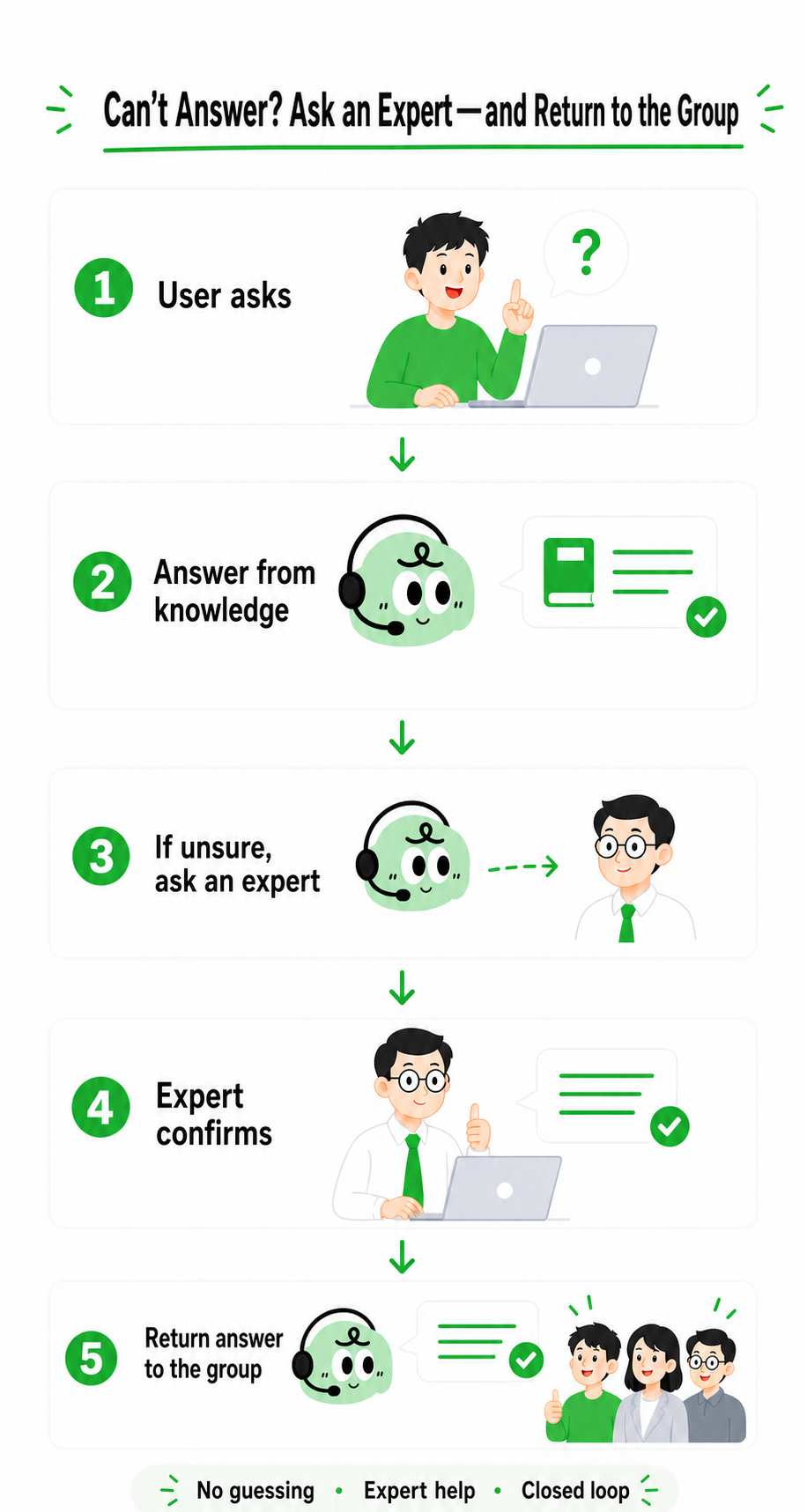
Support workflow: answer when evidence is sufficient, otherwise consult an expert and return the confirmed result to the original group.
Customer service Q&A scenario configuration
| Item | Recommended configuration | Key points |
|---|---|---|
| Role and scope | Create a Waker from the Group Chat Q&A Specialist template and give it a name that matches the support scenario. | Define its audience, supported topics, and escalation boundaries in the introduction, basic settings, and response settings. Never present a guess as a confirmed fact. |
| Bot and group chats | Configure an IM bot, connect a test group first, and add production support groups gradually. | Use pairing to control access. For each new group, verify message receipt, replies, and Q&A record links. |
| Knowledge base | Bind product documentation, FAQs, release notes, support procedures, and confirmed answers. | Retain only current material. Separate content for different products, versions, teams, or customers when their guidance differs. |
| Experts | Assign product, technical, service, or business experts by question category. | Expert labels should map directly to question types; avoid vague labels such as “general expert.” |
| Response style | Use concise, natural language appropriate for a group chat. | Give the conclusion first, then only the necessary evidence or steps. If the answer cannot be confirmed, explain why and what happens next. |
| Q&A records | Review unanswered questions, failures, expert escalations, and low-quality answers. | Use findings to improve knowledge, expert labels, response boundaries, and group access. |
- Known question: The specialist answers from the bound knowledge base.
- Unknown question: The specialist does not invent an answer and can start expert assistance.
- Out-of-scope question: The specialist clearly states the boundary and does not reuse unrelated guidance.
Example: Qmate
Qmate is an Alibaba-internal Group Chat Q&A Specialist used in Qoder product support groups. The example shows one implementation of this workflow; other teams should adapt the name, knowledge, and expert setup to their own needs.
| Item | Qmate configuration |
|---|---|
| Service scope | Covers Qoder installation, accounts, features, versions, and common usage issues. Issues outside this scope are not answered as confirmed facts. |
| Group rollout | Validate in a test group, then connect Qoder product support groups in stages. |
| Knowledge | Uses Qoder documentation, FAQs, release notes, known issues, and expert-confirmed Q&A. |
| Experts | Uses labels such as Installation and Environment, Accounts and Permissions, Product Features, and Versions and Compatibility. |
| Response style | Answers directly when evidence is sufficient; otherwise explains the uncertainty and asks an expert for help. |
| Ongoing maintenance | Samples Q&A records, adds reusable expert-confirmed answers, and removes or corrects outdated content. |
Separate standard knowledge from organization-specific knowledge
There are often two types of knowledge coexisting in customer service Q&A:
| Knowledge type | Examples | Maintenance guidance |
|---|---|---|
| Standard product knowledge | Supported features, installation instructions, and version-specific capabilities | Maintain centrally with the product documentation and update it with each release. |
| Organization- or customer-specific knowledge | Local processes, owners, approval rules, and customer agreements | Have the relevant business expert confirm it, and keep content for different teams or customers separate. |
Use expert assistance when an answer cannot be confirmed
Give each expert clear labels, such as Installation and Environment, Accounts and Permissions, Product Features, or Versions and Compatibility. When knowledge is missing, evidence conflicts, or human judgment is required, the specialist selects an expert by label.
The expert confirms, supplements, or corrects the proposed answer without taking over the group chat. The specialist then returns the confirmed result to the original group so the requester receives the complete answer in context.
Turn confirmed answers into reusable knowledge
Expert assistance should improve future answers as well as solve the current issue. For reusable answers:
- Record the original question, applicability, confirmed answer, and confirming expert.
- Rewrite the answer as a self-contained knowledge item and state any version, date, team, or customer scope.
- Correct or remove outdated content instead of retaining conflicting instructions side by side.
- Ask a differently worded version of the same question in the test group and confirm that it is now answered directly.
Once an expert-confirmed answer is added to the knowledge base, it can be reused for similar questions.
Write responses for group chat
The specialist should respond like a colleague who understands the product and the group context:
- Resolve omitted information and follow-up questions from the current chat where possible.
- Give a short conclusion first, followed only by relevant steps or evidence.
- Keep the tone natural, but stay focused on the question.
- State uncertainty directly instead of hiding insufficient evidence behind vague wording.
- Escalate decisions involving risk, permissions, or exceptions to an expert.
Reusable customer service Q&A scenarios
| Scenario | Recommended knowledge | Recommended experts | What to verify |
|---|---|---|---|
| Product support group | Product documentation, FAQs, release notes, known issues | Product manager, technical support | Version-specific guidance is correct and unknown issues are escalated. |
| Customer support group | Standard product knowledge, customer agreements, customer procedures | Product and customer-side experts | Customer knowledge is isolated and answers match that customer's actual setup. |
| Internal service group | Systems, procedures, permissions, handling guides | Business owner, IT, or function expert | Rules are updated after changes and sensitive questions are escalated correctly. |
| Project delivery group | Implementation guide, project agreement, delivery records | Delivery manager, solution expert | General solutions are distinguished from project-specific exceptions. |