

Choose a calling identity, integrate organization workloads, and manage service account and session usage.
Connect your application to model services and Agent execution with Qoder Agent SDK.
See How it works for the execution model.
Use a Personal Access Token (PAT) or the local CLI sign-in for personal development, scripts, or tasks that require a specific user's identity. Calls use that user's permissions and available Credits. Creating more PATs does not add Credits.
Use a service account (SA) for organization services, long-running jobs, and distributed applications. Its usage is billed to the organization.
An SA does not occupy a member seat. Business users use your application's accounts; your application manages authentication, permissions, and plans.
Follow Get started with Enterprise to prepare the organization, then enable service account billing.
Open Members > Service accounts, select Create service account, enter a name and description, and set a Credits limit if needed.
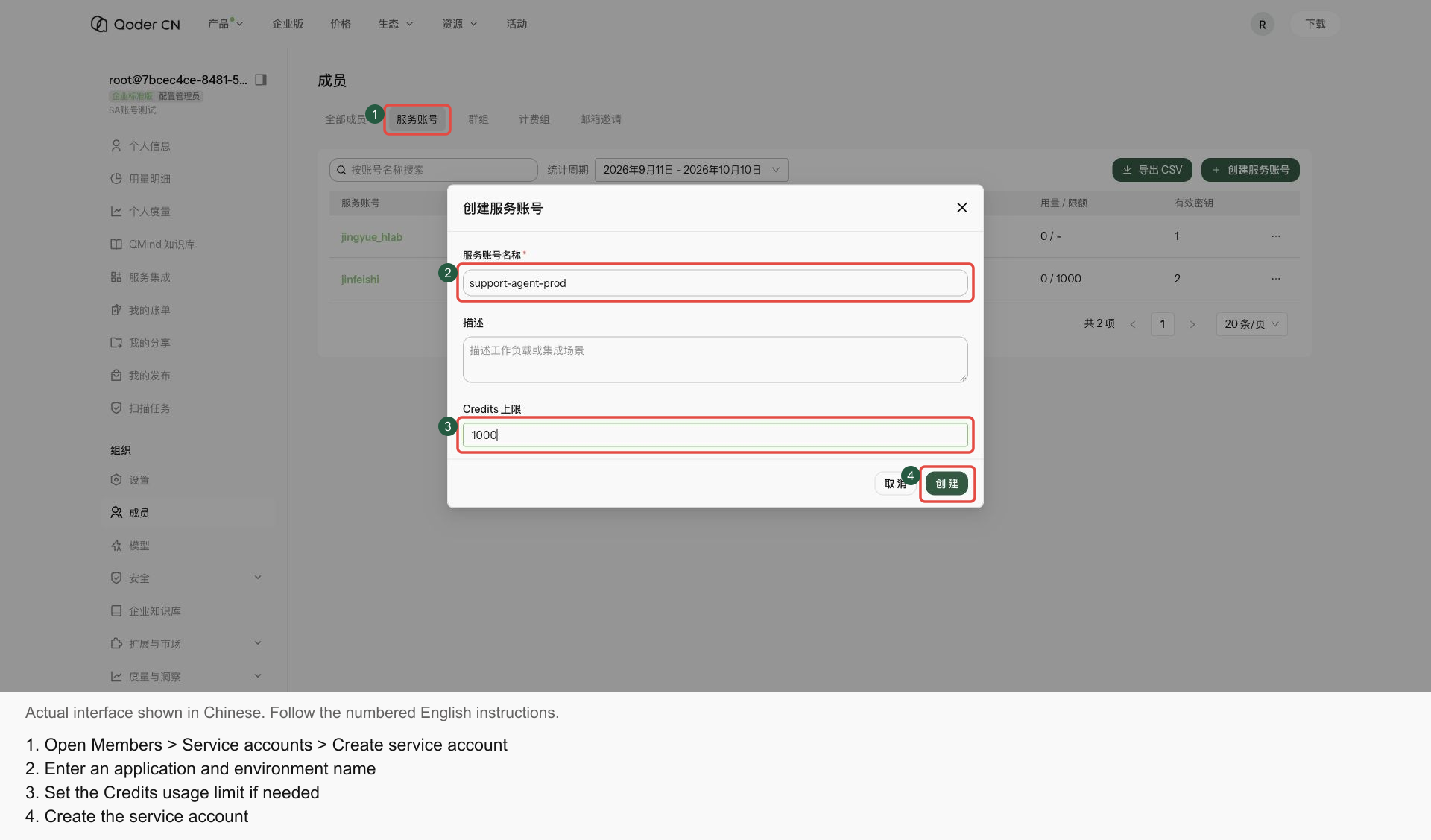 The limit caps usage in the current billing period; it does not add funds. Use an application and environment name such as
Open ... > Create credential on the SA row, or manage credentials under Edit > Existing credentials. Copy the SA Key when it is displayed and store it in a trusted backend's secret manager.
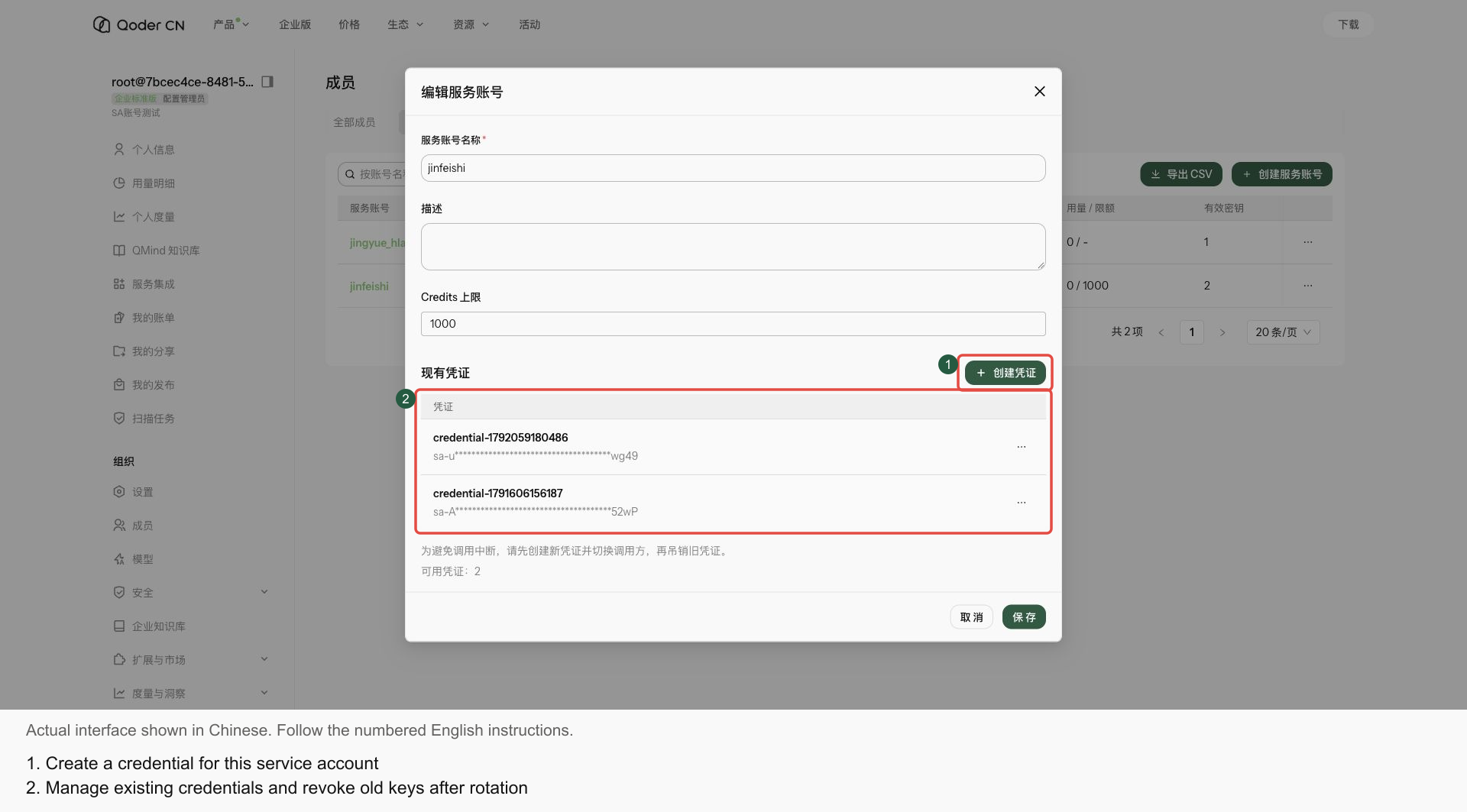 Do not include an SA Key in a distributed application package. To rotate it, create a new credential, switch callers to it, and then revoke the old credential. See Service accounts.
Install the TypeScript, Python, or Java SDK using Quick start. Choose authentication based on where it runs:
In TypeScript, use
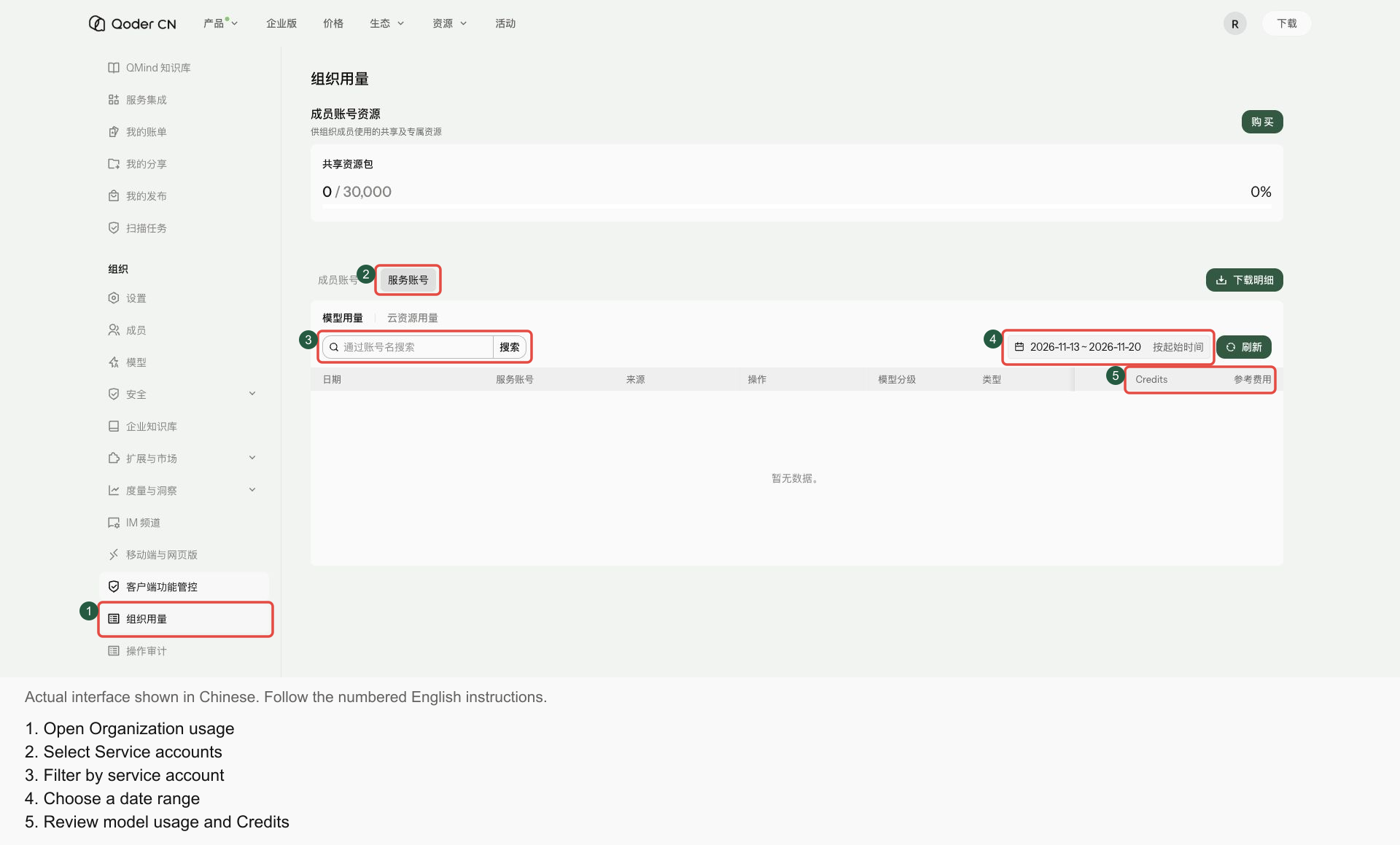
Run your first task with Quick start and confirm that you receive a session ID and task result. Open Organization usage > Service accounts and filter by account and date. Check charges in Alibaba Cloud bills.
Credits are associated with sessions and aggregated by SA. Keys do not have separate Credits allocations. SA usage is billed in arrears to the organization and does not consume member plan Credits or shared member Credits.
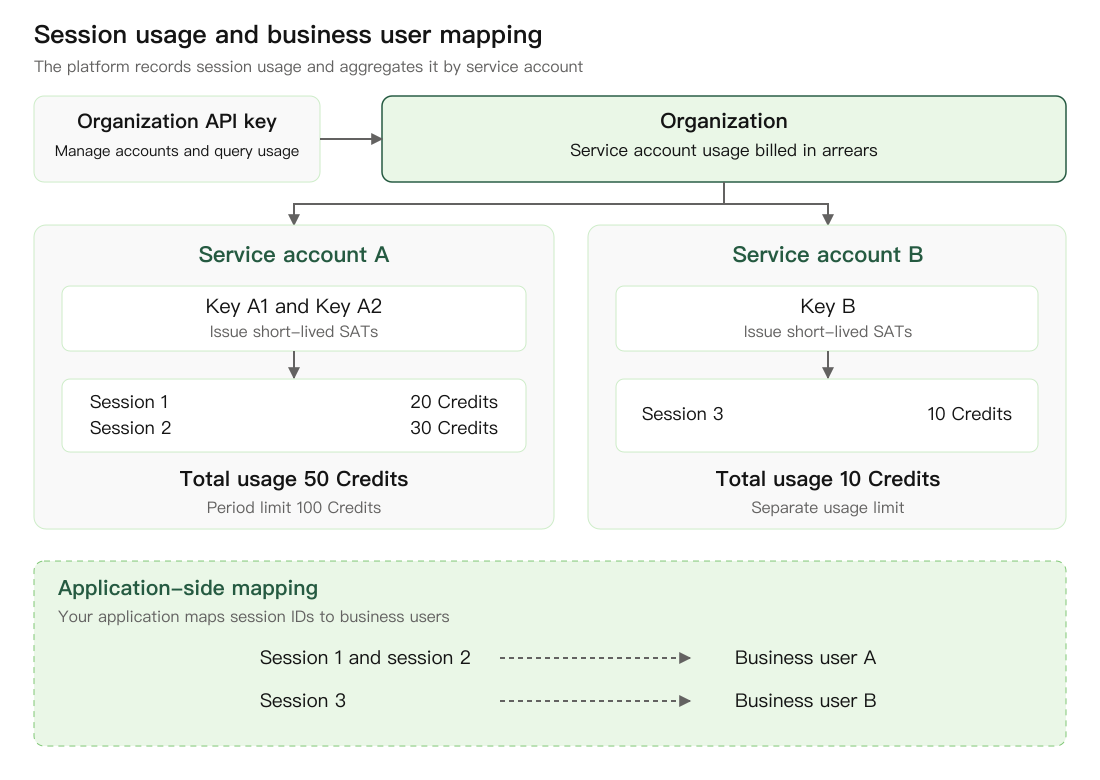
In the example, two sessions under one SA consume 20 and 30 Credits, totaling 50 Credits. Adding a key does not reset usage.
The platform records session usage. Your application matches session IDs to business users; one user can have multiple sessions.
At initialization, record the session ID, business user, tenant, and SA. TypeScript and Python expose
A task can make multiple model calls. Credits reflect actual model consumption, rather than a fixed charge per user, key, or session. There is no fixed Token-to-Credits conversion rate.
Use SDK usage for real-time display and platform queries for reconciliation. Do not add request-level Credits to the session total. See Cost and usage.
Qoder provides model services and the Harness foundation; extend the application layer with MCP, tools, Skills, and other capabilities as your business requires.
No, when the application provides service through an SA. The platform records session usage and aggregates it by SA. Your application maps it to business users; the platform does not automatically bill each business user separately.
The platform limit is set on the SA. Its keys and SATs share that limit. Use different SAs for separate application or environment limits, and manage per-user budgets and admission in your backend.
An SAT cannot exceed the permissions of its source key. Your application also controls business data access and configures SDK tool permissions and approvals. See Permissions.
No. A task may make further model calls, and concurrent tasks can consume Credits at the same time. Manage budgets and concurrency in your application. If you need admission before each model call, check the server-side inference callback requirements above.
Members and SAs are billed separately. Check SA pay-as-you-go enablement, the organization subscription, overdue payments, the SA limit, and credential validity and permissions. See Service account troubleshooting.
Integration scenarios
| What you want to build | What the SDK provides |
|---|---|
| Your own coding Agent | Combine code understanding, file editing, command execution, and multi-turn sessions in desktop tools, development assistants, or automated services |
| Agent capabilities in an existing application | Reuse the Harness task loop, context management, tool calling, and permission approvals to connect business systems |
| An Agent application for distribution or commercial use | Embed the SDK in a backend or desktop application, serve users through your own accounts, and manage their permissions, plans, and usage |
| Automated business workflows | Start code reviews, fixes, documentation tasks, and other jobs from scripts, CI, or task services |
Choose a calling identity
Individual calls
Use a Personal Access Token (PAT) or the local CLI sign-in for personal development, scripts, or tasks that require a specific user's identity. Calls use that user's permissions and available Credits. Creating more PATs does not add Credits.
Organization calls
Use a service account (SA) for organization services, long-running jobs, and distributed applications. Its usage is billed to the organization.
An SA does not occupy a member seat. Business users use your application's accounts; your application manages authentication, permissions, and plans.
Integrate organization workloads
Step 1: Prepare the organization and enable SA billing
Follow Get started with Enterprise to prepare the organization, then enable service account billing.
Step 2: Create a service account
Open Members > Service accounts, select Create service account, enter a name and description, and set a Credits limit if needed.
support-agent-prod. Create separate SAs when you need separate limits.
Step 3: Create and store credentials
Open ... > Create credential on the SA row, or manage credentials under Edit > Existing credentials. Copy the SA Key when it is displayed and store it in a trusted backend's secret manager.
Step 4: Install the SDK and configure authentication
Install the TypeScript, Python, or Java SDK using Quick start. Choose authentication based on where it runs:
| Runtime | Authentication |
|---|---|
| Trusted backend, CI, or task service | The backend reads the SA Key and passes it to the SDK, which obtains and refreshes short-lived SATs |
| Desktop application distributed to users | Your backend stores the SA Key, validates the business user, and exchanges the key for an SAT; the desktop application supplies SATs to the SDK through a credential callback |
serviceAccount({ serviceAccountKey }) or serviceAccount({ fetchServiceAccountToken }), respectively. See SDK authentication.
Step 5: Run a task and check usage
Run your first task with Quick start and confirm that you receive a session ID and task result. Open Organization usage > Service accounts and filter by account and date. Check charges in Alibaba Cloud bills.
Manage organization usage
How SAs, keys, and Credits relate
Credits are associated with sessions and aggregated by SA. Keys do not have separate Credits allocations. SA usage is billed in arrears to the organization and does not consume member plan Credits or shared member Credits.
| Object | Purpose | Credits attribution |
|---|---|---|
| Organization API key | Manage SAs and keys, and query usage | Does not call models or receive a separate Credits allocation |
| Service account | Application identity and per-period usage limit | Usage is attributed to the SA and billed to its organization |
| SA Key | Obtain short-lived SATs for its SA | Keys belonging to the same SA share its usage limit |
| SAT | Call models within its authorized scopes | Usage remains attributed to the issuing SA; no new Credits allocation is created |
| Session ID | Associate tasks and model calls in a session | Session consumption accumulates under the SA used for the calls |
Match sessions to business users
The platform records session usage. Your application matches session IDs to business users; one user can have multiple sessions.
At initialization, record the session ID, business user, tenant, and SA. TypeScript and Python expose session_id in the system/init message; Java exposes sessionId() in the initialization() result. Keep the mapping when resuming a session and record a new ID when forking one. See Session control.
Use an organization API key on your backend to query the Usage APIs by SA, session, and time. Retrieve all pages and deduplicate by eventId before allocating usage to users. Your application manages user plans, balances, and pricing.
How usage is calculated
A task can make multiple model calls. Credits reflect actual model consumption, rather than a fixed charge per user, key, or session. There is no fixed Token-to-Credits conversion rate.
Use SDK usage for real-time display and platform queries for reconciliation. Do not add request-level Credits to the session total. See Cost and usage.
Add capabilities for your business
Qoder provides model services and the Harness foundation; extend the application layer with MCP, tools, Skills, and other capabilities as your business requires.
| Business requirement | Integration and documentation |
|---|---|
| Access business data or internal systems | Custom tools, MCP |
| Define responsibilities, team conventions, and working methods | System prompts, Skills |
| Delegate specialized work or distribute extensions | Subagents, Plugins |
| Require approvals, validation, or audits | Permissions, Hooks |
| Restore sessions across instances | External session storage |
| Reuse experience or restore file state | Memory, File snapshots and rollback |
| Configure model policies or check code security | Model selection, Security scanning |
| Attribute usage to users or customers | Store user, task, and session mappings, read Cost and usage, and maintain application-side records |
| Restrict access by permissions, plan, or balance | Check business entitlements before starting a task and explain rejected requests; Qoder still checks credentials and platform limits |
| Check every model call or receive usage notifications | Server-side inference callbacks apply only to service account calls in Enterprise Dedicated 2.0 VPC (dedicated deployment); provide a public HTTPS service and have the implementation team enable them separately from SDK Hooks |