

Qoder CN provides enterprise code completion enhancement. When developers use Qoder CN for code generation, an enterprise-uploaded code repository can be used as context for inline code completion, aligning the results with the enterprise's coding standards and business characteristics. This topic describes how to build a high-quality enterprise code repository and shares developer best practices for frontend and backend scenarios.
To ensure your code data is processed effectively, follow the guidelines below when preparing your code repository. This improves retrieval efficiency and accuracy.
This section describes how to prepare code repositories for two different scenarios:
After reinstalling, I still cannot recall code from the knowledge base — even after restarting the IDE or signing in again.
Resolution:
Applicable editions and supported languages
Applicable editions: Enterprise Standard Edition, Enterprise Dedicated Edition
Backend support: Java, C#, C/C++, Go, Python
Frontend support: JavaScript, TypeScript, Vue, React
Backend support: Java, C#, C/C++, Go, Python
Frontend support: JavaScript, TypeScript, Vue, React
For administrators: how to prepare a high-quality enterprise code repository
To ensure your code data is processed effectively, follow the guidelines below when preparing your code repository. This improves retrieval efficiency and accuracy.
Guidelines for selecting and preparing a code repository
This section describes how to prepare code repositories for two different scenarios:
-
Scenario 1: Everyday project development to improve engineering efficiency. In enterprise development, to increase code reuse and development efficiency, you can use multiple code repositories to support retrieval augmentation. The main options are:
Preparing a code repository for backend scenarios
- [Recommended] Pick high-frequency code snippets or files: Choose code snippets or files that appear often or are reused frequently in the current project. They are highly reusable and well-suited for a knowledge base. Organize these into a separate code repository and upload it to an independent knowledge base for easier management and retrieval.
- Current project code: You can also upload the entire current project into the knowledge base, enabling comprehensive retrieval across the codebase and improving reuse and efficiency. However, interfering code or a large volume of low-quality code in the project will hurt the effectiveness of code completion enhancement.
Preparing a code repository for frontend scenarios
- [Recommended] Frontend template page code repository: Assemble enterprise custom components into templates for frontend pages that are highly reusable and closely tied to specific business — for example, login, registration, account display, and money transfer pages. These templates represent the highest-quality practices. If your enterprise already maintains such a template library, we recommend uploading it first into the enterprise code knowledge base.
- Current project code repository: The current project contains code most relevant to your current development task. For well-written, well-structured, and well-designed engineering code, uploading it to the enterprise code knowledge base enables comprehensive retrieval across the codebase and improves reuse and efficiency. However, interfering or low-quality code will hurt the effectiveness of code completion enhancement.
-
Scenario 2: Ensure code consistency and reduce duplicate development for specific business scenarios. In enterprise-level application development, certain business logic must remain consistent to ensure system stability and maintainability. Without unified standards, different developers may adopt different implementations, leading to inconsistent business logic, higher maintenance complexity, and potential stability issues.
Case 1: Reusing logic implemented by enterprise frameworks and middleware
An enterprise's product sales system requires a unified distributed lock mechanism for inventory management. By integrating the enterprise's in-house business framework into the code knowledge base, developers can easily recall and reuse these standardized code snippets when writing related business logic in the IDE. This improves development efficiency, reduces duplicate development, improves code quality, and ensures consistent business logic. Selecting and preparing the code repository: Clarify the target business pattern and implementation:- Identify key business modules: Determine which key business logic modules need a unified implementation — for example, inventory management, order processing, or payments.
- Refine the implementation for each specific business: For example, inventory management may involve different scenarios such as deduction, query, and locking, each of which may need a different implementation.
-
From the business framework, filter out the core code that implements the key business logic, organize it, and add it to a dedicated code knowledge base. For example, if inventory deduction requires a distributed lock mechanism for concurrency safety, pick the core module that implements the distributed lock.
Case 2: Reusing enterprise core business logic
An enterprise wants to apply a unified personalized recommendation strategy across its product recommendation system. By integrating the in-house business architecture into the code knowledge base, developers can easily access and reuse these standardized modules in the IDE. This accelerates development, avoids unnecessary duplication, improves overall code quality, and ensures consistent, stable business logic system-wide. Selecting and preparing the code repository: Clarify the target business module and specific behavior:- Identify key business modules: First identify which key business logic modules need a unified implementation — for example, the product recommendation system.
- Refine specific behavior: Next, define the specific business actions and core steps. For a personalized recommendation strategy, these might include collecting user behavior data, extracting user interest features, obtaining a candidate product pool, scoring and ranking products, and returning the top-scoring products. These steps are implemented with a fixed combination of code.
-
Pick the core code from the business framework that implements the key business logic, organize it, and store it in a dedicated code knowledge base. Here is an example for a personalized recommendation mechanism:
Case 3: Referencing legacy projects to accelerate new project development
When starting a new project, the enterprise can reuse similar core module code from a legacy project to accelerate development, reduce the time and cost of writing everything from scratch, and improve the quality and reliability of the new project. Selecting and preparing the code repository: Clarify the target business and identify key business modules:- Identify similar functionality: First determine which functionality and implementations are similar between the legacy and the new project. For example, if both projects involve user management, product display, and order processing, these modules can be the focus.
- Assess code quality: Ensure the legacy project code has been fully tested and is stable and reliable. Clean up unnecessary files and configurations to ensure the content of the code repository is clean and reusable.
- Extract core functions: From the legacy project, extract the core functional module code for the modules that have been confirmed as reusable. For example:
- User management: user registration, login, profile update, and so on.
- Product display: product list, details page, search, and so on.
- Order processing: create order, handle payment, update order status, and so on.
- Code knowledge base isolation: Based on the functional modules of the project, upload the prepared legacy project code to the corresponding code knowledge base. For example, place the user management module, product display module, and order processing module in separate independent knowledge bases.
- Permission management: Configure appropriate access permissions so that only the relevant development team can see the knowledge base for their module, avoiding unnecessary interference during code completion in the IDE.
Code file specifications
- Supported languages and frameworks:
- Backend: Java, C#, C/C++, Go, Python.
- Frontend: JavaScript, TypeScript, Vue, React.
- Upload limits: Only source code files can be uploaded. The repository should only contain source code files that were actually authored. For example,
.javafiles for Java,.csfiles for C#, and.jsor.jsxfiles for JavaScript. - Avoid uploading the following:
- Test data and code: Do not upload test scripts, test cases, or any test-related code that does not contain business logic.
- Mock methods: Exclude all code generated by mocking methods and tools unless it contains a specific business logic implementation.
- Build artifacts:
- Frontend: Exclude files generated by build tools (such as Webpack and Gulp), which are typically located in the
distorbuilddirectory. - Backend: Exclude compiled DLL files and all other compilation output.
- Frontend: Exclude files generated by build tools (such as Webpack and Gulp), which are typically located in the
- Commenting requirements:
- For functions that should be retrievable, add detailed comments in the function header.
-
Comments should provide enough information to distinguish different functions. Refer to the comment template below or adjust based on your enterprise specifications.
- Function naming conventions:
- If function comments are brief, function names must clearly describe the functionality.
- Use clear, descriptive names, such as
exportOrdersToPDFandupdateOrderStatus, instead offunc1.
Upload guidelines
- Package and compress files: Compress code files into
.zip,.gz, or.tar.gzformat. - Code package size limit: Each package must not exceed 100 MB.
For developers: how to use enterprise code generation enhancement
Backend best practices
- Generate code from natural language comments.
-
Upload code to the enterprise code repository: Upload a compressed package containing the required functional code — for example, code for the Snowflake algorithm — to the enterprise code repository, and make sure the target functions follow the commenting conventions with comments placed at the top. See the earlier best practices for enterprise code completion enhancement for more details on preparing a code repository.
-
Enter a comment: In your IDE, locate a Java class and enter a comment that matches the function you want to recall. The comment format can vary, but the meaning should be accurate and consistent.
Style 1
Style 2
Comment notes:
- Comment length: When writing code, avoid overly short comments. Aim for at least 15 characters, since comments that are too short will not trigger recall.
- Comment semantics: Make sure comments are accurate and meaningful, ideally including keywords and return-value descriptions so Qoder CN can accurately understand and match the code.
- Multilingual support: Both Chinese and English comments are supported. The comment language in the code repository can differ from the language used when authoring.
- Parameter names are flexible: Qoder CN automatically adjusts parameter names in the generated code to match those you provide. Below are counterexamples:
//Snowflake algorithm— problem: not enough information; the comment is too short.//Generate a unique sequence number— problem: missing specific keywords, which may hurt understanding and matching.
-
Code generation: After you press Enter for the first time, Qoder CN provides suggestions based on the comment. Press Enter again, and Qoder CN completes the code based on the enterprise code repository.
- If your comment contains parameters, Qoder CN automatically adjusts the parameter names in the generated code to keep naming consistent.
- To refresh the cache and get new suggestions, press ⌥(option) P on macOS or Alt P on Windows to manually trigger inline completion.
- Generate code from a function signature.
- Upload code to the code repository: Upload a compressed package containing the required functional code to the enterprise code repository, and make sure these functions have clear, unique identifiers for retrieval. See the earlier best practices for enterprise code completion enhancement for more details on preparing a code repository.
-
Enter the function signature: In your IDE, locate a Java class and type the signature portion of the target function. Parameter names are flexible — Qoder CN automatically adjusts them to match the recalled code.
Signature notes:
- Function name: Use a reasonably clear function name that carries semantic meaning for similarity matching.
- Parameters and return value: The types and order must match the target function; parameter names are flexible and Qoder CN automatically adjusts them. Below are counterexamples:
- public List<Object> func1(String name, int size)// Problem: the function name is unclear and does not accurately reflect the function.
- public List<String> nextList(int orderId)// Problem: parameter type and return type do not match the target function.
-
Code completion: After you press Enter for the first time, Qoder CN provides completion suggestions. Press Enter again, and Qoder CN completes the code automatically based on the enterprise code repository.
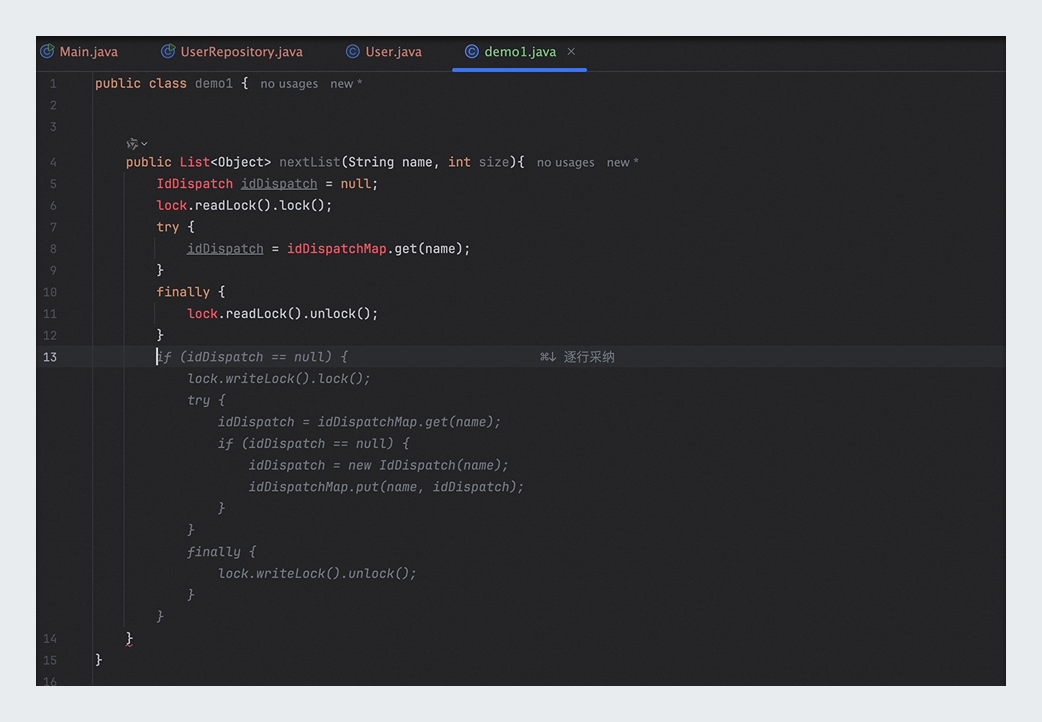
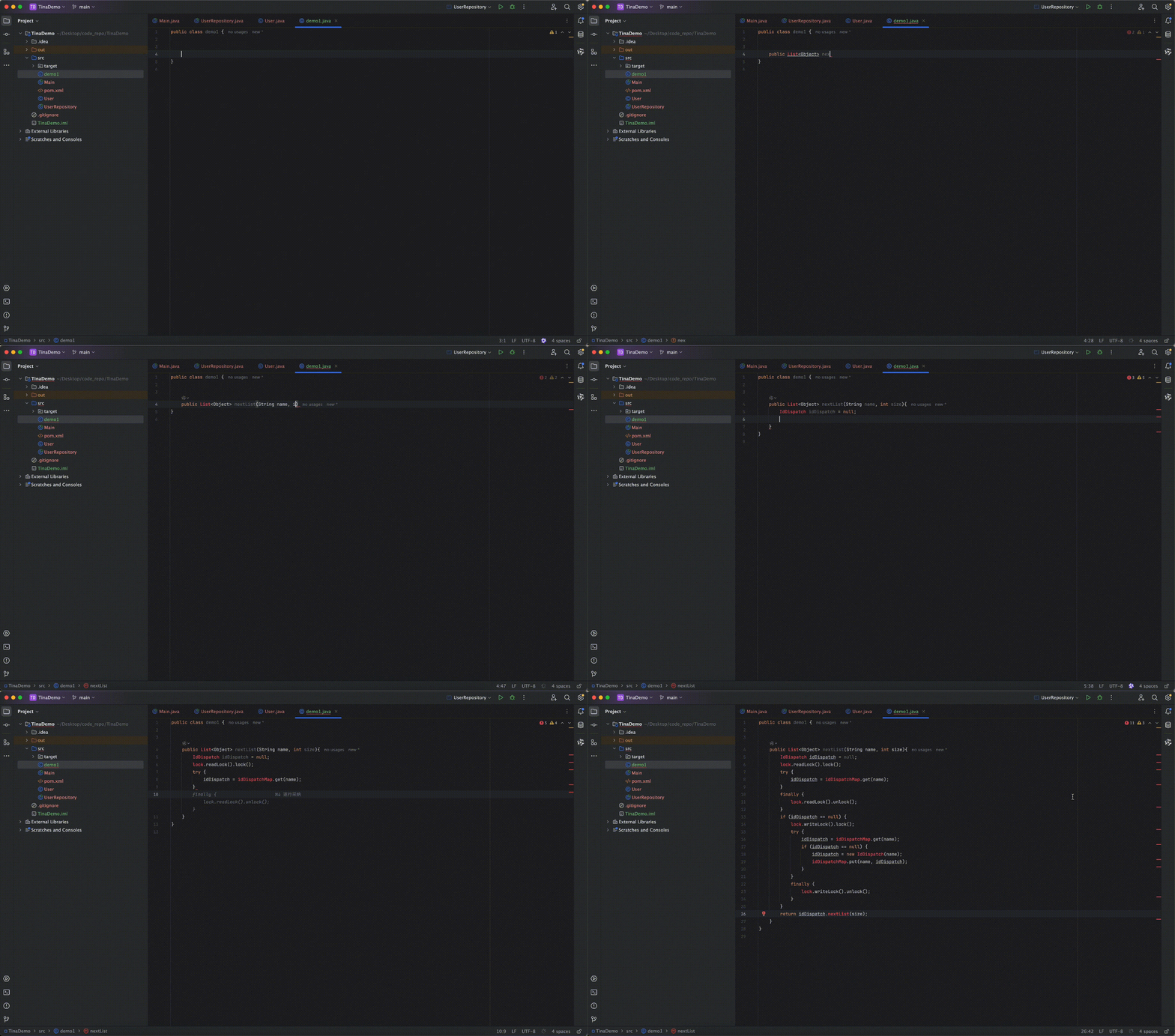
- Qoder CN automatically adjusts parameter names in the generated code to match the ones you provide, ensuring consistent naming.
- To refresh the cache and get new suggestions, press ⌥(option) P on macOS or Alt P on Windows to manually trigger inline completion.
Frontend best practices
- Complete in-house frontend component code using tags.
-
Upload code to the code repository: Before you start, make sure all the necessary frontend component code has been uploaded to the enterprise code repository. Below is a React example:
-
Write component code: In your IDE, open the corresponding
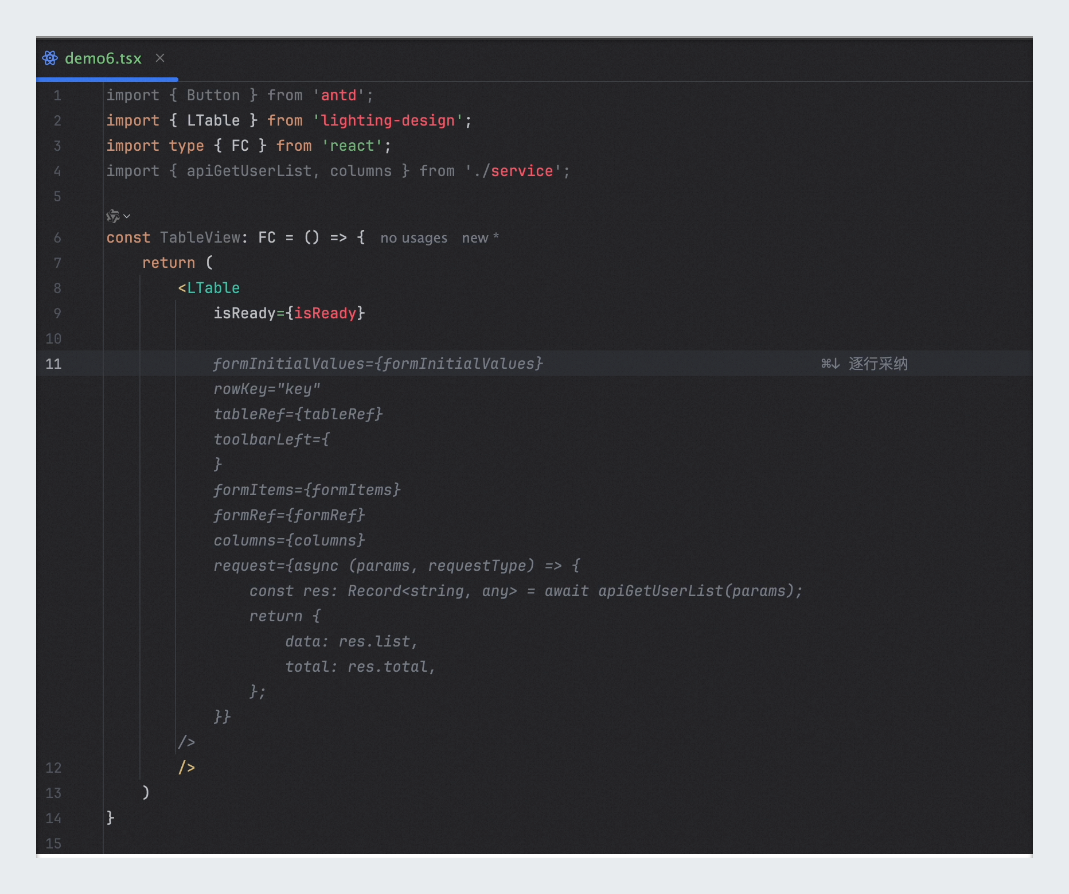
.jsxfile and start writing code. Type a basic HTML tag or a custom component tag, such as<LTable />. -
Automatic code completion: When the code you type reaches a certain length and can match code in the enterprise component library, the IDE automatically triggers code completion to generate the full component code. You can also press Enter to trigger completion manually.
- Generate code from natural language comments.
-
Upload code to the code repository: Upload a compressed package containing the required functional code to the enterprise code repository, and make sure every function follows the commenting conventions with comments placed at the top. See the best practices for enterprise code completion enhancement section for more details on preparing a code repository. Below is a JavaScript example:
-
Enter a comment: In your IDE, enter a specific comment in a JavaScript file, as in the example below.
Comment notes:
- Comment length: When writing code, avoid overly short comments. Aim for at least 15 characters; comments that are too short will not trigger recall.
- Comment semantics: Make sure the comment is accurate and meaningful, ideally including keywords and return-value descriptions so Qoder CN can accurately understand and match the code.
- Multilingual support: Both Chinese and English comments are supported. The comment language in the code repository can differ from the language used when authoring.
- Parameter names are flexible: Qoder CN automatically adjusts parameter names in the generated code to match the ones you provide.
- Code generation: After you press Enter for the first time, Qoder CN provides suggestions based on the comment. Press Enter again, and Qoder CN completes the code based on the enterprise code repository.
- If your comment contains parameters, Qoder CN automatically adjusts parameter names in the generated code, ensuring consistent naming.
- To refresh the cache and get new suggestions, press ⌥(option) P on macOS or Alt P on Windows to manually trigger inline completion.
FAQ
After reinstalling, I still cannot recall code from the knowledge base — even after restarting the IDE or signing in again.
Resolution:
-
On macOS, run the following command to restart the process and clear the cache:
- On Windows, end the Qoder CN process in Task Manager.